
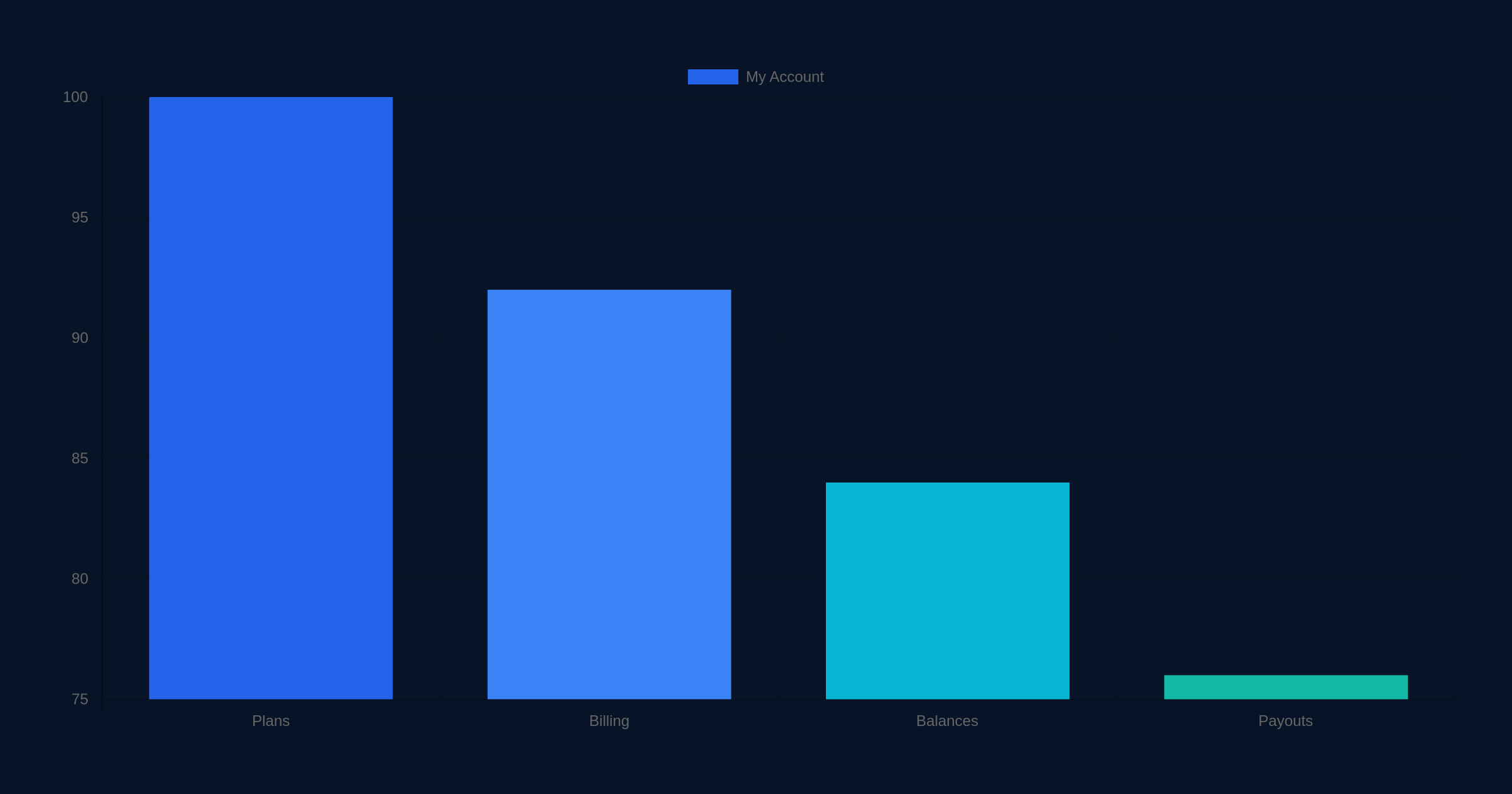
Sellvia My Account Explained: Billing, Plans, Balances and Payouts
Quick Answer: Sellvia My Account is the account-level control area I would use to keep four things straight: the $39/month base subscription, billing and renewal status, money moving through store balances, and payout readiness. Under the current Sellvia model covered in this guide, the base subscription starts with a 14-day free trial, while order-volume capacity is handled separately through weekly Performance Tiers. The most useful habit is to check subscription status, the correct balance bucket, and payout eligibility separately rather than treating “My Account” as one single number or one single payment screen.
Sellvia has several moving parts that can look related because they all involve money, but they do different jobs. A subscription charge keeps the platform account active. A Performance Tier relates to weekly order capacity. Processing an order is part of the order workflow. Store proceeds move through balance stages before they become available, and a payout is a separate action that moves eligible funds out of the platform. In this guide I separate those layers so that a routine account check takes minutes instead of turning into a hunt through unrelated screens.
What “My Account” means in practice
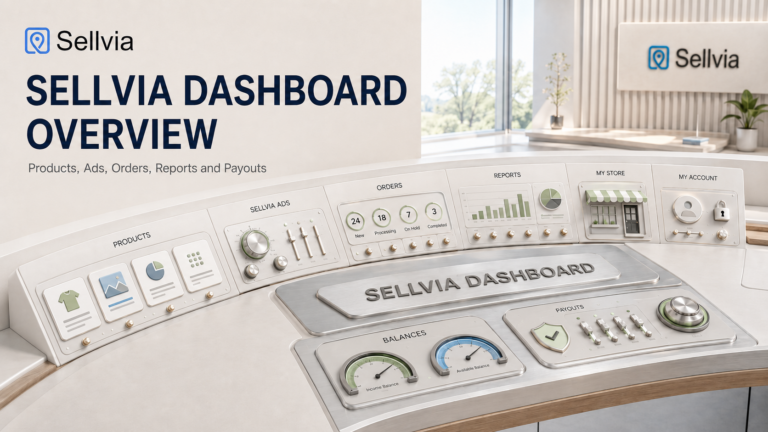
I think of My Account as the administrative side of a Sellvia store. It is not the same thing as the storefront, the product catalog, the Orders dashboard, or the advertising controls. Those areas answer operational questions such as what customers can buy, which orders need attention, or what a campaign is doing. Account-level screens answer a different set of questions: Is the subscription active? What plan-related charge should I expect? Which funds are pending, incoming, available, or reserved? Am I eligible to request a payout?
That distinction matters because the same dollar amount can mean very different things depending on where it appears. A subscription charge is an expense. An order processing cost is tied to an order. An Incoming amount is not the same as Available funds. Risk Reserve is deliberately separated from immediately available proceeds. A payout fee applies when money is withdrawn through the relevant method. Reading each number in its own context prevents most account confusion.
| Account area | What I check | Why it matters |
|---|---|---|
| Base subscription | Trial/active status and next renewal | Keeps platform access predictable |
| Performance Tier | Current weekly tier and order allowance | Separates order-volume capacity from the $39 monthly base plan |
| Billing | Recent charges and renewal-related entries | Helps distinguish subscription charges from operational transactions |
| Balances | Pending, Incoming, Available and Risk Reserve | Shows where store proceeds are in the settlement cycle |
| Payouts | Available amount, minimum, verification and method | Shows whether funds are ready to withdraw |
1. Start with the base Sellvia subscription
The first layer is the base platform subscription. The current model used throughout sellvia.info is $39 per month, with a 14-day free trial for the base plan. Sellvia’s current public offer also describes a store built around digital products such as guides, courses and checklists and includes a $40 advertising credit for getting started. That is the baseline I keep separate from every other account transaction.
During the trial, the important account question is not simply “Am I being charged today?” but “When does the trial end, and what happens next?” A free-trial period and an active paid subscription are two stages of the same subscription lifecycle. If I were auditing an account, I would record the trial start date, expected conversion date, current subscription state and the payment method attached to the account. That creates a simple reference point for later billing questions.
Once the paid period begins, I would treat the $39 monthly subscription as the recurring platform charge and avoid mixing it with weekly Performance Tier charges, ad spending, order processing costs or payout fees. This sounds obvious, but it is the easiest way to reconcile an account: identify the type of transaction first, then investigate its amount or timing.
A simple subscription check
- Confirm whether the account is in the 14-day trial or an active paid period.
- Note the expected renewal date shown for the account.
- Confirm the base recurring price you expect: $39/month under the current model.
- Keep any weekly tier charge separate in your records.
- If a charge looks unfamiliar, compare its date and description with subscription, tier, advertising and order activity before assuming it is a duplicate.
2. Understand Performance Tiers separately from the monthly plan
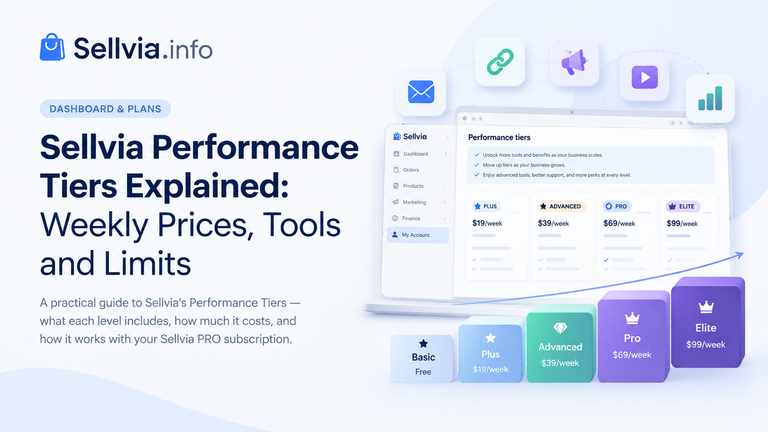
Performance Tiers are easy to misread as replacement subscription plans. I would not treat them that way. In the current model they are weekly tiers tied to order capacity: Plus is $19 per week for up to 100 orders, Advanced is $39 per week for up to 250, Pro is $69 per week for up to 500, and Elite is $99 per week for unlimited orders. The base platform subscription remains a separate monthly layer.
| Performance Tier | Weekly price | Order allowance |
|---|---|---|
| Plus | $19/week | 100 orders |
| Advanced | $39/week | 250 orders |
| Pro | $69/week | 500 orders |
| Elite | $99/week | Unlimited |
For a deeper explanation of what those tiers control, see Sellvia Performance Tiers Explained. For My Account purposes, the important point is classification: when reviewing charges, I want to know whether I am looking at the monthly platform subscription or a weekly order-capacity tier. They have different cadences and different purposes.
3. Read billing as a transaction history, not as a balance
Billing and balances answer different questions. Billing tells me what the account was charged for and when. Balances tell me where store-related funds currently sit. I would never use a balance figure alone to decide whether a subscription renewed correctly, and I would never use a subscription invoice to infer how much is ready for payout.
A useful billing review starts with chronology. I look at the most recent entries, identify the service associated with each entry, and compare the cadence with what I expect. Monthly base subscription? Weekly Performance Tier? Advertising budget? Order processing? Payout-related fee? Categorizing first makes the history much easier to understand.
The next article in this series is dedicated specifically to Sellvia billing, charges, renewals and billing history, so I intentionally keep this section at the account-overview level. The key rule here is that My Account should give you the administrative context; detailed billing reconciliation deserves its own workflow.
4. Know what each balance stage means
Balances are where account management connects directly with the order lifecycle. Under the current Sellvia flow, an order is placed, the order is processed, and the relevant amount progresses through settlement stages rather than becoming immediately withdrawable. That is why “I received an order” and “I can withdraw the proceeds” are not equivalent statements.
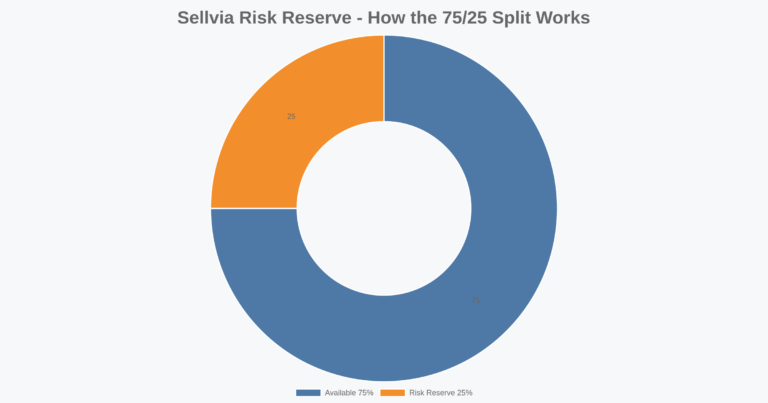
The practical sequence is: order → process cost → Pending → Incoming for roughly 72 hours → 75% to Available and 25% to Risk Reserve. The reserve portion is held for about 125 days. For a detailed balance-focused walkthrough, I recommend our separate Sellvia Balance Explained guide.
Pending
Pending is an early workflow state. I do not interpret money associated with an order at this stage as payout-ready. The order still needs to progress through the platform’s process. If an order seems “stuck,” the better place to investigate is the order workflow rather than the payout screen. Our Sellvia Orders Dashboard Explained guide maps the operational statuses, while How to Process a Sellvia Order covers the processing step itself.
Incoming
Incoming is the stage I watch after processing. Under the current model, the Incoming period is approximately 72 hours. The useful mental model is “settling,” not “withdrawable.” If I am planning a payout, I therefore look at Available rather than adding Incoming funds to money I can request immediately.
Available
After the Incoming period, 75% moves to Available under the current account model. Available is the balance bucket relevant to payout readiness, subject to the payout minimum, verification and the selected payout method. This separation is useful because it gives a much cleaner answer to the question “What can I actually withdraw?” than total sales or total order value.
Risk Reserve
The remaining 25% goes to Risk Reserve and is held for approximately 125 days. I treat this as a timed balance bucket, not as missing money and not as immediately available cash. When reviewing the account, the most useful checks are the reserve amount, the age of the underlying transactions and the expected release timing. That keeps a long reserve window from being confused with the shorter Incoming stage.
5. Payouts: check eligibility before choosing speed
A payout is the final account-level step: moving eligible Available funds out of Sellvia. The current model uses a $100 payout minimum and requires identity verification, with a $4.99 verification charge. Available methods include ACH and Wire, with method-specific fees and timing. Express is 14% with an expected 1–3 day timeframe; the US bank option is 5% plus $10 with an expected 5–7 day timeframe.
I would check payout readiness in this order: Available balance first, minimum threshold second, identity verification third, destination/payment details fourth, and only then fee-versus-speed. That order prevents a common mistake: comparing payout methods before confirming that the account can request a payout at all.
| Payout check | Current account rule used in this guide |
|---|---|
| Minimum | $100 |
| Identity verification | Required; $4.99 |
| Methods | ACH / Wire options |
| Express | 14%; approximately 1–3 days |
| US bank | 5% + $10; approximately 5–7 days |
For the full payout workflow, including why Available matters more than gross store activity, see Sellvia Payouts Explained.
6. How the account areas connect to an actual order
The easiest way to understand My Account is to follow one order conceptually. A customer completes checkout. The order appears in the operational workflow. The processing cost must be handled. The order then progresses through Pending and Incoming. After roughly 72 hours in Incoming, the current model allocates 75% to Available and 25% to Risk Reserve. The Available portion contributes toward payout eligibility; the reserve portion follows its longer release schedule.
This is why I would not troubleshoot an order from the subscription screen. Each screen has a job. Checkout behavior is explained in Sellvia Checkout Explained. Order status belongs in Orders. Settlement belongs in Balances. Withdrawal belongs in Payouts. Subscription renewal belongs in billing/account management. Moving to the screen that owns the problem is much faster than trying to infer everything from one dashboard number.
7. A practical My Account review routine
I would use a short recurring routine rather than checking every screen constantly. The goal is not to stare at the account; it is to catch mismatches early.
Step 1: Verify subscription state
Confirm whether the base subscription is in trial or paid status and note the next expected renewal. If you are still in the trial, record the end date rather than relying on memory. If the account is paid, compare the next renewal with the previous monthly cadence.
Step 2: Verify the Performance Tier
Check which weekly tier applies and whether its order allowance matches current activity. The important account-management point is simply to recognize the weekly tier as a separate service layer from the $39 monthly base subscription.
Step 3: Scan recent billing entries
Look for unexpected dates, duplicate-looking entries or charges that you cannot immediately classify. Before escalating anything, compare each entry against subscription renewal, tier billing, ad activity and order processing. A charge that looks unfamiliar in isolation can become obvious once matched to the correct activity.
Step 4: Compare order status with balance status
If you have recent orders, compare their operational state with what you see in the balance buckets. A recently processed order should not be expected to behave like an old Available amount. Time matters. Incoming has its own approximate 72-hour stage, while Risk Reserve has a much longer approximately 125-day hold.
Step 5: Check payout readiness
Use Available—not total sales, not Incoming, and not Risk Reserve—as the starting point. Confirm the $100 minimum, verification status and payout details. Then choose the payout method based on the fee and timing that make sense for the request.
8. What I would record outside the dashboard
Even with a clear dashboard, a tiny external record can make account administration much easier. I would keep only a few fields: subscription renewal date, current Performance Tier, last payout request date, payout method, and any support reference for an unresolved billing or balance issue. I would not duplicate the entire dashboard in a spreadsheet; the point is to preserve the dates and decisions that are easiest to forget.
For a trial account, I would also record the trial end date. For an account with active orders, I would note unusual processing events rather than every routine order. For Risk Reserve, I would use transaction dates to understand the approximate release horizon rather than treating the entire reserve as one lump with one release date.
9. Common My Account mistakes to avoid
- Treating every charge as the monthly subscription. The base subscription, weekly Performance Tier, ads, order processing and payout-related costs are different categories.
- Counting Incoming as immediately withdrawable. Incoming is part of the settlement path; Available is the relevant payout bucket.
- Ignoring Risk Reserve timing. The 25% reserve has an approximately 125-day hold under the current model.
- Using sales totals as a payout estimate. Sales activity and payout-ready Available funds are not interchangeable.
- Comparing payout methods before checking eligibility. Verify Available balance, the $100 minimum and identity requirements first.
- Mixing monthly and weekly billing cadence. The $39 base subscription is monthly; Performance Tiers are weekly.
- Troubleshooting an order from the wrong screen. Use Orders for order state, Balances for settlement and Payouts for withdrawals.
10. When an account number does not look right
If something appears wrong, I would first identify the exact object: a charge, an order, a balance movement, a reserve amount or a payout. Then I would capture the relevant date, amount and status. That produces a much better support question than “my balance is wrong,” because it narrows the investigation to one transaction and one stage.
For an order, start with the Orders dashboard and processing history. For a billing entry, compare the date with subscription and tier cadence. For a balance question, determine whether the amount is Pending, Incoming, Available or Risk Reserve. For a payout question, verify that the amount is actually Available and that minimum/verification requirements have been met. This sequence avoids jumping between unrelated explanations.
My Account checklist
- Base subscription status is understood: 14-day trial or $39/month paid period.
- Next expected subscription renewal date is known.
- Current weekly Performance Tier is identified separately from the base plan.
- Recent charges can be classified by purpose.
- Recent orders have been processed where required.
- Pending and Incoming funds are not counted as payout-ready.
- Available balance is checked before planning a withdrawal.
- Risk Reserve is tracked on its approximately 125-day timeline.
- The $100 payout minimum is met before requesting a payout.
- Identity verification and destination details are complete.
- Payout method is chosen with both fee and timing in mind.
FAQ
How much is the Sellvia base subscription?
Under the current model covered here, the base subscription is $39 per month after a 14-day free trial. I keep that charge separate from weekly Performance Tiers and other operational costs.
Are Performance Tiers the same as the monthly Sellvia plan?
No. In the current account model, Performance Tiers are a separate weekly order-capacity layer: Plus $19/100 orders, Advanced $39/250, Pro $69/500 and Elite $99/unlimited.
When does money become Available?
The current workflow moves processed order funds through Pending and then Incoming for roughly 72 hours. After that stage, 75% moves to Available and 25% goes to Risk Reserve.
How long is Sellvia Risk Reserve held?
The current model uses an approximately 125-day hold for the 25% Risk Reserve portion. Because transactions occur on different dates, reserve releases should be thought of as transaction-based rather than one universal release date.
What is the Sellvia payout minimum?
The account model used in this guide has a $100 minimum. Identity verification is also required and carries a $4.99 charge.
Should I use total sales to decide how much I can withdraw?
No. I would use the Available balance as the starting point. Pending, Incoming and Risk Reserve represent different stages and should not be treated as immediately withdrawable funds.
Where should I look if an order has not moved as expected?
Start with the order itself and the Orders dashboard rather than the payout area. Confirm whether processing has been completed and what status is shown. The order guides linked above cover that workflow in detail.
Final takeaway
The cleanest way to manage Sellvia My Account is to separate four layers that happen to live under the same business: subscription access, weekly order capacity, settlement balances and payouts. The $39 monthly base subscription answers whether the platform service is active. Performance Tiers answer how weekly order capacity is structured. Pending, Incoming, Available and Risk Reserve show where order-related funds sit. Payout settings determine how eligible Available funds leave the platform.
Once those layers are separated, the account becomes much easier to read. My routine would be simple: verify renewal status, identify the current tier, classify recent billing entries, check order-to-balance progression, and use Available as the starting point for payout decisions. That gives each number a purpose and makes unusual activity much easier to spot.

Jeck Palmer is an ecommerce writer and platform researcher at Sellvia.info. He specializes in analyzing Sellvia’s features, pricing, tools, advertising system, order workflow, and overall business model. His articles are designed to explain complex platform processes in clear and practical language, helping beginners understand potential costs, evaluate available tools, and make more informed decisions before starting an online business.


The digital fitness content catalog is what got me – I kept paying for three separate tools to cover what this handles in one place, and the $39/month actually made the math embarrassing once I saw it clearly.
The cost breakdown in any honest Sellvia review should separate the $39 base from ad spend – because those are genuinely different decisions, not one combined fee. I cancelled two separate tools I was paying for individually, and this platform replaced both while still giving me room to start ads at $10 a day without feeling like I was bleeding money before I had proof it worked.
Before the setup, I was manually tracking five different spreadsheets trying to do what this guide explains the account dashboard just… shows you (the subscription status, the balance stages, all of it) – a family member at work was paying twice as much for a tool that didn’t even separate pending from available funds.