
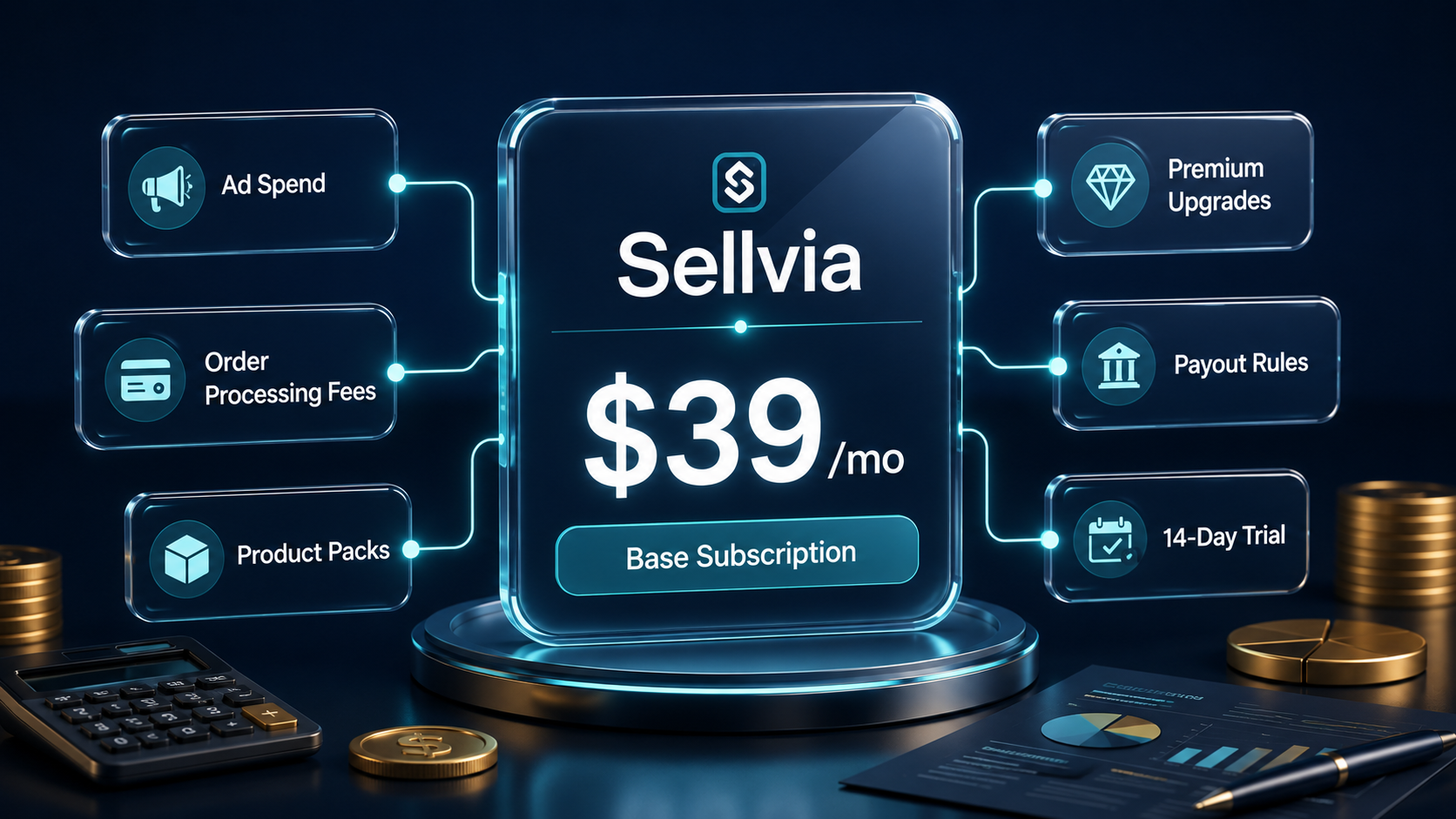
Sellvia Pricing Explained: Costs and Budget
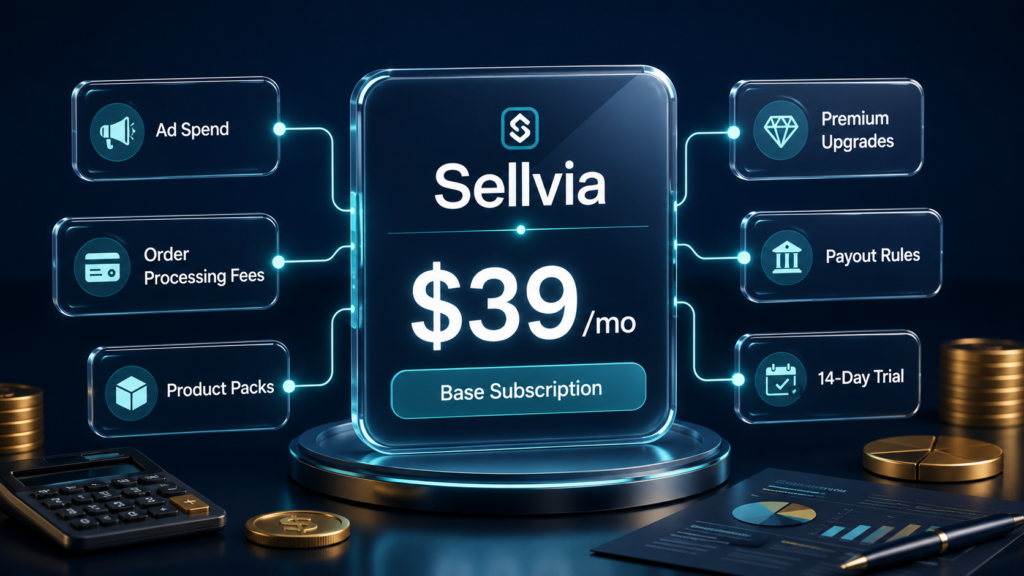
When people search “Sellvia pricing,” they usually want a clear, honest answer before they commit to anything. That is a reasonable thing to want. Sellvia is a SaaS online business platform – a software-based service that gives users a ready-built digital product store, a product catalog, a built-in advertising system, and the tools to manage sales from a single dashboard. Understanding what this type of platform actually costs requires looking at more than the monthly subscription number.
The monthly plan is just the starting point. Running an active Sellvia-based store means factoring in advertising spend, order processing fees, optional performance tiers, and the timing of when earnings actually become available for withdrawal. These costs may not be hidden if users read the platform terms carefully, but they are easy for beginners to overlook when they focus only on the monthly subscription. Those who plan only around the subscription fee often find themselves underprepared.
Note: Pricing, fees, plan names, and platform terms can change. This article is an independent informational overview and should not replace checking the latest Sellvia pricing directly on the platform before subscribing.
This article walks through every layer of Sellvia pricing so you can build a realistic budget before you start. Pricing details and plan structures visible in this article are based on information current at the time of writing. Always verify the latest figures directly on the platform before making any financial decisions.
If you are new to the platform, start with our guide on what Sellvia is before comparing pricing. To understand the workflow behind fees and payouts, read our guide on how Sellvia works.
Quick Answer: How Much Does Sellvia Cost?
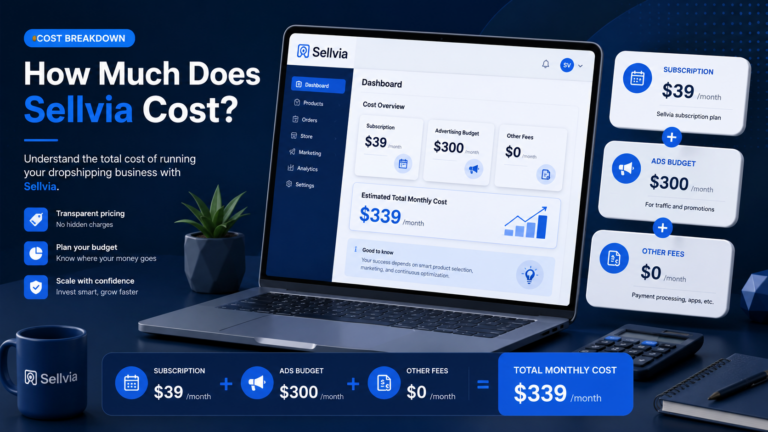
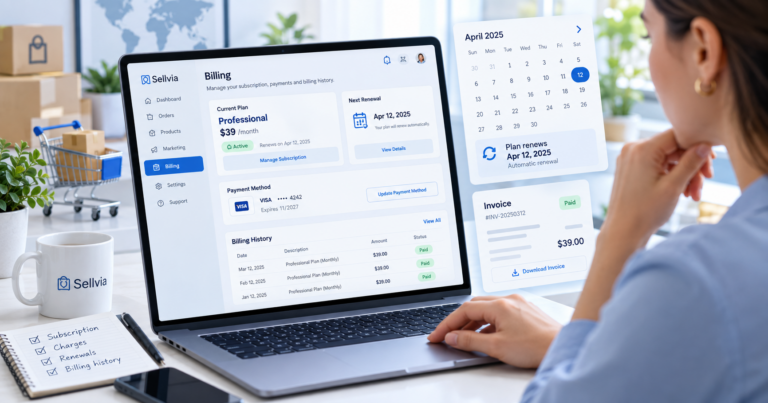
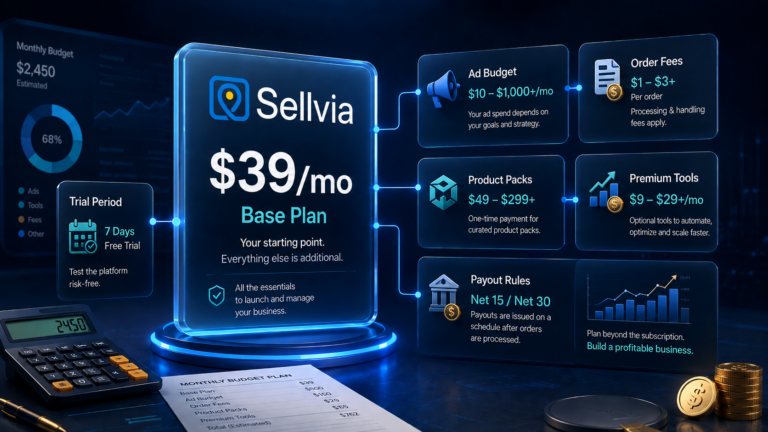
The base Sellvia subscription is currently $39 per month. This covers platform access, your online store, hosting, a domain, SSL, payment gateway, fraud protection, and priority support. On top of the subscription, most active users also spend on Sellvia Ads – starting at $10 per day and going up to $50 per day depending on the package selected. Order processing fees apply to each transaction: payment processing runs 2.90% + $0.30, digital fulfillment adds 1.90% + $0.30, and refund and chargeback protection is 0.90% + $0.30 per successful transaction. Optional performance tiers, which unlock additional marketing tools, start at $19 per week. A 14-day free trial is available to new users. Always confirm current Sellvia pricing directly on the platform before subscribing, as terms and rates can change.
Sellvia Pricing Is More Than the Monthly Fee
The $39/month subscription gives you access to the platform. It does not cover the cost of driving traffic to your store, processing orders, or unlocking advanced marketing features. Beginners often discover this after signing up, which can create frustration if the full budget picture was not mapped out in advance.
Here is what the total cost picture actually looks like for a typical active user:
- Subscription fee – the base $39/month plan
- Advertising spend – daily budget for Sellvia Ads, ranging from $10 to $50 per day
- Order processing fees – percentage-based charges applied to each processed transaction
- Performance tier – optional weekly fee starting at $19/week that unlocks additional marketing tools as your order volume grows
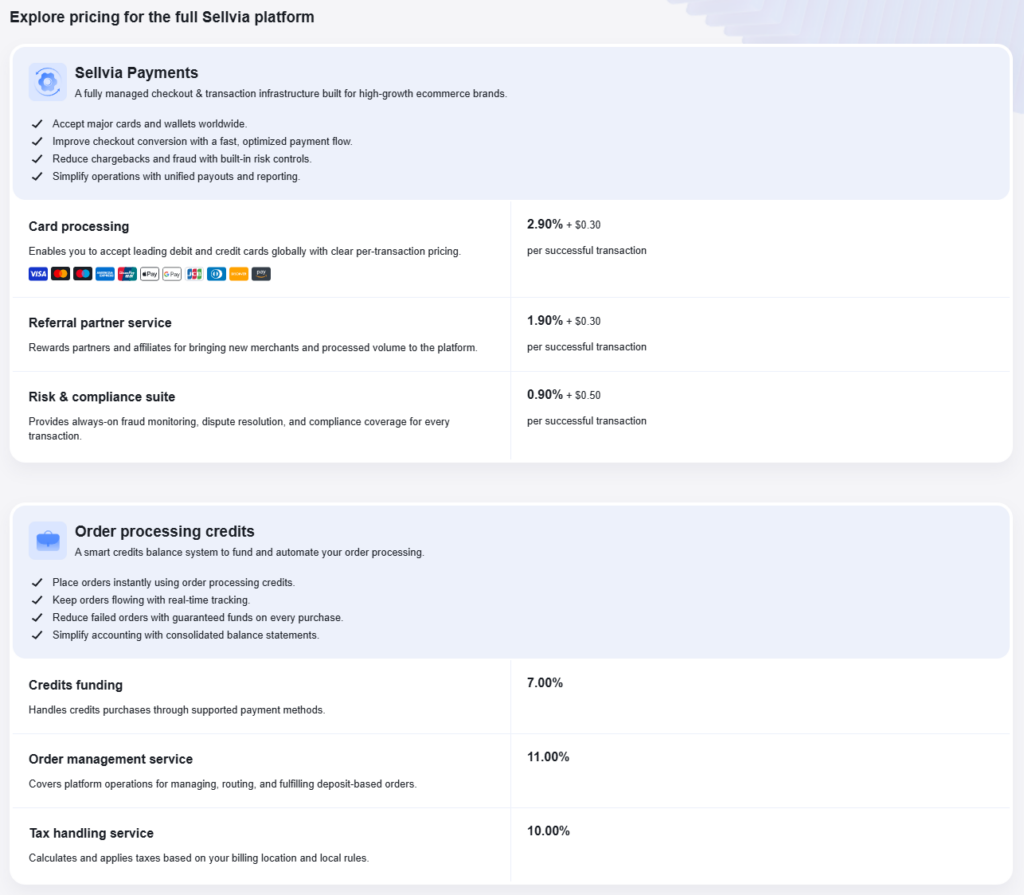
- Order processing credits – a prepaid balance system used to fund automated order handling, with a 7% credits funding fee and an 11% order management service fee
- Testing budget – the time and ad spend required to learn what works for your store
The platform provides real infrastructure. The subscription fee is real value. But results depend on what you do with that infrastructure – and that costs additional money beyond the monthly plan.
What the Sellvia Subscription Includes
The current base plan – listed as Sellvia Pro at $39/month – includes a meaningful set of features that you would otherwise need to build or purchase separately. Based on the current platform pricing page, all subscription plans include:
- Online store plus hosting – a turnkey business with professional design, optimized for conversions
- Domain – a unique domain with no technical setup required
- SSL certificate – security and encryption handled automatically
- Payment gateway – fully integrated checkout that accepts all major payment methods
- Fraud protection – real-time threat detection with an auto-adapting system
- Sellvia mobile and web app – manage your store from anywhere with instant notifications
- Advanced analytics – live performance tracking and business growth insights
- Priority support – individual growth strategy, a personal business manager, and 24/7 support
For someone building their first online business, this bundle removes a significant amount of technical setup work. The store is functional from day one. That said, subscription access alone does not bring customers to your store – that requires advertising or organic traffic, both of which carry their own costs.
What May Cost Extra With Sellvia
Here is a structured breakdown of the additional cost areas beyond the base subscription. Verify current rates on the platform before budgeting.
| Cost Area | What It Means | Why Beginners Should Care |
|---|---|---|
| Sellvia Ads daily budget | $10 to $50/day depending on the package chosen (Bronze through Ultimate) | This is often the largest ongoing cost. Without traffic, the store does not generate orders. |
| Payment processing fee | 2.90% + $0.30 per successful transaction | Applies to every order. Must be factored into profit calculations per sale. |
| Digital fulfillment fee | 1.90% + $0.30 per successful transaction | Charged alongside payment processing on each order processed. |
| Refund and chargeback protection | 0.90% + $0.30 per successful transaction | Covers disputes and chargebacks. Small per order but adds up at volume. |
| Performance tier | $19 to $99/week depending on tier (Plus, Advanced, Pro, Elite) | Unlocks marketing tools like Social Media Tool, SEO Blog Posts, YouTube Marketing, and more. Optional but relevant once you want to scale. |
| Order processing credits | 7% credits funding fee + 11% order management service fee | Required if using automated order processing. This is a prepaid credits system, not a subscription charge. |
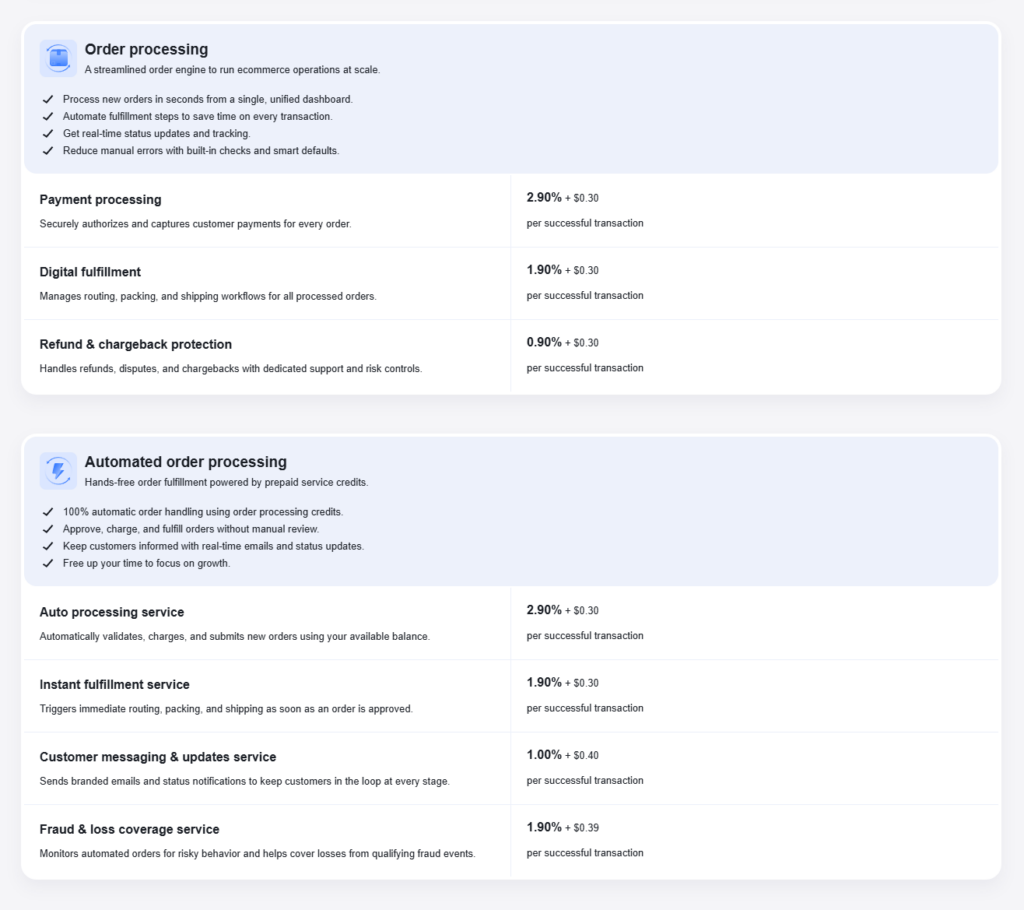
| Automated order processing add-ons | Auto processing 2.90% + $0.30, instant fulfillment 1.90% + $0.30, customer messaging 1.00% + $0.40, fraud and loss coverage 1.90% + $0.39 | These stack with manual processing fees if you enable automation. Understand which services you are activating. |
| Tax handling service | 10% per transaction | Calculates and applies taxes based on billing location. Relevant for US-based users. |
Sellvia Ads and Marketing Budget
Traffic does not appear automatically when you launch a store. Every platform – regardless of how complete the setup is – requires some mechanism for getting buyers in front of your products. On Sellvia, the primary traffic tool is Sellvia Ads, a built-in advertising system that handles targeting, creatives, and optimization without requiring marketing expertise from the store owner.
The ad system currently offers five daily budget packages visible in the platform dashboard:
- Bronze – $10 per day
- Silver – $15 per day
- Gold – $20 per day
- Platinum – $30 per day
- Ultimate – $50 per day
Additional settings within the ads system include accelerated delivery, which can increase the daily budget by up to 50%, and remarketing, which can add up to 25%. New users receive a $40 advertising coupon during their trial, which is enough to test the Bronze or Silver package for a few days.
Important for budget planning: Ad spend is not a guaranteed investment. Some days generate orders. Some days do not. Treat advertising budget as testing money, particularly during the first few weeks. The platform’s ad system collects data and optimizes over time – the “Learning” status visible in the dashboard settings indicates the system is still gathering data.
Beginners who activate ads early tend to see results faster, but that also means ad costs begin immediately. A user running the Bronze package for a full month at $10/day will spend $300 in ads alone – on top of the $39 subscription. Planning for this is not optional. It is part of how the platform is designed to work.
Digital Product Catalog Costs
The Sellvia platform is built around digital products – guides, courses, checklists, online tools, and other downloadable content. The store comes pre-loaded with a selection of digital products from the Sellvia catalog, which users can sell immediately without creating any content themselves.
The base subscription provides access to the catalog included in your plan. Additional product packs – broader collections or niche-specific bundles – may be available for separate purchase. The platform also offers a “Products – HOT” section visible in the dashboard sidebar, suggesting featured or trending catalog additions that can be added to your store.
Key points for beginners:
- Understand which products are included by default in your plan versus which require additional purchase
- Expanding your catalog can increase potential order variety and average order value
- Digital products have no per-unit cost to the seller – profit comes from the markup on each sale, which is typically in the 50-70% range per transaction before platform fees
- Verify the current catalog structure and any associated costs before assuming all products are included
Order Processing, Fees, and Cash Flow
This is one of the areas that surprises new users most often, so it is worth explaining carefully.
When a customer places an order in your store, the order does not automatically generate withdrawable earnings. It enters a processing workflow. The store owner must either manually process the order within 7 days (as visible in the dashboard notification), or activate automated processing using prepaid order processing credits. Unprocessed orders are cancelled automatically – so active management of the orders section is required.
Each processed order carries fees. Based on the current platform pricing, the standard order processing structure looks like this:
- Payment processing: 2.90% + $0.30 per transaction
- Digital fulfillment: 1.90% + $0.30 per transaction
- Refund and chargeback protection: 0.90% + $0.30 per transaction
On a $12.00 order, for example, the combined base processing fees amount to roughly $1.37 plus the fixed $0.90 in per-transaction flat fees – before any performance tier or tax handling charges apply. The dashboard shows “Your profit” as a direct figure per order once processing is complete, which makes it practical to see your actual net per transaction. Screenshots from the platform show processed orders with profit figures visible directly in the orders list – for example, a $12.00 order showing $6.00 profit, or an $87.99 order showing $39.59 profit.
Sellvia Payout Rules and Minimum Withdrawal
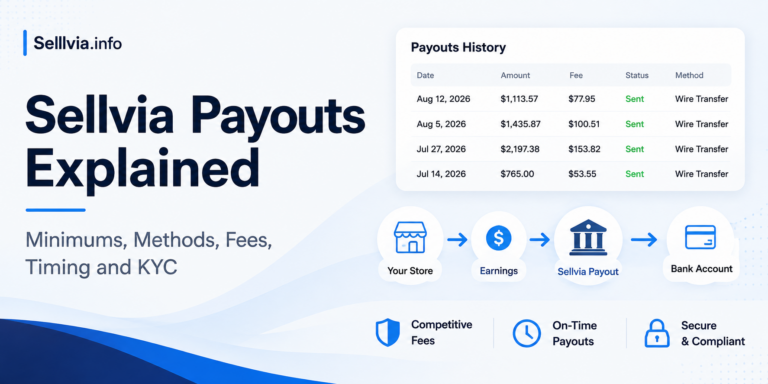
Processing an order and seeing a profit figure in your dashboard is not the same as having that money in your bank account. Here is exactly how the payout system works, based on the official Sellvia Help Center and Sellvia Payments Terms of Service.
How earnings are split after an order is processed
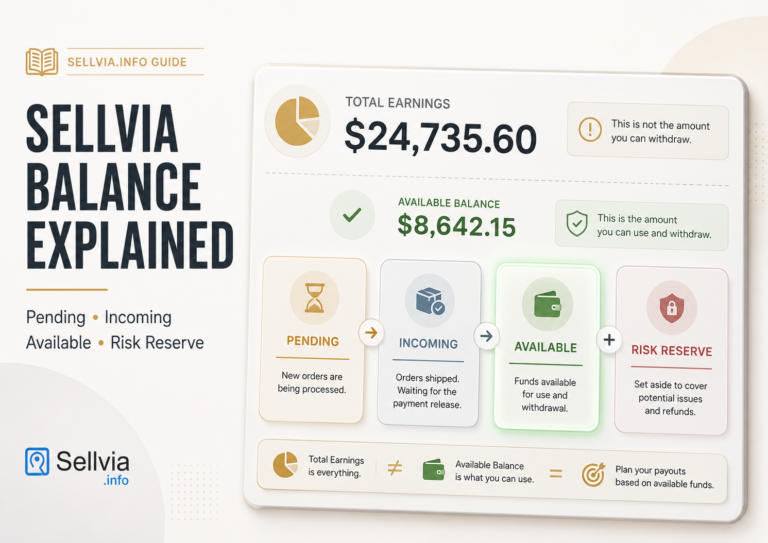
When an order is processed, your earnings are divided into two portions:
- 75% becomes Available after 3 days – this portion can be withdrawn or transferred to Order Processing Credits once the holding period passes
- 25% is held as a Risk Reserve for 125 days – this portion is not a fee and is not lost. It is held as protection against chargebacks and refund disputes. After 125 days it is automatically released to your Available balance
Minimum withdrawal threshold
You can only request a payout once your Available balance reaches $100 or more. If your balance is below $100, you cannot withdraw it or transfer it to Order Processing Credits. During that period, orders must be funded using a credit card directly.
Withdrawal fee and limits
- A 5% commission applies to each withdrawal (currency conversion fees are included in this)
- Maximum per withdrawal: $5,000
- Withdrawals cannot be reversed once processed
How to request a payout
Go to Dashboard – My Account – Home – Request payout. You will receive an email confirmation once the withdrawal is issued.
Alternative: transfer to Order Processing Credits
Instead of withdrawing to a bank account, you can transfer your Available balance directly to Order Processing Credits. This is useful for keeping orders running without funding them separately from a card. Navigate to My Account – Home and select Withdraw to Order Processing Credits.
What this means in practice: A beginner who processes their first orders in week one will not have withdrawable funds until at least day 4 (after the 3-day hold on the 75% portion). The remaining 25% of those early orders will not be accessible for over four months. On top of this, the $100 minimum means you need enough processed order volume before a withdrawal is even possible. Plan your cash flow around these timelines, not around the profit figures shown in the orders list.
Performance Tiers: Optional Weekly Cost for More Tools
Separate from the monthly subscription, Sellvia offers performance tiers – a weekly fee structure that unlocks additional marketing tools as your business scales. These are not required to run a store, but they become more relevant as order volume grows.
The current tiers, based on platform screenshots, are:
| Tier | Price | Order Limit | Notable Inclusions |
|---|---|---|---|
| Plus | $19/week | Up to 100 orders | Email marketing tool, Google backlinks tool |
| Advanced | $39/week | Up to 250 orders | Plus social media marketing, SEO blog posts, design customization |
| Pro | $69/week | Up to 500 orders | Plus YouTube marketing, promo videos |
| Elite | $99/week | Unlimited | All tools including Instagram and TikTok ads tool, TikTok store, premium themes, priority support hotline |
The platform notes smart auto-upgrade: if your order volume surpasses the limit on your current tier, you are automatically moved to the next one. Users can downgrade by contacting support. All tiers include Sellvia Market listing access, which is relevant if you eventually want to sell your store on the built-in business marketplace.
Example Sellvia Budget Scenarios
These are approximate scenarios to illustrate realistic monthly costs. They are not income guarantees or official projections. Results vary significantly based on ad performance, product selection, and how actively the store is managed. Verify all current pricing before planning your actual budget.
Scenario 1 – Cautious beginner (low spend, learning phase)
- Monthly subscription: $39
- Advertising: $10/day (Bronze) for 2 weeks = approximately $140
- Performance tier: None (using base plan tools only)
- Estimated total: approximately $180/month
Lower risk, slower traffic, longer learning curve. Good for someone who wants to understand the platform before committing to higher ad spend.
Scenario 2 – Active beginner with ad testing budget
- Monthly subscription: $39
- Advertising: $20/day (Gold) for a full month = approximately $620
- Performance tier: Plus at $19/week = approximately $76/month
- Order processing fees: variable per transaction volume
- Estimated total: approximately $735+/month before order fees
More realistic traffic volume. Room to learn what converts. Performance tier adds email and SEO tools.
Scenario 3 – Higher-spend user scaling aggressively
- Monthly subscription: $39
- Advertising: $50/day (Ultimate) for a full month = approximately $1,550
- Performance tier: Advanced or Pro at $39-$69/week = approximately $156-$276/month
- Order processing fees: higher at scale
- Estimated total: approximately $1,745+/month before order fees
Higher cost, higher traffic volume, higher potential order volume. Only appropriate if the user has the budget and understands that higher ad spend does not guarantee proportionally higher profit.
What Beginners Often Misunderstand About Sellvia Pricing
Here are the most common misconceptions, based on how the platform is structured and how new users tend to approach it:
- Thinking the monthly fee is the full budget. The $39/month plan covers access to the platform. It does not cover traffic, which is the primary driver of sales. Advertising is a separate ongoing cost.
- Assuming the free trial has no costs at all. The 14-day trial is free for platform access. Order processing fees apply if orders come in during the trial. The $40 ad coupon helps offset early ad spend, but it has a finite value.
- Ignoring ad spend entirely. Some beginners assume the platform brings traffic automatically. It does not. Sellvia Ads is a tool you activate and fund – it is not an automatic traffic source built into the subscription.
- Not accounting for order processing fees. Each processed order carries fees totaling approximately 5.70% + $0.90 in base processing charges before optional services. These reduce the net profit per order from the gross markup.
- Expecting commissions to be instantly withdrawable. Earnings move through payment statuses before becoming available. The timing gap between a processed order and a withdrawable balance can surprise new users who expected immediate access to funds.
- Assuming marketing tools guarantee sales. Performance tier tools like SEO posts, social media tools, and YouTube marketing are assets that build traffic over time. They are not instant sales generators.
- Not checking cancellation terms before subscribing. Understanding what happens to your store, your earnings balance, and your data if you cancel is important before you start, not after.
- Misreading the performance tier as optional regardless of order volume. If your store reaches the order limit on your tier, you are automatically upgraded to the next level. This changes your weekly cost without a separate decision being required.
Is Sellvia Expensive?
Compared to building an online business from scratch – sourcing or creating digital products, setting up a store and hosting, configuring a payment system, and learning how to run ad campaigns independently – the Sellvia monthly subscription covers a substantial amount of that groundwork at a fixed monthly cost. For someone who would otherwise spend weeks on setup alone, that has real practical value.
Whether the total cost feels manageable depends on how you budget for it. A user running Sellvia Ads at $20/day will spend roughly $600/month on advertising alone, on top of the $39 subscription and per-order processing fees. That is a meaningful amount, and it is worth planning for honestly before starting. At the same time, the entry point is relatively flexible – the Bronze ad package starts at $10/day, and the 14-day free trial with a $40 ad coupon gives new users a chance to test the platform before committing to ongoing costs.
Whether Sellvia fits your budget comes down to what you can realistically allocate for advertising, how quickly you expect to see results, and how actively you engage with the tools the platform provides. It works best for users who approach it with a clear budget and realistic timelines rather than expecting the subscription fee alone to generate results.
Is Sellvia Worth the Price?
This depends on what you are comparing it to and what you are willing to put into it. The platform provides genuine value: a ready-made store, a digital product catalog, a built-in ad system, order and payment infrastructure, and marketing tools accessible through performance tiers. For a beginner who would otherwise spend months building and configuring all of this separately, that value is real.
It is worth the price if:
- You can budget for advertising spend beyond the subscription
- You are willing to process orders promptly and manage the dashboard actively
- You understand that earnings are not instant – they move through processing stages before becoming available
- You treat the first weeks as a learning investment, not as guaranteed profit
It is harder to justify if:
- You are expecting results from the subscription fee alone without additional ad spend
- You have no budget for marketing beyond the platform fee
- You are not prepared to manage orders within the required processing window
Sellvia Pricing Compared With Building From Scratch
| Factor | Using Sellvia | Building From Scratch |
|---|---|---|
| Store setup time | Ready on day one | Weeks to months depending on skills |
| Product creation | Products provided in catalog | Must create or license your own |
| Payment infrastructure | Built in via Sellvia Payments | Must integrate and configure separately |
| Ad system | Built-in with managed targeting | Must set up and manage independently |
| Monthly cost (platform) | $39/month subscription | Variable – hosting, tools, integrations |
| Ownership and control | Within platform ecosystem | Full ownership, full flexibility |
| Technical skill required | Minimal | Moderate to high |
Building from scratch gives more long-term flexibility and ownership. Sellvia gives a faster, lower-friction starting point with significantly less setup work. Both approaches require a real advertising budget to generate traffic.
What to Check Before Paying for Sellvia
Before entering your payment information or converting from a free trial to a paid subscription, work through this checklist:
- Current monthly subscription price and what plan tiers are available
- Trial length, what the trial includes, and what happens when the trial ends
- Whether a credit card is required to start the free trial
- What is included in the base subscription versus what costs extra
- Current advertising package options and daily budget ranges
- Order processing fee structure – payment, fulfillment, and protection fees per transaction
- Performance tier pricing and what triggers automatic tier upgrades
- Order processing credits system – funding fee and order management fee
- Payout minimums, payout methods, and the timeline for earnings to become withdrawable
- Cancellation terms – what happens to your store and balance if you cancel
- Refund terms if applicable
- Recent Sellvia reviews to understand current user experiences
Final Thoughts: Sellvia Pricing Explained
Sellvia pricing is not complicated – but it requires looking beyond the monthly subscription to understand the full picture. The $39/month plan covers platform access, store infrastructure, payment gateway, and support. It does not cover advertising, which is the primary cost for most active users, nor does it cover the per-transaction processing fees that apply to every order.
Performance tiers add a weekly cost on top of the subscription for users who want access to a broader set of marketing tools. The order processing credits system introduces another layer for users who automate their order handling. And payout timing means that earnings visible in the dashboard may not be immediately withdrawable – something worth understanding before building expectations around dashboard balances.
Before starting, beginners should verify current Sellvia pricing directly on the platform, read the Sellvia tools overview, understand how Sellvia works, and review Sellvia reviews to get a realistic picture of what to expect. The platform offers real functionality for building a digital product business – but that functionality comes with a real total cost that requires honest planning.
Frequently Asked Questions About Sellvia Pricing
1. How much does Sellvia cost?
The base Sellvia subscription is currently $39 per month, which covers platform access, store hosting, domain, SSL, payment gateway, and priority support. Most active users also spend on Sellvia Ads starting at $10/day, and order processing fees apply to each transaction. Always verify current Sellvia pricing on the platform before subscribing.
2. What is included in Sellvia pricing?
The base subscription includes your online store, hosting, domain, SSL certificate, payment gateway, fraud protection, the Sellvia mobile and web app, advanced analytics, and priority support with a personal business manager. Digital product catalog access and the built-in Sellvia Ads system are also part of the platform, though ads require a separate daily budget starting at $10/day.
3. Is Sellvia pricing only the monthly fee?
No. The Sellvia monthly fee covers platform access, but the full operating cost includes advertising spend, order processing fees per transaction, optional performance tier fees starting at $19/week, and potentially order processing credits if you use automated order handling. Beginners who budget only for the subscription fee often find the total cost higher than expected.
4. Does Sellvia require an advertising budget?
Advertising is not technically required, but it is the primary way most users drive traffic to their stores. The Sellvia platform includes a built-in ad system with packages ranging from $10 to $50 per day. Without an advertising budget, traffic to your store depends entirely on organic channels, which take longer to build. New users receive a $40 ad coupon during the trial period.
5. Are Sellvia tools included in the price?
The base subscription includes core platform tools. Additional marketing tools – such as social media marketing, SEO blog posts, YouTube marketing, and Instagram and TikTok ad tools – are available through performance tiers that carry a separate weekly fee ranging from $19 to $99 per week. The tier you access depends on your order volume, with the platform auto-upgrading you as you grow.
6. How do commissions affect Sellvia pricing?
When a customer places an order, the gross sale amount is not fully kept by the store owner. Order processing fees – covering payment processing, digital fulfillment, and chargeback protection – are deducted per transaction. The Sellvia dashboard shows a “Your profit” figure for each processed order, making it practical to track net earnings per sale. Earnings then move through payment statuses before becoming available to withdraw.
7. Is Sellvia worth the cost for beginners?
Whether the Sellvia platform is worth the cost depends on the user’s budget, expectations, and level of engagement. For someone who can budget for advertising spend, commits to managing their store actively, and treats early results as a learning process, the platform provides a meaningful amount of ready-built infrastructure. It is harder to justify for users who plan to rely on the subscription fee alone without advertising.
8. What should I check before paying for Sellvia?
Before converting to a paid Sellvia subscription, verify the current monthly price, trial terms, what is included in the base plan versus what costs extra, advertising package options, order processing fee rates, performance tier pricing, payout minimum requirements and timing, and cancellation terms. Reading recent Sellvia reviews will also give you a practical sense of current user experiences.

Jeck Palmer is an ecommerce writer and platform researcher at Sellvia.info. He specializes in analyzing Sellvia’s features, pricing, tools, advertising system, order workflow, and overall business model. His articles are designed to explain complex platform processes in clear and practical language, helping beginners understand potential costs, evaluate available tools, and make more informed decisions before starting an online business.
I thought the layered fee breakdown would confirm my suspicion that this platform was designed to trap beginners – it wasn’t, and at week 26 the actual numbers I ran before signing up still hold.
The layered fee breakdown confirmed something I suspected but couldn’t articulate before I started – that the $39 is the entry ticket, not the operating budget. Around day 22 I mapped every cost line properly for the first time and the SEO package being available meant I wasn’t permanently dependent on daily ad spend to maintain traffic. The processing fee per order is the number to watch, not the subscription, and this article is the first place I’ve seen that said clearly.
The payout timing section is the one I wish had been in my face before I activated ads – I was watching the commission balance climb for about 11 days before I understood why none of it was withdrawable yet. Once I mapped the 3-day hold plus the $100 minimum against my real weekly ad spend, the cash flow picture made sense in a way the dashboard alone never communicated clearly. Worth it once you understand the mechanics, frustrating if you don’t build that into your planning first.
The break-even calculation in this article is the thing I ran four times before I believed it – at week 18 the numbers I tracked before signing up still hold, which felt surprising given how much skepticism I went in with. The order processing fee is the variable that most people underestimate, not the subscription, and mapping that against the 50-70% margin range per product is what made the whole model feel like something I could actually manage rather than guess at.
The Sellvia Market installment option is the detail that pushed me past the subscription hesitation before my trial ended – knowing at week 12 that I could list the store for sale after 60 days and recover my investment through structured payments changed how I thought about the $39 as a monthly cost versus an investment in an asset. The article covers the cost layers clearly but the exit angle is the one that actually changed my risk calculation from day one.
The article is right that the subscription is roughly 10% of a realistic monthly budget – I verified that at week 9 when I finally built the full cost model and realized my $39 was sitting next to $300 in ad spend and variable processing fees. What helped most was treating the first 30 days as tuition rather than expecting profit, because the learning phase cost money regardless and fighting that reality just delayed the adjustment.