
Sellvia AI Toolkits Review: What Is Inside the Digital Products?
An AI toolkit is a good digital product only when it leaves the buyer with something more useful than a folder of vague prompts. That is the question I brought to this Sellvia AI Toolkits review. The platform’s current digital-product offer includes AI-oriented resources alongside guides, courses, planners and other downloadable materials. For a store owner, that is an appealing direction because these products can connect a concrete customer problem with a repeatable process.
My editorial verdict is favorable: the strongest Sellvia AI toolkit offers package a job to be done, not just a fashionable technology label. A planning resource can help somebody turn scattered obligations into a weekly structure. A creative toolkit can make a complicated brief easier to develop. An educational set can guide someone through unfamiliar decisions. The usefulness comes from instructions, examples and an understandable outcome.
I review these offers from two angles. First, how clearly does the public listing describe the included resources? Second, how would a buyer actually put that type of material to work? Those are practical questions a merchant can answer before promising that a product will solve every problem automatically.
What Sellvia means by an AI toolkit
Sellvia describes AI toolkits as packaged digital products designed around particular outcomes. Its current Academy material gives examples such as productivity systems, content-creation resources and meal-planning workflows. That positioning matters. A toolkit is not necessarily a subscription to a proprietary AI model, a software service or a chatbot that runs on behalf of the customer.
Depending on the particular listing, a digital toolkit may contain structured instructions, reusable prompts, worksheets, editable templates, examples or an interactive resource. A buyer may use those materials with an AI service or adapt them without one. The exact files and requirements should come from the selected product description.
I prefer this practical definition because it gives readers a way to evaluate value. The question becomes: could a person with an ordinary task use the material to get organized or produce a better first draft? If the offer makes that sequence understandable, it already has an advantage over a generic download with "AI" in the title.
First impression: outcome clarity beats technological spectacle
The easiest AI toolkit to explain is usually not the one promising the most automation. It is the one with the smallest, clearest job. Take a customer struggling to organize a busy week. A well-designed productivity toolkit could ask them to list commitments, assign deadlines, identify constraints and create a review routine. AI may help draft or reorder the plan, but the useful part is the structured approach.
For a creator, the outcome might be a month of consistent content themes with a manageable production rhythm. For a student, it might be a revision plan with questions that expose gaps in understanding. For a small business owner, it might be a clearer customer FAQ or a reusable outline for a newsletter.
To make that advantage concrete, I use these scenarios as practical exercises: identify the job, choose the inputs, build a short sequence and check the result. They show why ready-made prompts and supporting material can be valuable when attached to a coherent workflow. The buyer pays for direction and organization rather than the novelty of typing into a model.
A closer look at Personal AI Productivity Companion Toolkit
One public Sellvia Mall example is Personal AI Productivity Companion Toolkit 10-in-1. The visible listing describes a collection of resources aimed at scattered tasks, calendars and daily routines. It also presents the product as a multi-part resource rather than a single prompt. That is the right direction for an organizational toolkit: the customer’s problem rarely ends after one answer from an assistant.
What appeals to me about this type of offer is the possibility of a full loop: collect tasks, identify priorities, estimate available time, create a schedule, review progress and adapt when the week changes. A seller can explain that loop in simple terms. It gives the customer a reason to return to the resource instead of opening it once and forgetting it.
The more useful observation is how the product is organized around a recognizable task rather than an abstract promise. In assessing this type of toolkit, I look for resources that support the whole workflow and instructions that still make sense with the AI services a buyer uses today.
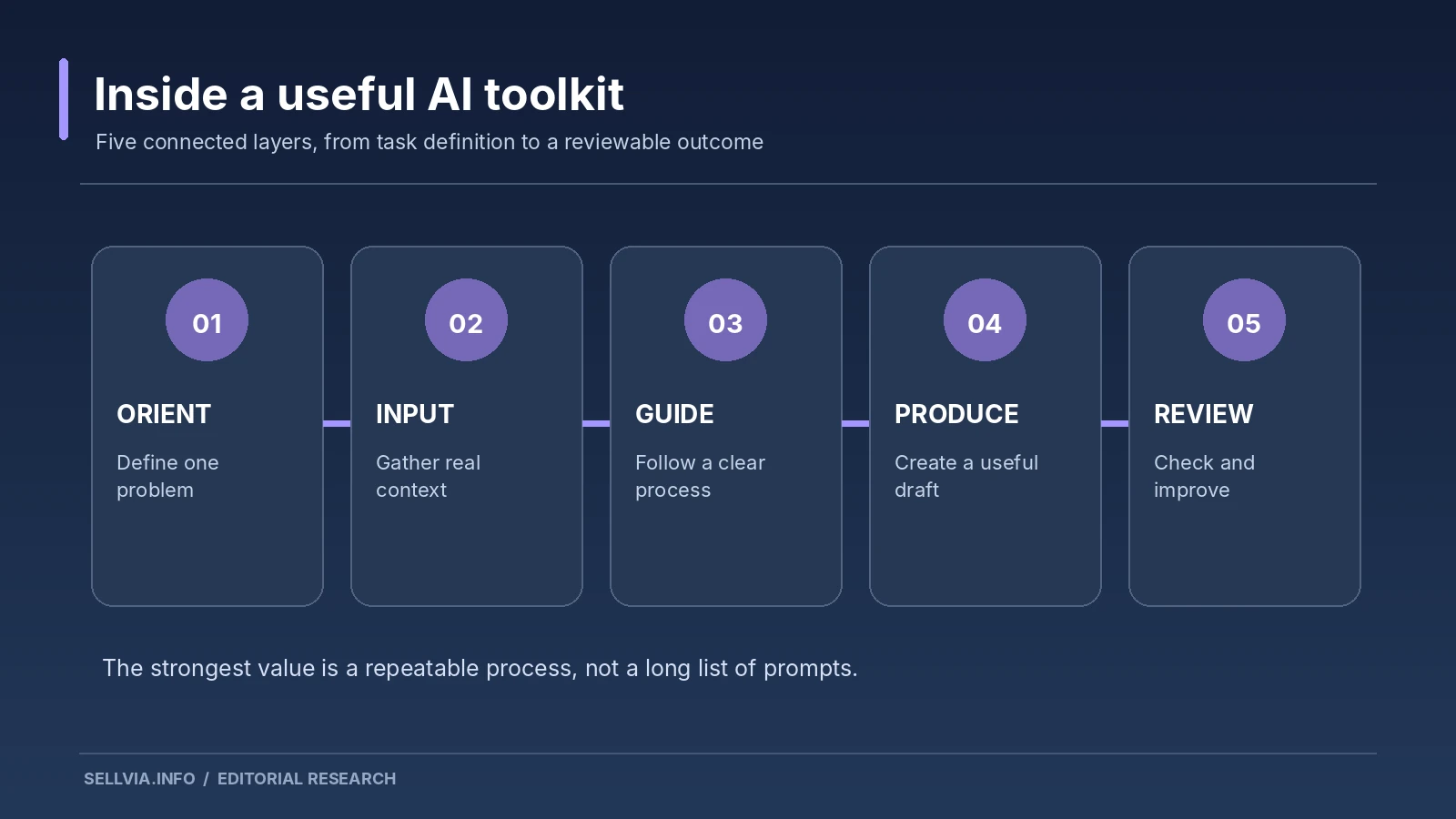
What goes into a useful toolkit: five working layers
I assess AI-related digital materials through five layers. Orientation explains the problem and the intended reader. Inputs tell the buyer what information to gather. Process gives the order of steps and prompts or templates. Output defines what the user should end up with. Review helps the buyer decide whether to adjust the result.
A prompt library with only the third layer is often harder for a beginner to use. A complete toolkit does more than provide words to paste into a chat window. It explains when to use them, what details matter and how to evaluate the response. That is why a guide, checklist and example can be more valuable than adding hundreds of near-duplicate prompts.
Sellvia’s ready-made digital-resource model suits this layered approach. A merchant can position the toolkit by the whole task it supports rather than trying to convince buyers that sheer file count equals usefulness. Good documentation creates confidence before purchase and a clearer expectation afterward.
A practical workflow: build a weekly plan
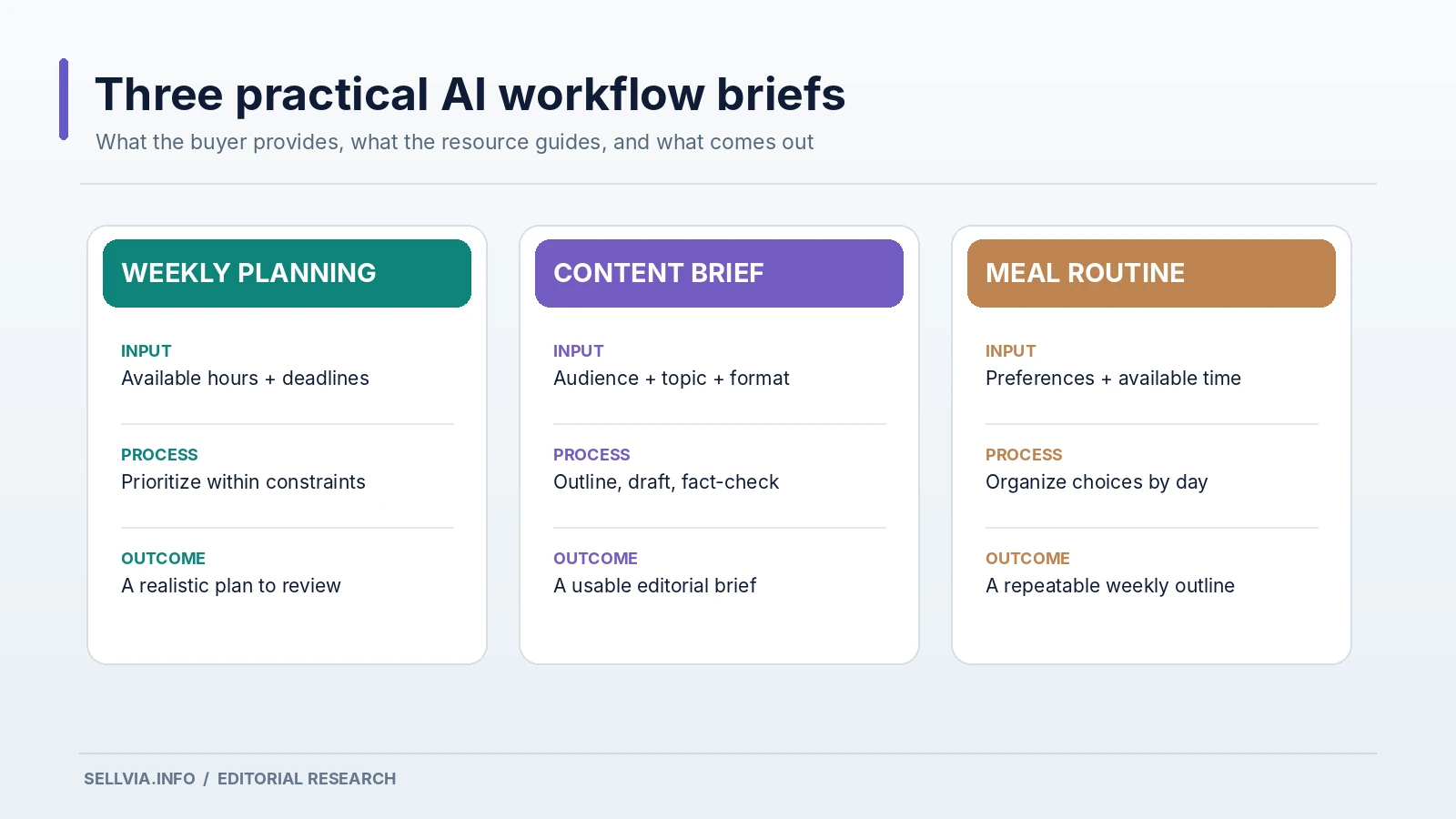
To make the evaluation concrete, consider an editor with four writing assignments, several meetings and limited focused work time. The first step is to gather the assignments, due dates, estimated work blocks and non-negotiable commitments. The second is to rank them by urgency and value. The third is to ask an AI assistant to propose a schedule that respects the actual calendar instead of inventing extra hours.
A useful instruction would look something like this: "I have 12 hours of uninterrupted work this week. Two articles need six hours combined, editing needs three, and research needs two. I also need one hour for unexpected revisions. Suggest a day-by-day plan without scheduling more than three focused hours per day." This is the kind of precise planning brief I use to assess whether a toolkit teaches a repeatable process.
The output is then inspected: did the plan preserve deadlines, include a buffer and avoid unreasonable assumptions? If not, the user corrects it. A toolkit that teaches this revision habit delivers more durable value than one presenting AI output as automatically correct.
A second workflow: turn a loose content idea into a usable brief
A creator often knows the topic but not the format. Suppose the idea is "how to prepare for a first job interview." Start with the target audience, the three most important questions, the tone and the intended channel. Then ask AI for alternative outlines. Choose one and test it against what the audience actually needs to know.
A worthwhile toolkit can supply a creative brief template, a list of clarification questions, a sequence of prompts for drafting and editing, and a final checklist for accuracy and originality. The customer still makes the key decisions. AI assists with structure and variation, while human judgment selects what to publish.
This approach makes Sellvia’s AI-product category commercially understandable. It is not selling a miraculous shortcut. It is packaging a reusable process that people would otherwise have to invent for themselves. That is a positive, defensible value proposition for a digital storefront.
A third workflow: personal planning with sensible boundaries
Meal planning is another example mentioned in Sellvia’s platform guidance. The useful inputs are ordinary: available time, household preferences, a budget and ingredients the buyer already knows how to use. The resulting plan should be convenient enough to follow on a difficult day, not just visually impressive.
There is also an important boundary. A planning toolkit can help organize meals and shopping ideas, but generic AI output should not be represented as individualized medical or dietary advice. The best products make the scope clear. They help with planning and organization and tell the reader when a specialized professional is needed.
That clarity is a selling advantage. Buyers can make a confident choice when the product describes exactly what it helps them do. A merchant who respects that boundary can market the resource positively without creating an unrealistic promise.
How prepared product pages help explain intangible value
Digital products are harder to evaluate at a glance than familiar everyday purchases. A potential buyer cannot judge an AI workflow by its cover alone. The description needs to show the types of resources inside and how they fit together. Sellvia’s prepared product-page structure offers a practical starting point for that explanation.
I check whether the page distinguishes prompts from worksheets, lessons from software tools and access requirements from optional suggestions. I also look for evidence of a sequence: what should the customer do first, and what happens next? Even a brief example can make the contents more understandable.
An effective listing should answer four basic questions near the top: Who is this for? What is included? What will I be able to do with it? What tools or skills do I need? When those answers are visible, a buyer has a fair basis for making the decision. Our separate Sellvia Product Pages Explained article covers the wider page and checkout experience.
Are Sellvia AI toolkits the same as AI software subscriptions?
Not as a general rule. The category refers to digital resources built around AI-related tasks and workflows. Some offers may involve interactive formats, but that does not make every item a hosted application, an API account or a paid software license.
This distinction improves product descriptions. If a toolkit includes instructions to use a third-party AI assistant, the buyer should know that the external service is separate and may have its own usage terms. If a digital file works locally in a browser, the listing should say so. If an ebook teaches AI concepts without any interactive component, it should be presented as learning material.
A retailer gains credibility by being specific. I find this especially important in a category where promotional language often runs ahead of what a product actually contains. Sellvia’s advantage is that these offers can sit in a professionally presented catalog with their contents described in an orderly way.
How I assess instruction quality
I read instructions looking for the places a beginner might get stuck. Does the material define unfamiliar terms? Are the steps in a sensible order? Does it explain which information the user must supply? Are sample outputs sufficiently detailed to show what success looks like? Can the customer recover after a poor AI response?
A polished introduction is helpful, but the middle of the workflow is where quality becomes visible. For example, "ask AI to create a marketing plan" is not enough. A stronger resource asks for the audience, budget, existing channels, available time, objective and limitations before generating a draft. It then explains how to review the suggestions rather than following them blindly.
The best editing opportunity for a store owner is often small: update a product page so it reflects what the resource actually teaches. Sellvia’s prepared listings reduce the amount of work needed to reach that point. The remaining job is judgment, not building the entire product presentation from nothing.
The difference between quantity and completeness
I do not give a toolkit extra credit merely because its description says "10-in-1" or lists dozens of prompts. Some tasks genuinely require several coordinated resources. Other tasks are solved more effectively by one concise guide and a reusable worksheet. Count is meaningful only when the components have distinct jobs.
For a productivity offer, a calendar guide, prioritization worksheet, review checklist and example workflow could form a coherent set. Four unrelated motivational PDFs would not provide the same structure. For a creator, prompts for ideation, outlining, drafting, editing and repurposing can support a complete cycle if they are not repetitive.
This is why I like toolkits that are organized around outcomes rather than file volume. A seller can describe the role of each component, and the buyer can see how the pieces fit. It is easier to promote a useful system than a collection whose only selling point is a large number.
What a merchant should review before adding an AI toolkit
The decision begins with audience fit. A store focused on home routines should not automatically add a specialized creator toolkit just because AI is popular. Conversely, a small-business education store may find content-planning and productivity workflows a natural complement to existing guides.
Next comes page accuracy. Check the named formats, usage requirements, and whether promises imply an outcome the product cannot control. Pay attention to words such as "automated," "personalized" and "guaranteed." Those terms need support from the real tool and the way the buyer will use it.
Finally, consider the surrounding content. A brief educational article showing how to structure a prompt or review an output can prepare buyers for an AI toolkit without giving away the entire product. It also gives the store a helpful identity beyond listing as many items as possible.
Why Sellvia’s model fits this product category
An individual creator selling a toolkit independently must write the resource, design files, build a product page, arrange the checkout and prepare marketing materials. Sellvia’s platform combines a ready-made store with a prepared catalog, reducing the amount of setup work for a subscriber who wants to curate and promote digital offers.
The practical benefit is strongest for someone who understands the audience but does not want to produce every document and listing from scratch. They can concentrate on selection and presentation. That leaves the important work of understanding the buyer intact while reducing routine publishing tasks.
Our Sellvia Product Catalog Explained guide describes the overall catalog model. AI toolkits deserve their own review because customers judge these products differently: they need not only information but a clear process for turning that information into action.
Our editorial verdict
I view Sellvia’s AI toolkit category as one of the platform’s more interesting digital-product directions. It lets a store focus on useful outcomes such as better planning, clearer creative briefs and repeatable personal workflows. The prepared catalog and product-page structure make those offers easier to present coherently than starting from a blank storefront.
The strongest toolkit is not automatically the biggest or the most technically impressive. It is the one with clear instructions, examples, sensible requirements and a finish line the customer can recognize. A curated Sellvia store that explains those qualities plainly can make AI-related products approachable to people who are not technology specialists.
My recommendation is to favor outcome-specific resources, inspect the promised components and market them in everyday language. That turns the AI label into a practical benefit. It is a positive case for Sellvia’s format, and a much more useful one than claiming a collection of prompts will run a business on autopilot.
Frequently asked questions
What is an AI toolkit on Sellvia?
It is a digital product organized around an AI-related task or outcome. Depending on the offer, it may contain prompts, guides, templates, examples, worksheets or interactive materials. The individual product description defines what is included.
Do all AI toolkits provide access to AI software?
No. A toolkit may teach a process or provide materials for use with other services. Check the listing for any required applications, accounts or external subscriptions.
Can beginners use Sellvia AI toolkits?
The outcome-focused format can be beginner-friendly, especially when instructions explain the inputs, sequence and review process. Choose resources with clear examples and prerequisites.
Are larger toolkits automatically better?
No. The useful measure is whether the included components work together to solve the stated task. A focused resource can be more valuable than a larger, repetitive set.
Which AI toolkit niche would you prioritize?
I would start with a concrete audience and recurring task, such as weekly organization or content planning, rather than choosing a product only because AI appears in its title.
Is a digital AI toolkit the same as a completed service?
Usually not. The buyer often needs to follow instructions, enter information and review outputs. A good toolkit supports that work; it does not remove every decision.

Jeck Palmer is an ecommerce writer and platform researcher at Sellvia.info. He specializes in analyzing Sellvia’s features, pricing, tools, advertising system, order workflow, and overall business model. His articles are designed to explain complex platform processes in clear and practical language, helping beginners understand potential costs, evaluate available tools, and make more informed decisions before starting an online business.