
Sellvia Store Models Explained: Partner Storefront vs Customer-Managed Payments
When I assess an ecommerce store, I start at the checkout, not the promotional homepage. The test is simple: follow a buyer’s decision from the digital-product page, check who is taking the payment, then look at the order and the responsibilities that follow. Our Sellvia editorial work includes hands-on transaction checks, so this is a practical comparison of two store models rather than a tour of legal terminology.
The biggest takeaway is that the same polished storefront can represent two very different operating relationships. Understanding which one you are using changes how you interpret sales, commissions, order processing, and customer service. Sellvia’s two-model structure is useful precisely because it makes that choice visible.
An online store can look almost identical to another store while operating under a very different payment arrangement. A buyer sees a product page and a checkout button. The owner sees a dashboard and a list of orders. Yet one business may direct the buyer to a platform-operated checkout, while another accepts payments using its own payment provider. That difference determines who is actually selling the product, who controls the transaction, and who must handle a dispute.
Sellvia now describes these arrangements explicitly as the Partner Storefront Model and the Customer-Managed Payments Model. These names matter because they resolve a question that many beginner guides leave unanswered: does operating a storefront automatically make the account holder the seller receiving the buyer’s money? Under Sellvia’s published definitions, the answer depends on the payment setup.
What earns Sellvia a positive assessment here is not simply the existence of two labels in the contract. It is the usable separation between product presentation, customer payment, and subsequent order operations. Those are the three checkpoints we return to in store testing. Keeping them separate helps prevent the most common misunderstandings about what a dashboard figure actually represents.
The two Sellvia store models at a glance
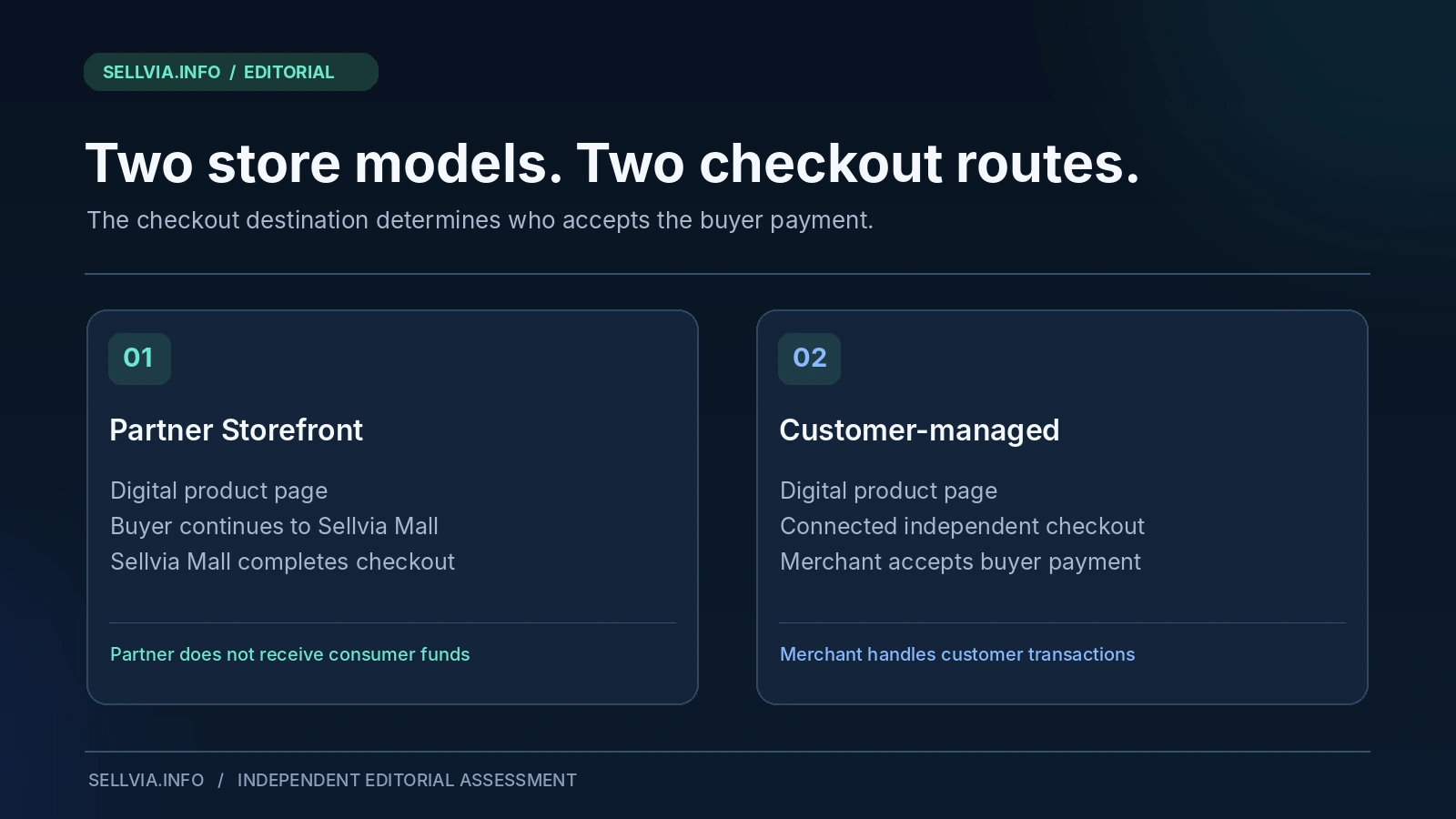
Under the Partner Storefront Model, the customer-facing site is primarily a promotional and pre-checkout interface. It displays digital products and directs shopping intent to Sellvia Mall for completion. Sellvia’s Terms say that a partner does not receive or handle the consumer’s payment. A separate Sellvia-funded promotional commission program may apply, subject to its own conditions.
Under the Customer-Managed Payments Model, the store owner connects an independently operated payment system. That owner takes the customer payment and acts as seller for transaction-related purposes. Sellvia describes its role as supplying catalog products and completing orders submitted through the system, rather than controlling the buyer’s payment.
These are not simply two names for the same financial flow. They are different definitions of the relationship among the visitor, the store operator, the payments provider, and Sellvia. If you are trying to understand the checkout experience, begin with that distinction, not with the earnings graph in a dashboard.
| Question | Partner Storefront | Customer-Managed Payments |
|---|---|---|
| Where is the purchase completed? | At Sellvia Mall after the storefront refers the visitor | At the customer’s own connected checkout |
| Who handles the buyer’s payment? | The partner does not handle it | The customer using an independent payment system |
| Who is the transaction-facing seller? | The partner is not the direct seller under the published model | The customer acts as seller for transaction purposes |
| What is the partner’s potential compensation? | A conditional Sellvia-funded promotional commission | Business receipts through the owner’s payment system, subject to costs and obligations |
| Who manages disputes with the cardholder? | Not the partner as direct payment recipient | The customer using their payment provider |
| Can the owner freely change product prices? | The Terms restrict partner price changes | Verify applicable pricing permissions in the individual account and contract |
That limitation is worth understanding before choosing a model. Sellvia expressly restricts price overrides in a Partner Storefront. For Customer-Managed Payments, the correct approach is to read the pricing controls shown by the actual account rather than assume that owning the checkout gives unlimited freedom over every catalog price.
What a Partner Storefront actually does
The Partner Storefront is best understood as a focused discovery experience. A visitor can assess a digital product, read its description, and indicate an intention to buy. The storefront then sends that visitor toward Sellvia Mall, which operates the completion stage. According to Sellvia’s Terms, the partner is not selling directly to the end consumer through this arrangement.
What I like about the partner arrangement is its focused division of work. The partner can spend time making digital-product offers understandable and bringing the right visitors to those pages, while the direct consumer checkout is operated elsewhere. In a hands-on review, that matters more than the label “turnkey”: it reduces the number of payment operations the partner personally administers. It does not remove the need to check orders, understand commission eligibility, or build an audience.
There is also a limit to the model. Because the purchase is completed elsewhere, a partner cannot assume they control the payment page, the card processor, or every step of the customer experience. And because listing prices are managed at platform level, the owner should concentrate on accurate presentation and audience relevance instead of improvising price edits in unsupported ways.
This makes the storefront’s real job more visible: communicate what the digital product is, whom it helps, what the buyer receives, and why the offering is worth investigating. A clear presentation is a legitimate contribution, even though it is different from becoming the merchant of record for a card payment.
A practical example: a productivity guide
Imagine a storefront built around downloadable productivity resources. A visitor sees a guide for building a weekly planning routine and reads the summary. In the Partner Storefront configuration, the page can create interest and lead the visitor to the Sellvia-operated purchase environment. The partner’s work is to build that connection accurately, not to accept the visitor’s card details.
If the platform attributes qualifying partner activity, a promotional incentive may be allocated under the Commission rules. But an on-screen commission figure is not the same as money received from a customer, nor is it automatically an approved payout. Sellvia characterizes Commission as an internal non-cash incentive until redemption requirements and approval have been satisfied. Treating it as ordinary checkout revenue would obscure the very distinction the model is designed to make.
What changes when you connect your own payments
The Customer-Managed Payments Model draws a clearer merchant boundary. In Sellvia’s current published wording, connecting an independent payment system makes the customer the seller to the end consumer for transaction-related purposes. That can be attractive for an operator who already has payment-provider approval, understands the relevant customer-service obligations, and wants a direct relationship with the checkout process.
With that control comes work. The operator becomes responsible for transaction records, fraud management, disputes, refunds, regulatory obligations, and other requirements linked to accepting consumer payments. These are not hidden details to be handled later. They influence the payment provider you choose, the terms on your store, the information you must show buyers, and the response process when something goes wrong.
The value of the customer-managed route is control over the buyer transaction. For a merchant already accustomed to taking card payments, that can be a natural fit. The price of that control is the operational work: refunds, disputes, fraud handling, records, and consumer obligations. Sellvia’s strength is that it can supply the digital-product infrastructure while leaving that transaction relationship with the merchant. We see this as a genuine choice between different ways of running a store, not as a promise of easier earnings.
A customer-managed example
Consider an independent creator-oriented store that sells digital planners, workbooks, and course materials. The owner connects an approved payment system, takes payments directly through that system, and keeps the records needed for refunds and disputes. Sellvia still provides the relevant catalog and order-handling services according to the contract, but does not act as the card-payment operator for that checkout.
The customer-managed route may provide a more direct transaction relationship. It also means the store owner cannot reasonably assume that Sellvia will handle a payment dispute on their behalf. A beginner who dislikes payment administration should treat that responsibility as an important selection factor, not as a minor technical configuration.
The payment route is not the order-processing route
This is where many explanations become vague. Checkout answers who accepts payment from the buyer. Order processing answers what operational work follows the order. Those are related stages, but not interchangeable. The Sellvia Terms contain separate sections addressing order processing, and the workflow can have costs and requirements of its own.
On Sellvia.info, our existing How to Process a Sellvia Order guide focuses on those downstream steps. Read it alongside this analysis rather than trying to interpret an order-processing status as proof of who collected the customer’s funds. A partner who does not receive consumer payments may still have an order-related processing obligation under Sellvia’s program; a customer-managed merchant may also have platform processing requirements.
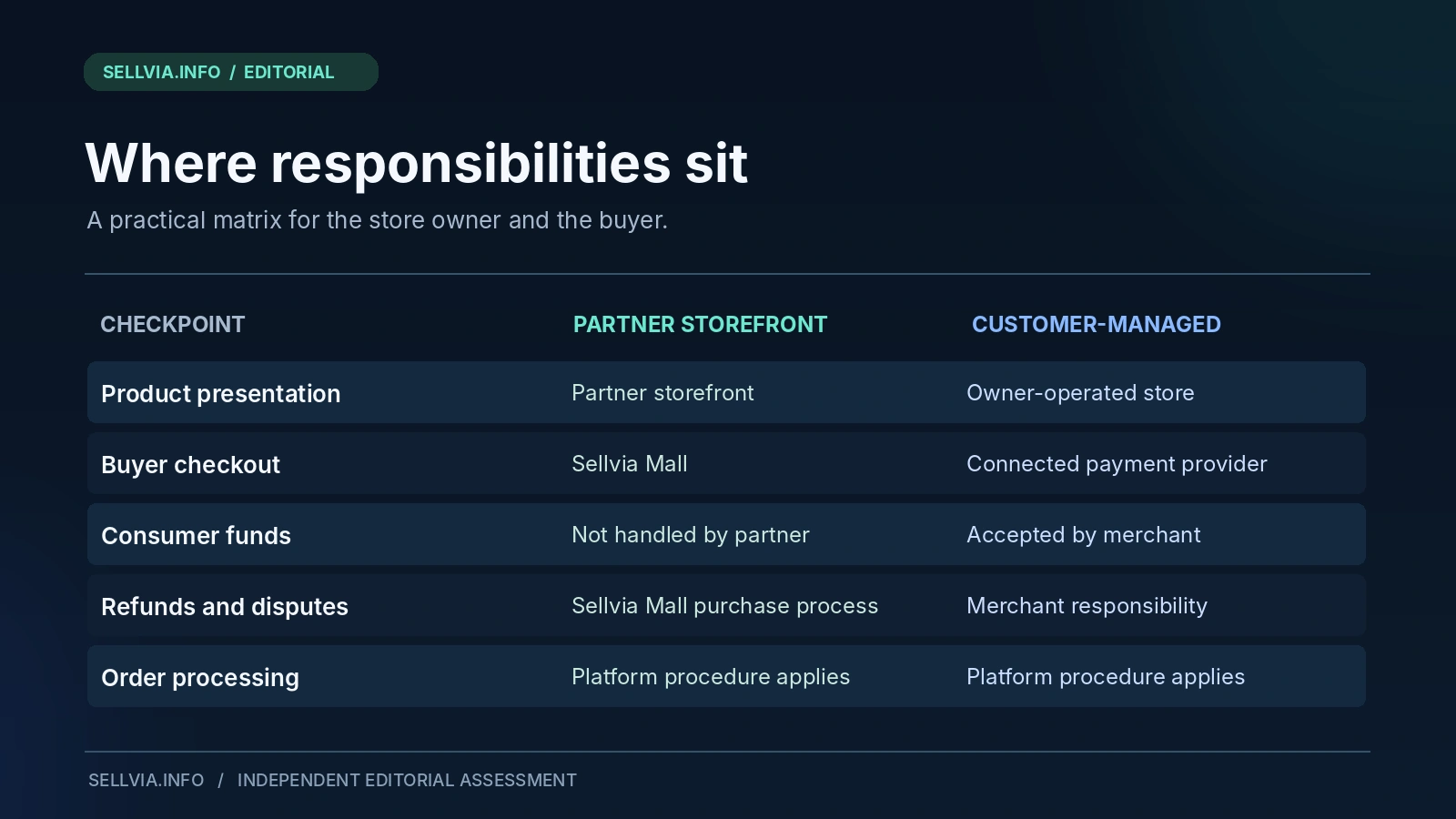
Which model offers the simpler beginning?
For a person learning how to create coherent digital-product pages, the partner setup has a reasonable appeal. It can let attention remain on product relevance, language, content quality, and visitor intent. For someone already running independent payment operations, the customer-managed configuration may fit established processes more naturally.
A careful choice also considers what the customer experiences. Does the checkout route feel transparent? Does the destination make sense from the product page? Are the terms and contact details clear? Does the person know who will handle a purchase question? These are more consequential than whether the administrator regards the route as ‘fully managed.’
What stood out in the transaction and order workflow
When we assess a real purchase flow, the first question is where the buyer goes after clicking the purchase button. A visitor may feel that the entire experience belongs to one branded store, but the final payment step tells a more useful story. In a Partner Storefront setup, the visitor is directed to Sellvia Mall; under Customer-Managed Payments, the merchant operates the connected checkout. That is the operational distinction we want readers to recognize before they start comparing dashboards.
Our next check is what happens once a transaction is recorded. We look at the order’s identity, whether further processing is required, the status visible to the operator, and the place where customer questions must be handled. This is why we insist on separating a purchase from order processing. A completed buyer payment is one event; a processed order is another. The account may show both, but they do not mean the same thing.
The responsibility split is one of Sellvia’s better-designed ideas. A Partner Storefront can concentrate on explaining and presenting digital offers without becoming the direct recipient of card payments. A merchant using their own payment provider gets a more direct commercial relationship with the buyer, with responsibility for refunds, disputes, transaction records, and compliance. In practice, that is a more useful choice than a vague promise that a store is “fully automated.”
We also compare these practical observations with the current Sellvia Terms of Use, especially sections 1.2-1.4. The Terms matter because they set the rules that a successful checkout does not reveal on its own. The hands-on view tells us what matters at each step; the contractual view tells us who is responsible.
A buyer-journey checklist worth using
Our transaction-review routine follows the full buyer journey. We open a digital-product page as a visitor, read its promise without the admin dashboard in view, follow the purchase action, confirm the destination and seller information, then inspect the resulting transaction and order record in the relevant system. We also compare what a customer would expect from the confirmation details with the task the operator sees next.
That process forces useful distinctions. A page can be persuasive while leaving the seller’s identity unclear; a payment can be successful without removing the need for order processing; a commission can be displayed without being approved for redemption. Those are exactly the points a store review should make easy to understand, rather than burying them beneath generalized claims about simplicity.
When reviewing a customer-managed store, we focus on the payment provider’s onboarding and transaction record, customer-service terms, and the way refunds and disputes are handled. With a Partner Storefront, the emphasis shifts to the handoff to Sellvia Mall, restrictions on platform-set prices, and the order and Commission states that follow qualified activity. The useful result is a clear division of responsibilities that a store owner can act on.
A good store model should reduce ambiguity. If the owner cannot explain in one sentence who accepts the buyer’s money, the setup is not yet understood well enough to support accurate marketing copy. That is not a criticism unique to Sellvia; it is a useful standard for any commerce platform.
A closer look at control, not just convenience
Control comes in several forms. You might control the store’s subject matter, product selection, page copy, audience strategy, and content calendar without controlling the checkout service. Alternatively, you might operate the payment system but rely on a platform for the underlying product library. Neither arrangement provides unlimited control across every layer.
Sellvia’s structure separates these capabilities in a way an operator can evaluate. The first model emphasizes presenting catalog products and referring potential buyers. The second adds independent payment acceptance and the corresponding customer-facing obligations. Calling both simply ‘selling through a Sellvia store’ conceals information the reader needs.
Mistakes that are easy to avoid
The first mistake is assuming that because a product is visible on a personally branded page, the page owner must be the party collecting the payment. The second is describing a promotional commission as ordinary store sales income. The third is connecting an independent payment service without planning how refunds, consumer communications, compliance, and chargebacks will be handled.
Another is assuming the two arrangements always share the same settings. Sellvia explicitly notes in its Terms that dashboards and features can vary by account type and assigned version. A screenshot from someone else’s account, or from an older guide, is not reliable evidence that a particular checkout option is available to you.
Finally, do not assume a catalog product’s licensing rights become yours simply because it appears on your store. The digital products remain governed by Sellvia’s intellectual property and service terms. Store access, product display rights, and ownership of the underlying educational material are separate concepts.
Our editorial verdict
Sellvia deserves credit for spelling out two distinct store relationships rather than forcing every customer into one poorly explained payment story. The Partner Storefront Model offers a relatively focused way to present digital products without personally processing the buyer’s checkout. The Customer-Managed Payments Model is more appropriate for operators who want the direct payment relationship and can shoulder the corresponding duties.
The most important finding is not that one option promises better earnings. No such conclusion follows from public Terms. It is that Sellvia supplies a structured digital-product storefront ecosystem while making the legal and operational consequences of payment configuration more explicit. For a newcomer, that transparency can be as valuable as another software feature.
Our recommendation is practical: identify the payment model first, then test the customer journey and trace a real order all the way through the dashboard. Check whether the buyer is directed to Sellvia Mall or your own payment system, whether the price is controlled by the platform, and which party handles a transaction problem. On that basis, Sellvia offers a strong starting structure for a digital-product store without pretending every configuration carries the same responsibilities.
Frequently asked questions
Does a Sellvia Partner Storefront collect card payments?
According to Sellvia’s current Terms, the Partner Storefront directs customers to Sellvia Mall for order completion, and the partner does not receive or handle consumer payments. Verify the current flow on your actual site.
Is Sellvia Commission the same as store sales revenue?
No. The Terms describe partner Commission as a Sellvia-funded, non-cash promotional incentive under defined qualification and redemption rules. It should not be presented as customer money or automatically payable earnings.
What happens if I connect my own payment provider?
Under the documented Customer-Managed Payments Model, the customer accepting payments becomes the seller for transaction-related purposes and takes on the associated obligations. Whether a specific provider is eligible must be checked with Sellvia and the provider.
Can partners change the price of a digital product?
The Terms explicitly say Partner Storefront listing prices are controlled at platform level and prohibit unauthorized overrides. Do not assume other pricing rights without checking the applicable account agreement.
Does the model determine the quality of Sellvia products?
No. The two models concern payment and seller responsibilities. Product quality should be assessed separately by reviewing the actual deliverables, product pages, and intended customer use, as discussed in our Sellvia Digital Product Catalog guide.
Which model should a beginner choose?
A beginner who does not want to administer independent card payments may find the partner route easier to understand. Someone with an existing payment operation may prefer the customer-managed route. The decision depends on eligibility, responsibilities, and the features enabled for the account.
Editorial reference: Our comparison draws on storefront transaction checks, the order workflow, and Sellvia’s published Terms of Use (sections 1.2-1.4, reviewed November 5, 2026). The illustrations explain the two operating routes; they are not reproductions of payment statements.

Joe Radmon is a digital commerce researcher and contributing author at Sellvia.info. His work focuses on the practical mechanics behind Sellvia, from subscription costs and advertising budgets to order processing, account balances, and payout planning. Joe is particularly interested in how platform features affect everyday business decisions. His articles aim to replace vague expectations with clear explanations, realistic examples, and useful context for readers evaluating Sellvia as an online business platform.