
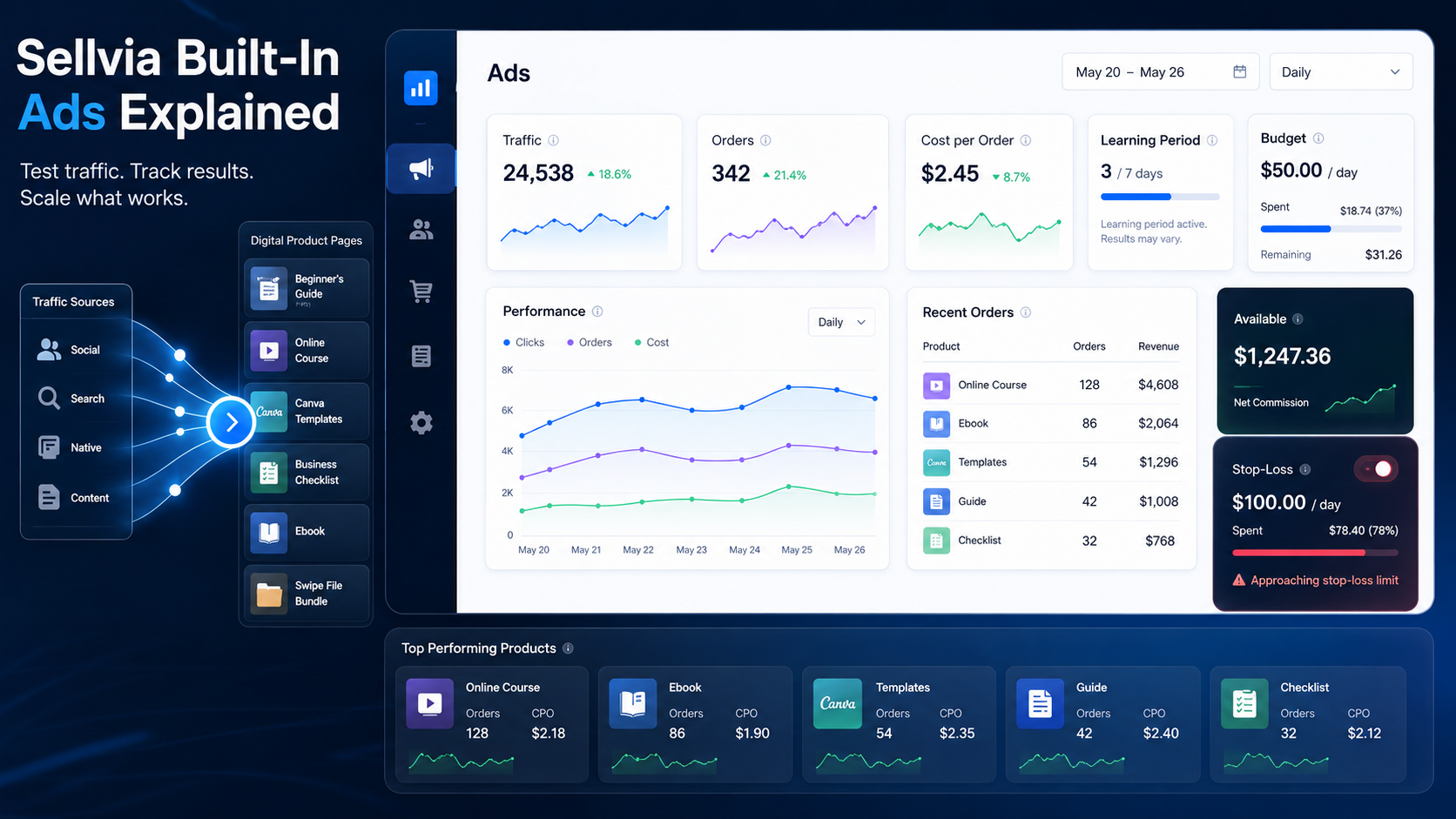
Sellvia Built-In Ads Explained: How the Platform’s Advertising System Works
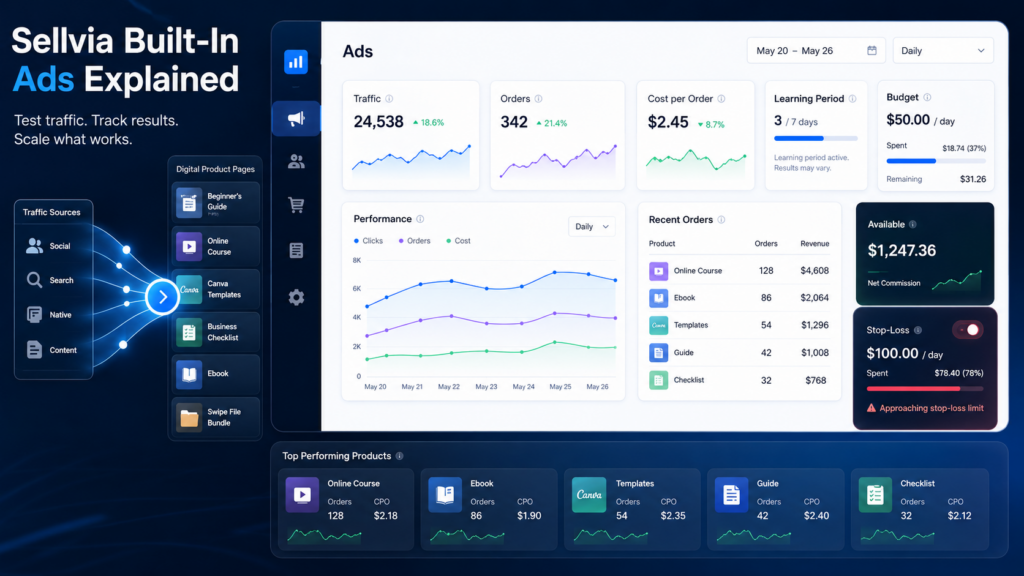
Sellvia is a SaaS online business platform that gives users access to a digital product store, dashboard tools, marketing options, an order processing workflow, and payout rules – all from one place. One of the first features beginners notice after signing up is the built-in advertising system. It can influence how fast traffic reaches a new store, how quickly testing data appears, and how much money gets spent each month on top of the base subscription.
This article focuses specifically on Sellvia built-in ads – what they are, how the system works, what beginners should realistically expect, and how to avoid the most common mistakes. It is not a pricing article. For a breakdown of subscription costs and fee structures, see the Sellvia Pricing Explained guide. For monthly budget planning, see How Much Does Sellvia Cost? and Sellvia Startup Budget.
Understanding how Sellvia ads work before funding them is worth the time. The ad system can be a useful tool, but it does not guarantee sales or profit. Budget control, performance tracking, and a clear stop-loss plan matter just as much here as they do with any other paid advertising channel.
Quick Answer
Sellvia built-in ads are an advertising feature integrated directly into the Sellvia platform. Instead of setting up campaigns manually through external ad platforms, users can activate advertising from within the Sellvia dashboard and set a daily spending limit. The system then works to drive traffic toward the user’s digital product store.
The key word in that description is “works to drive traffic” – not “guarantees sales.” Built-in ads may simplify the technical side of starting paid advertising, but they do not remove the fundamental uncertainty of any paid traffic channel. A user can spend money on Sellvia ads and receive orders. A user can also spend money and receive very few orders.
Users should verify current ad package options, daily budget settings, and any available trial coupons directly inside the Sellvia platform before funding ads. Specific figures mentioned in this article reflect information available at the time of writing and may change.
Why Sellvia Built-In Ads Matter
New online stores have one core problem: no one knows they exist. Organic traffic – the kind that comes from search engines and social media without paid promotion – takes time to build. For a store that launched last week, there is no existing audience and no track record.
Paid advertising is one way to create faster feedback. Rather than waiting weeks or months to see whether a store generates interest, a user can direct traffic toward it almost immediately by funding an ad budget. This is why built-in ads tend to be one of the first features new Sellvia users engage with, and also why ad spend can quickly become the largest variable cost in the whole operation.
The built-in nature of Sellvia ads is relevant here. Setting up and managing paid campaigns on external platforms requires technical knowledge, time, and patience. The Sellvia ad system reduces that setup barrier significantly for beginners. However, reducing the setup barrier is not the same as removing business risk. Ads that are easier to turn on are also easier to fund without fully understanding what the spend is producing.
Remember: Ad spend should be treated as testing money until results are consistently proven. That mindset matters more than the daily budget level itself.
How Sellvia Ads Fit Into the Platform Model
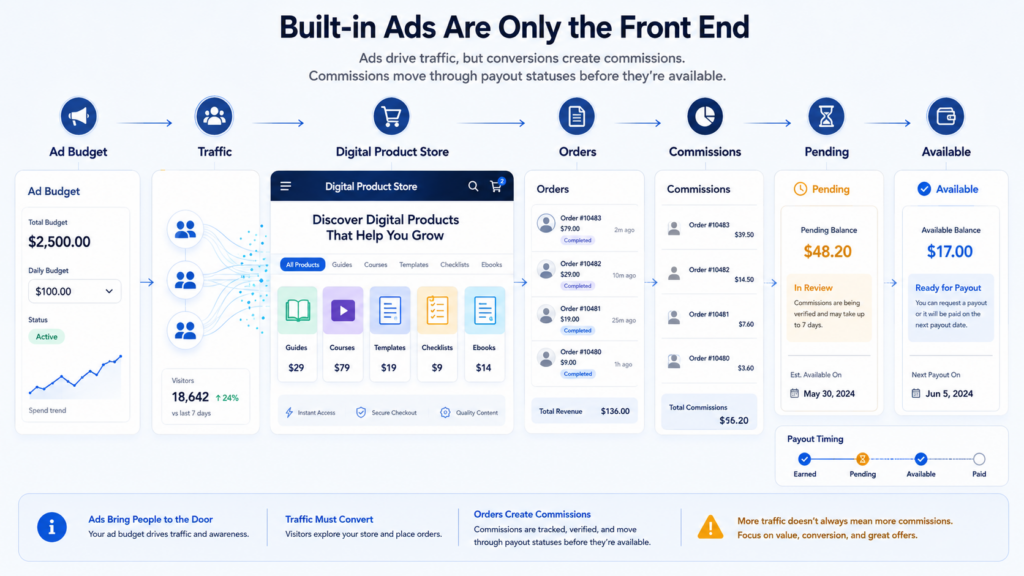
Sellvia is not just an ad platform. It provides the full structure for a digital product store: the store itself, a catalog of products users can sell, dashboard access for tracking activity, an order processing workflow, and tools for managing the business over time.
Built-in ads sit inside this larger system. They are a traffic source, not the entire business. Traffic still needs to reach a product page, land on something compelling, and convert into an order. Then the order needs to be processed correctly to generate commission. Then commission moves through the platform’s balance system before it becomes available for payout.
In other words, ads are the front end of a longer chain. Understanding where ads end and the rest of the platform begins matters a lot for interpreting results. A user who sees traffic in their dashboard but no orders may have an ad problem or a product page problem. A user who sees orders but is confused about earnings probably needs to understand the commission and payout workflow better. These are related but separate questions.
What Sellvia Built-In Ads May Do
Here is a realistic list of what the ad system may help with, depending on setup, budget, and platform conditions at the time of use:
- Simplify ad activation for users with no prior advertising experience
- Help a new store receive its first visitors without requiring manual campaign setup
- Connect advertising activity directly to the Sellvia dashboard for easier monitoring
- Reduce the time needed to start testing whether a store’s products attract interest
- Provide a controlled daily budget structure instead of open-ended spending
- Generate early performance signals about which areas of the store get engagement
- Reduce dependence on technical ad platform knowledge during the early testing phase
Each of these benefits is real but qualified. “May simplify” is not the same as “will simplify for everyone.” Results depend on current platform conditions, budget level, product selection, and how actively the user monitors performance.
What Sellvia Built-In Ads Do Not Do
This section matters a great deal for setting accurate expectations before spending money.
- Guarantee sales. Traffic and orders are two different things. The ad system can send visitors to a store. Whether those visitors become buyers depends on factors the ad system does not control.
- Guarantee profit. An order is not automatically profitable. If the cost to acquire each order through advertising is higher than the net commission earned on that order, the user is losing money per transaction even while generating dashboard activity.
- Remove the need for budget control. Because ad spend runs daily, costs accumulate continuously. Without a spending limit and regular review, it is easy to spend significantly more than planned over the course of a month.
- Prove the business model in a few days. Early performance can fluctuate considerably. A few days of data is rarely enough to draw conclusions about long-term results.
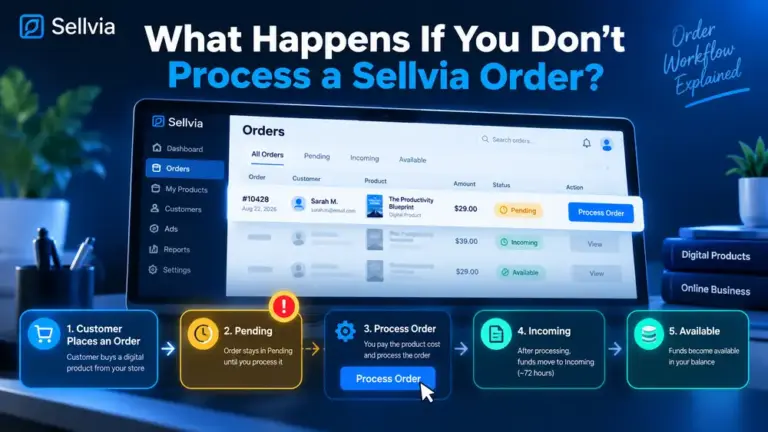
- Make commissions instantly available. Orders generate commission activity, but commission goes through a pending and processing phase before it becomes available for payout. Ad spend is charged in real time. This timing gap matters for cash flow planning.
- Replace performance tracking. The system runs on its own, but the user still needs to review results regularly, understand what the numbers mean, and make decisions based on data.
- Make every product convert. Not every product in the catalog will produce the same results. Built-in ads expose traffic to the store; product relevance and presentation still affect whether visitors buy.
Key point: Built-in ads reduce technical setup friction. They do not reduce business uncertainty. Both can be true at the same time.
Sellvia Ads vs. Manual Advertising
| Area | Sellvia Built-In Ads | Manual Advertising |
|---|---|---|
| Setup difficulty | Low – activated from the dashboard | Medium to high – requires platform knowledge |
| Control level | Limited – platform handles targeting and creative | High – user controls all variables |
| Beginner friendliness | High | Low to medium |
| Learning curve | Short for activation, longer for interpretation | Long for setup and optimization |
| Budget control | Daily budget limit set in dashboard | Full control over bidding and spend |
| Optimization responsibility | Handled by the platform | Handled by the user |
| Performance tracking | Dashboard metrics provided | External analytics required |
| Flexibility | Fixed within platform options | Flexible across platforms and formats |
Sellvia built-in ads may be the right starting point for users who have no advertising experience and want to begin testing traffic quickly. Manual advertising can offer more control and flexibility for users willing to invest time in learning. Neither option eliminates risk or guarantees results.
Understanding Sellvia Ad Budget Levels
Ad spend on Sellvia is separate from the monthly platform subscription. The subscription covers platform access. Ad spend is an additional variable cost that runs on a daily basis.
At the time of writing, daily ad budgets may start at around $10/day, with higher tiers available depending on current platform settings. Users should verify available budget options directly inside the Sellvia dashboard, as packages and minimums may change.
The reason daily budget matters so much is that it multiplies across the full month:
| Daily Budget | Approximate Monthly Ad Spend |
|---|---|
| $10/day | ~$300/month |
| $15/day | ~$450/month |
| $20/day | ~$600/month |
| $30/day | ~$900/month |
| $50/day | ~$1,500/month |
These are ad spend projections only. They are not revenue projections or profit estimates.
Lower daily budgets produce data more slowly but limit downside exposure. Higher daily budgets produce data faster but increase the cost of a poor testing period. For beginners, starting at the lowest reasonable budget and reviewing results before increasing spend is almost always the right approach.
How Beginners Should Start With Sellvia Ads
A practical starting method for new users:
- Activate ads at the lowest available daily budget. Do not start high because the results feel more exciting. Let the system run at a level that is financially manageable.
- Give the system time to collect data. A single day is not enough. Aim for at least 5-7 days before drawing conclusions.
- Track orders daily, not hourly. Day-to-day results can vary significantly. What matters is the trend across multiple days.
- Calculate cost per order, not just order count. One order after spending $50 on ads is not necessarily a good result.
- Do not increase the daily budget after one good day. A single strong day can be noise. Wait for consistent patterns across a week or more.
- Review results weekly. Set a specific day each week to look at total spend, total orders, and cost per order for the week.
- Pause or adjust if results are not improving after 10-14 days. Continuing to spend when results are poor does not fix the problem – it deepens the loss.
- Do not purchase additional platform tools before understanding ad performance. Optional upgrades are easier to evaluate once the core ad-to-order workflow is understood.
What Metrics to Track When Using Sellvia Ads
Tracking orders alone is not enough to understand whether an ad campaign is working. Here is a more complete list of what to monitor:
- Daily ad spend – what was charged each day
- Total weekly ad spend – cumulative cost across the week
- Number of orders – how many orders were placed in the store
- Cost per order – total ad spend divided by number of orders
- Net commission per order – what the platform shows as earned per order after fees
- Pending balance – commission not yet available for payout
- Available balance – commission that can be withdrawn
- Refund or failed order signals – any indicators of cancelled or reversed orders
- Weekly trend – is cost per order improving, staying flat, or getting worse?
- Stop-loss remaining – how much of the reserved testing budget is still available
The gap between “orders placed” and “available balance” is one of the most important things to monitor. If orders are appearing but the available balance is not growing in a way that reflects those orders, that is worth investigating – either in the fee structure, payout timing, or order quality.
Why Cost Per Order Matters More Than Order Count
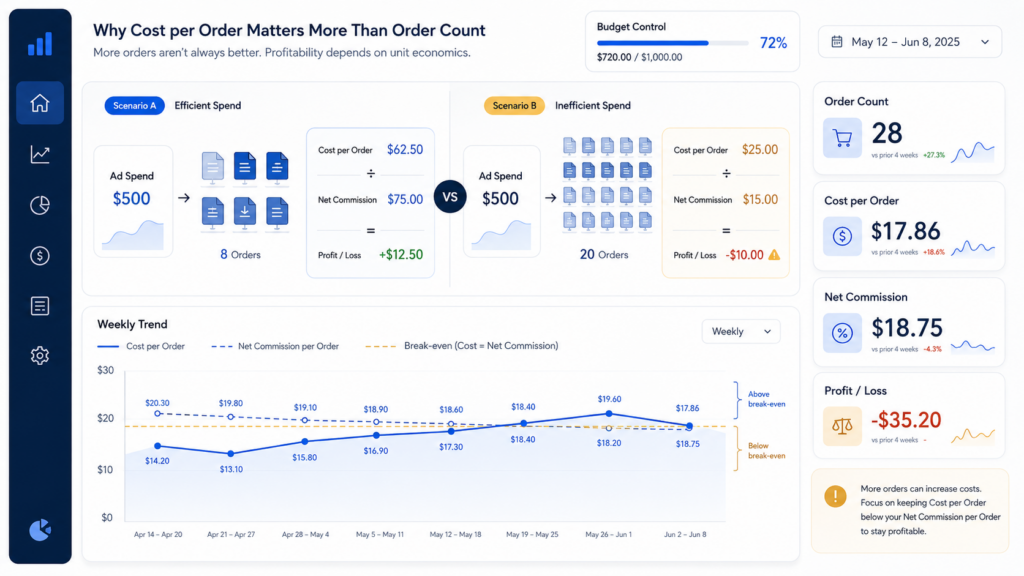
Beginners often focus on the number of orders because orders feel like proof that the business is working. A few orders in the dashboard creates a sense of progress. But the order count alone does not tell you whether those orders were profitable.
The question that actually matters is: what did it cost to produce each order?
Example: If a user earns a net commission of $12 per order but spent $40 in ads to generate one order, the result is a net loss of $28 on that transaction. Getting more orders in this scenario does not help – it makes things worse.
The goal is to bring cost per order below net commission per order. When that happens consistently across a week or more, the ad system may be working effectively. Until it does, spending more does not solve the problem.
The basic calculation is straightforward: total weekly ad spend divided by number of orders that week equals cost per order. Compare that number to what the platform shows as net commission per order. The relationship between those two numbers tells most of the story.
The Learning Period: Why Early Ad Results Can Be Noisy
The first few days of running any paid ad campaign tend to produce unstable results. This is normal across advertising platforms generally, not specific to Sellvia. The system is still gathering data about which kinds of users respond to the store, what times produce better engagement, and how the budget is being allocated.
One strong day during this period is not evidence that the campaign is working. One weak day is not evidence that it is failing. Both can be part of normal early-stage variability.
What beginners should avoid is making major decisions – increasing budget significantly, pausing permanently, or concluding that the business does not work – based on one or two days of data.
A more reliable picture begins to emerge after a consistent block of time, typically at least 7-10 days at a steady daily budget, with no major changes in the middle. Changing the budget or product selection mid-week resets the signal, making it harder to interpret what is driving results.
When to Increase Sellvia Ad Spend
Budget increases should be considered only when all of the following are true:
- At least 7-14 days of consistent daily data are available
- Cost per order is stable or improving across multiple days
- Net commission per order is understood and calculated
- Available balance is growing at a pace that reflects order activity
- The user still has stop-loss budget in reserve
- The decision to increase is based on data, not excitement or impatience
Warning: Increasing ad budget too early amplifies whatever is currently happening. If the current result is a small loss per order, a higher budget makes that loss grow faster.
When to Pause Sellvia Ads
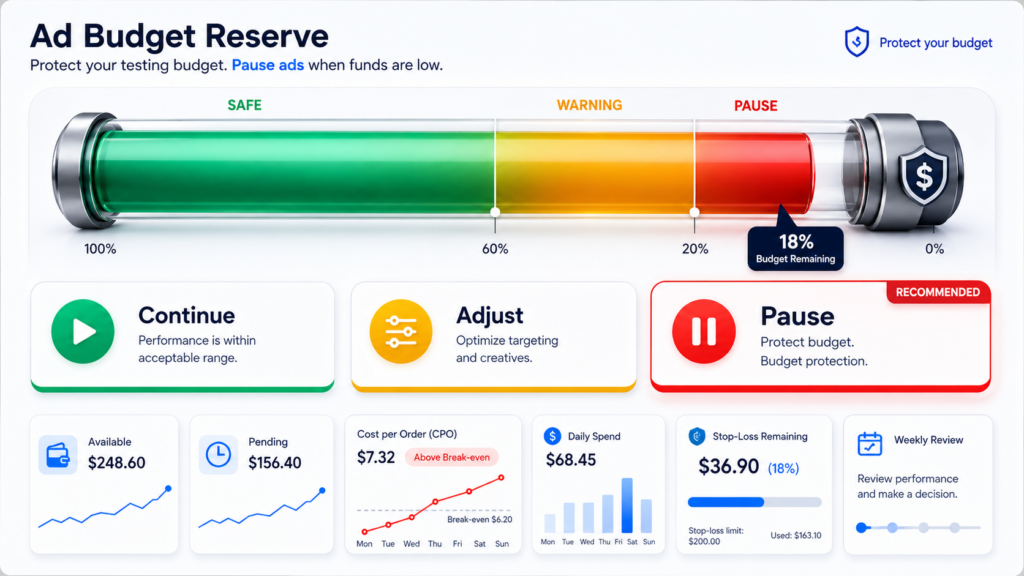
Pausing ads is a normal and legitimate tool, not a sign of failure. Consider pausing when:
- Ad spend continues but orders are not appearing or are declining
- Cost per order has been consistently above net commission for more than 5-7 days
- Available balance is not reflecting order activity in a way that makes sense
- The user cannot explain what the dashboard data means
- Budget stress is increasing and the stop-loss limit is approaching
- The user needs time to re-read Sellvia pricing rules or review the payout structure
- Something in the order processing workflow seems unclear and needs investigation
Pausing does not end the business. It stops the spending while the user figures out what is happening. That is budget control, and budget control is good business practice.
Common Mistakes Beginners Make With Sellvia Ads
- Assuming built-in ads guarantee sales. They do not. Traffic and conversions are separate events.
- Starting with a higher daily budget than they can afford to test with. More spend does not mean faster proof. It means faster losses if results are poor.
- Judging everything after one or two days. Early results are noisy and require more context before drawing conclusions.
- Scaling the budget after one good order. One order is not a pattern. A week of consistent orders is closer to a pattern.
- Not calculating cost per order. Watching order count without comparing it to ad spend misses the most important metric.
- Ignoring the difference between pending and available balance. Commission pending is not cash available. These are different numbers in the dashboard.
- Purchasing optional platform tools before validating ad performance. Additional tools add cost before the core ad-to-order chain is understood.
- Continuing to run ads for weeks without any weekly review. Automatic spending without regular review is how testing budgets disappear without useful data.
- Expecting the trial coupon to prove everything. The trial period is too short and the coupon budget too small to draw long-term conclusions.
- Confusing revenue with profit. Orders generate gross revenue. Net commission after fees is what the user actually keeps. These can be significantly different numbers.
How Sellvia Ads Connect to Orders, Commissions, and Payouts
Understanding the full chain from ad spend to available cash helps beginners read their dashboard more accurately.
Ad spend creates traffic to the store. Traffic may produce orders when visitors choose to purchase a product. Orders then generate commission activity in the user’s account. That commission typically moves through a pending phase before it becomes available for payout. Order processing fees apply at the point of order fulfillment.
The important timing point: ad spend is charged as it happens, in real time. Commission moves through the system more slowly. This creates a cash flow gap, especially in the first few weeks. A user may have spent $150 on ads while only seeing $30 in available balance – not because the commissions are not coming, but because they are still in the pending phase.
This gap is one of the most common sources of confusion for beginners. Understanding it in advance prevents the mistake of assuming the ads are not working simply because the available balance does not match expectations in real time.
For a detailed explanation of commission statuses and payout timing, see the Sellvia Pricing Explained article.
Are Sellvia Built-In Ads Good for Beginners?
Built-in ads may be a useful starting point for beginners who want to test traffic without setting up external advertising accounts. The reduced setup barrier is real. A new user can activate advertising faster through Sellvia’s system than they could by learning to manage campaigns on an external platform from scratch.
However, easier setup does not mean lower risk. Ad spend accumulates daily regardless of performance. A beginner who activates ads without understanding cost per order, commission timing, or payout structure can spend a meaningful amount of money without a clear picture of what it produced.
Sellvia built-in ads are most appropriate for beginners who are willing to monitor performance regularly, treat early spend as testing money, and make data-based decisions about whether to continue, pause, or adjust. They are less appropriate for users who expect the system to manage everything automatically and produce profit without active involvement.
Who Should Be Careful With Sellvia Ads
- Users with a very limited cash reserve who cannot afford 3-4 weeks of testing without those funds being needed elsewhere
- Users who cannot check dashboard performance at least once per week
- Users who expect guaranteed results or a specific return on ad spend
- Users who have not yet read the Sellvia pricing guide and do not understand how fees interact with commission
- Users who have not defined a stop-loss limit before funding ads
- Users planning to increase ad spend based on excitement rather than data
- Users who are not sure what “available balance” means in the context of the platform
This is not a list of reasons not to use Sellvia. It is a list of preparation steps that reduce the chance of a frustrating early experience.
Sellvia Built-In Ads and the Trial Period
Sellvia currently offers a 14-day free trial, and at the time of writing, a $40 ad coupon may be available to new users during this period. Users should verify whether this coupon is currently offered and how it applies to ad spend inside the platform.
The trial and coupon combination can serve a useful purpose: they allow a new user to explore the dashboard interface, activate ads, and observe how the system works without committing to a full paid subscription or significant ad funding.
However, it is worth being clear about what the trial period can and cannot tell you. At a low daily budget, $40 covers only a short period of ad activity. That is enough time to learn the interface and see how traffic appears in the dashboard. It is not enough time to draw conclusions about whether the ad system will be profitable for a specific store over the long term.
Note: Users who make decisions entirely based on trial results – either concluding the platform does not work or deciding to scale up quickly – are working from a very limited data set. The trial is an introduction, not a proof of concept.
Final Thoughts: Sellvia Built-In Ads Explained
Summary
Sellvia built-in ads may make traffic testing more accessible for beginners who have no prior experience with paid advertising. The reduced setup barrier is a genuine benefit. But easier activation does not mean lower risk, and advertising activity does not automatically become profit.
The right way to approach Sellvia ads is with a controlled daily budget, a defined stop-loss limit, consistent weekly performance review, and a clear understanding of cost per order versus net commission per order. Ad spend that cannot be explained in those terms is not a strategy – it is hope, and hope is not a reliable business input.
Before funding ads, beginners should understand how the Sellvia platform works, read the Sellvia pricing guide, plan a startup budget that includes realistic ad spend, and review available Sellvia tools.
Results may vary. Verify all current ad package options, budget settings, and platform terms directly inside the Sellvia platform before funding any ad spend. Pricing figures and platform features mentioned in this article reflect information available at the time of writing and are subject to change.
Frequently Asked Questions
What are Sellvia built-in ads?
Sellvia built-in ads are an advertising feature integrated directly into the Sellvia platform. They allow users to activate paid traffic toward their digital product store from within the Sellvia dashboard, without needing to set up campaigns manually on external advertising platforms. The user sets a daily budget, and the system handles the technical side of running the campaign.
Do Sellvia ads guarantee sales?
No. Sellvia built-in ads can direct traffic toward a store, but traffic and sales are two different outcomes. Whether visitors convert into buyers depends on multiple factors, including the products available, the daily budget, and how long the campaign has been running. Ad spend does not guarantee orders, and orders do not automatically mean profit.
How much should beginners spend on Sellvia ads?
There is no single right answer, but the general principle is to start at the lowest available daily budget and let the system collect data before increasing spend. At the time of writing, daily budgets may start at around $10/day, though users should verify current settings inside the platform. Beginners should treat early ad spend as testing money, not an investment with a predictable return.
Are Sellvia built-in ads good for beginners?
They can be a useful starting point for beginners who want to test traffic without learning to manage external ad campaigns. The setup process is simpler than building campaigns from scratch. However, built-in ads still require regular performance monitoring, budget control, and an understanding of how cost per order compares to net commission per order to be used effectively.
What should I track when using Sellvia ads?
The most important metrics are daily ad spend, total weekly ad spend, number of orders, cost per order, and net commission per order. Beyond those, tracking the difference between pending and available balance helps beginners understand payout timing and avoid confusion about when earnings become accessible.
When should I pause Sellvia ads?
Pausing is appropriate when cost per order has been consistently above net commission for multiple days, when total ad spend is approaching your stop-loss limit, when the dashboard data does not make sense and needs investigation, or when you need time to review the platform’s pricing and fee rules. Pausing is a tool for budget control, not a sign of failure.
Are Sellvia ads included in the subscription?
No. The monthly subscription covers access to the Sellvia platform – the store, dashboard, and digital product catalog. Ad spend is a separate variable cost charged based on the daily budget the user sets. The two costs run independently, and ad spend will typically be larger than the subscription for users who are actively running campaigns. Users should verify current subscription terms and ad spend structures directly inside the Sellvia platform.
What should I read before using Sellvia ads?
Before funding any ad spend, it is worth reading the Sellvia Pricing Explained article to understand the full fee structure, How Much Does Sellvia Cost? for practical monthly budget planning, and Sellvia Startup Budget to understand how much to set aside before starting. Reading the how Sellvia works overview and checking Sellvia reviews can also help set realistic expectations before the first dollar is spent.

Jeck Palmer is an ecommerce writer and platform researcher at Sellvia.info. He specializes in analyzing Sellvia’s features, pricing, tools, advertising system, order workflow, and overall business model. His articles are designed to explain complex platform processes in clear and practical language, helping beginners understand potential costs, evaluate available tools, and make more informed decisions before starting an online business.


What no Sellvia review actually warned me about was how fast the $40 trial coupon disappears when you don’t set a hard daily cap first – I burned through half of it in 36 hours before I caught it. The part that surprised me most was that the ad system itself isn’t complicated, it’s the stopping rules that matter, and nobody tells you that upfront. Set your daily limit before you fund anything. Seriously.
At week 13, the point about traffic versus sales is the one I wish someone had put in bold before I funded anything – I sell digital courses through this platform and the catalog variety there genuinely surprised me, but traffic showing up does not mean the right traffic showed up. (I convinced myself my first two orders were a fluke and nearly paused the whole experiment, which in hindsight would have been the wrong call.)