
How Does Sellvia Work? A Step-by-Step Explanation of the SaaS Platform
Many people search “how does Sellvia work” after first hearing about the platform and trying to understand what exactly they are looking at. Is it a store builder? Is it a digital product platform? Is it a business-in-a-box? Is it something that works automatically?
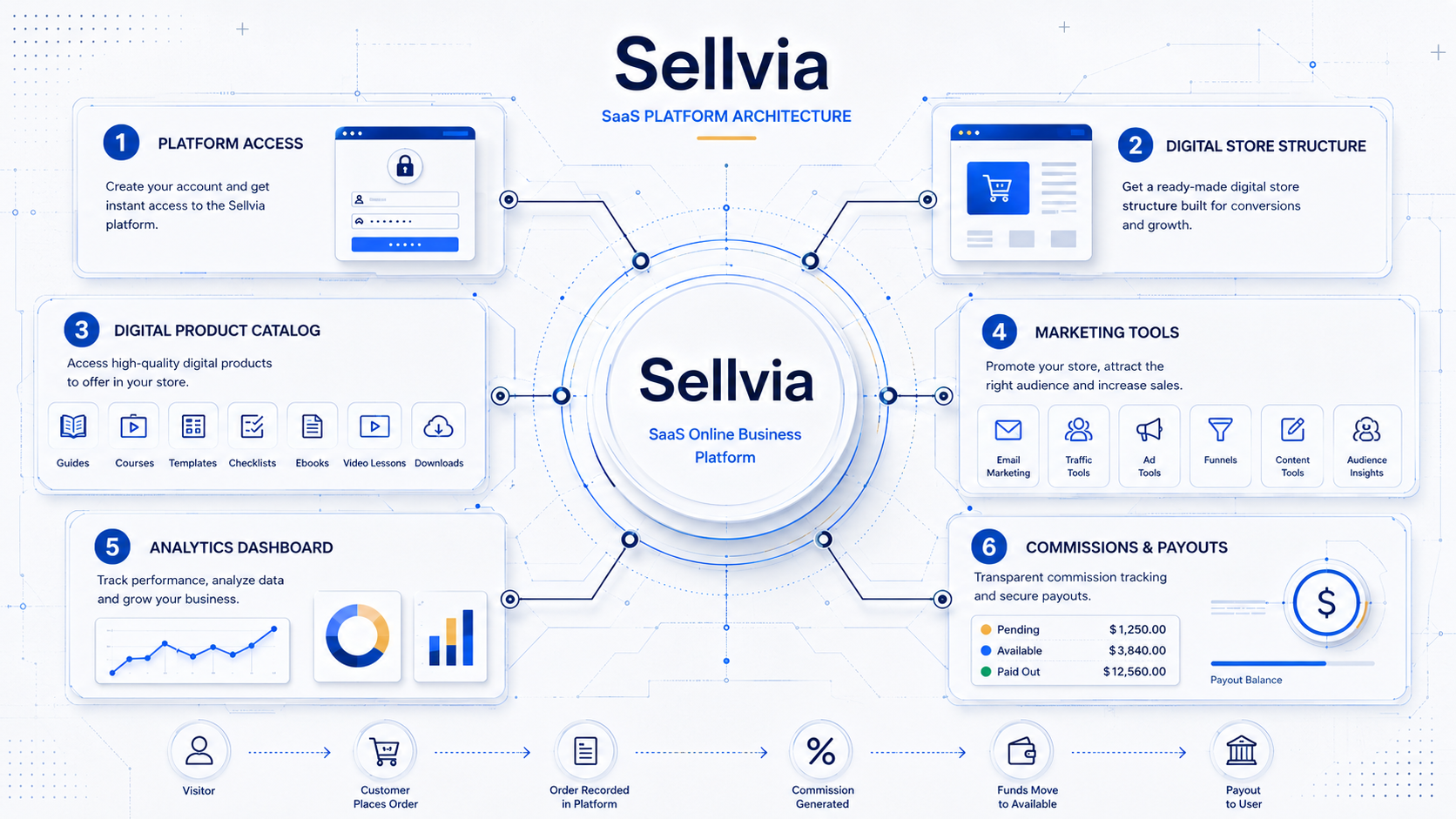
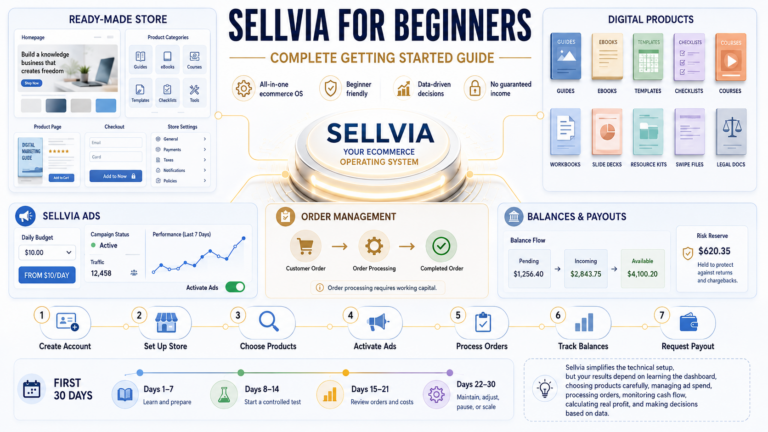
The clearest way to understand Sellvia is as a SaaS online business platform. In this context, Sellvia is not best understood as a traditional dropshipping model. Instead, it gives users access to a platform environment built around a ready-made digital product store structure, a digital product catalog, dashboard tools, marketing-related features, and a payment or commission workflow.
That distinction matters. Sellvia may provide a structured starting point, but it does not remove the need for business judgment. Users still need to understand costs, marketing, audience fit, customer acquisition, platform rules, order processing, commissions, and payout timing.
This article explains how Sellvia works step by step, from platform access to digital product catalog use, tools, customer orders, payment flow, and realistic beginner expectations.
Quick Answer: How Does Sellvia Work?
Sellvia works by giving users access to a SaaS platform with a ready-made digital product store structure, digital product catalog, dashboard, tools, marketing options, and a payment or commission workflow.
The platform provides infrastructure. That means users do not start from a completely blank page. They get access to a store environment, digital product resources, and tools that can help manage parts of the business process.
However, Sellvia is not a guarantee of profit. The user still needs to understand marketing, costs, order rules, platform limitations, payout timing, and how to attract the right audience.
In simple terms: Sellvia provides the platform and structure, but the user still has to operate the business side of the system.
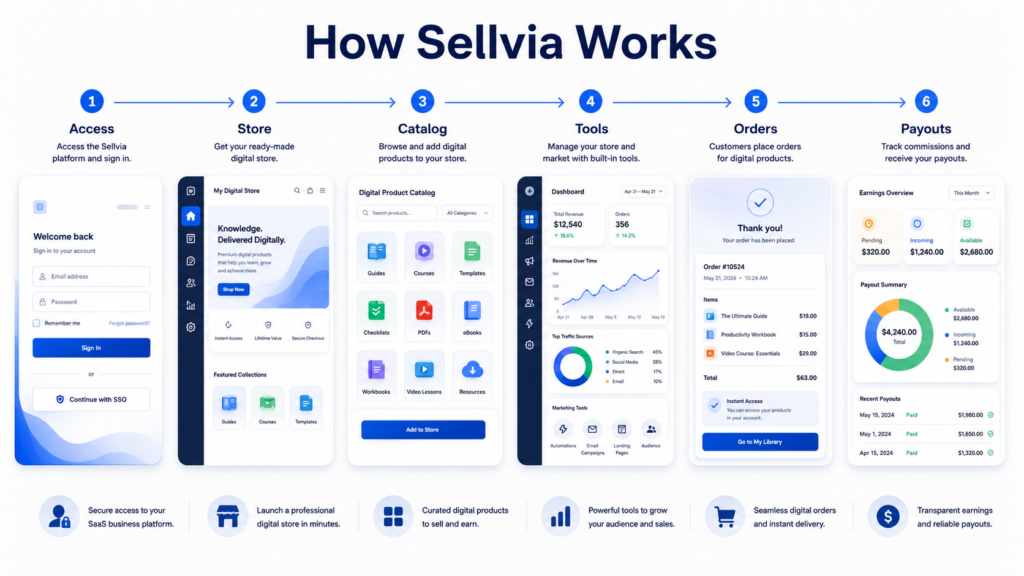
Step 1: Users Get Access to the Sellvia SaaS Platform
The first step in how Sellvia works is platform access.
Sellvia operates as a SaaS-style platform, meaning users pay for access to a software-based business environment. That access may include a dashboard, digital store structure, catalog features, tools, and account-level controls.
This is important because SaaS access is different from owning every part of a business outright. A user is not simply buying a finished business that automatically runs itself. Instead, the user is getting access to a platform that provides the working environment.
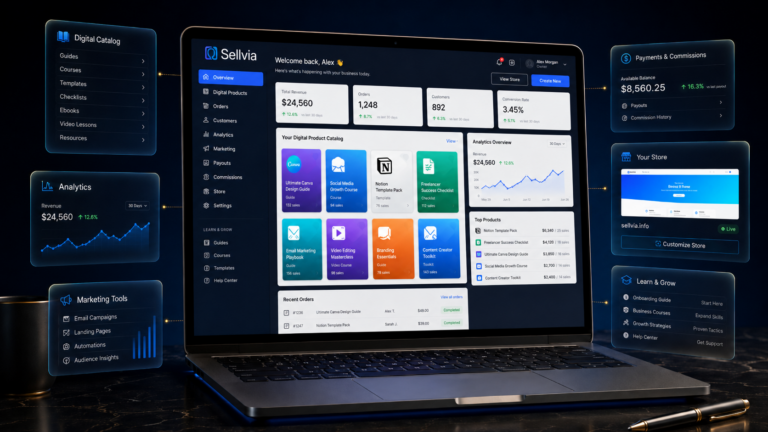
Inside the Sellvia platform, users can typically expect to interact with:
- account settings
- dashboard controls
- store-related features
- digital product catalog access
- order and customer information
- marketing-related tools
- payment or commission information
- platform guidance and learning resources
For beginners, this is useful because it reduces the amount of setup required at the start. Instead of building every technical piece from zero, the user enters a more structured environment.
But that structure should not be confused with guaranteed success. Platform access gives users a starting point. It does not automatically create traffic, sales, or profit.
Step 2: Sellvia Provides a Ready-Made Digital Product Store Structure
The next step is the ready-made digital product store structure.
In this context, Sellvia is built around a digital product store model. The store gives the user a starting framework where digital products can be presented, organized, and sold through an online storefront.
This can be helpful for beginners because one of the hardest parts of starting online is creating the first structure. A blank website can be intimidating. Users may not know how to organize product pages, what type of store layout to use, or how to begin presenting offers.
Sellvia simplifies part of that setup by providing a ready-made structure.
However, a ready-made store should not be mistaken for a ready-made business outcome. The store may exist, but users still need to understand:
- who the target audience is
- why someone would buy the digital products
- how the store is positioned
- how visitors will find the site
- what marketing strategy will be used
- what costs are involved
- how orders and commissions are handled
A digital store structure gives users a foundation. It does not replace strategy.
Step 3: Users Access a Digital Product Catalog
A major part of how Sellvia works is access to a digital product catalog.
This is one of the most important differences between a SaaS digital product platform and a traditional physical-product model. The catalog in this context is focused on digital resources, not physical items.
Examples of digital products may include:
- guides
- courses
- templates
- checklists
- ebooks
- video lessons
- downloadable resources
- educational content
- business learning materials
- practical digital toolkits
These products can be part of the user’s store environment. The idea is that the platform gives users access to a catalog of digital products that can be presented through the store structure.
For beginners, this can make the early setup process feel more approachable. Instead of creating every product from scratch before launching, users can begin with platform-provided catalog access.
Still, digital products require the right audience. A digital guide, course, checklist, or template does not sell just because it exists. It needs positioning, demand, trust, traffic, and a reason for the customer to care.
That is why understanding the Sellvia digital product catalog is only one part of understanding the full Sellvia platform workflow.
Step 4: The Sellvia Dashboard Helps Users Manage the Store
The dashboard is where the platform becomes more operational.
A SaaS dashboard usually acts as the control center. It gives users a place to see important information, access tools, manage settings, and track business activity.
In the Sellvia platform, the dashboard may help users understand areas such as:
- store overview
- digital product catalog visibility
- orders
- customers
- analytics
- marketing features
- commissions or payment-related information
- platform settings
- performance indicators
This matters because beginners often need one central place to understand what is happening. Without a dashboard, users may feel lost between store setup, product pages, marketing, orders, and financial tracking.
The Sellvia dashboard helps organize that workflow.
But again, a dashboard is not a magic engine. A dashboard can show data, provide controls, and help users manage activity. It cannot automatically make every business decision correctly.
For example, analytics may show visitors, performance patterns, or order activity. But the user still needs to interpret that information and decide what to improve.
Step 5: Sellvia Tools Support Marketing and Store Operations
Sellvia tools are another important part of the platform workflow.
The purpose of tools inside a SaaS online business platform is to make the process easier to manage. Tools can support store activity, marketing, content, analytics, and performance tracking.
Depending on the platform setup, Sellvia tools may relate to areas such as:
- marketing tools
- built-in advertising options
- analytics
- performance tracking
- promotional features
- store management
- content or campaign support
- dashboard guidance
- customer and order visibility
These tools can be useful because beginners often struggle with execution. They may understand the idea of an online store but not know how to attract visitors, track performance, or manage the next steps.
Tools can reduce friction.
But tools do not replace business judgment. A marketing feature does not guarantee that the right audience will respond. A performance chart does not automatically improve conversion. A campaign option does not mean every campaign will be profitable.
Sellvia tools should be viewed as support systems. They help users operate the platform, but the user still needs to test, learn, adjust, and make decisions.
Step 6: Customers Place Orders Through the Digital Store
Once the store is set up and traffic reaches the site, customers may place orders through the digital product store.
This is where the platform moves from setup into actual business activity.
A simplified customer-side workflow may look like this:
- A visitor lands on the user’s store.
- The visitor views a digital product.
- The visitor decides whether the offer is relevant.
- The visitor places an order.
- The order appears inside the platform environment.
- The user follows the platform workflow for processing and tracking.
This is a key point: orders are not just numbers on a screen. Users need to understand what each order means inside the Sellvia platform.
A beginner should know how orders are recorded, what actions may be required, how commissions are tracked, and when funds become available according to platform rules.
This is one of the reasons why learning how Sellvia works is important before focusing only on revenue screenshots or surface-level claims.
Step 7: Commissions and Payment Flow Need to Be Understood
The payment and commission workflow is one of the most important parts of Sellvia for beginners to understand.
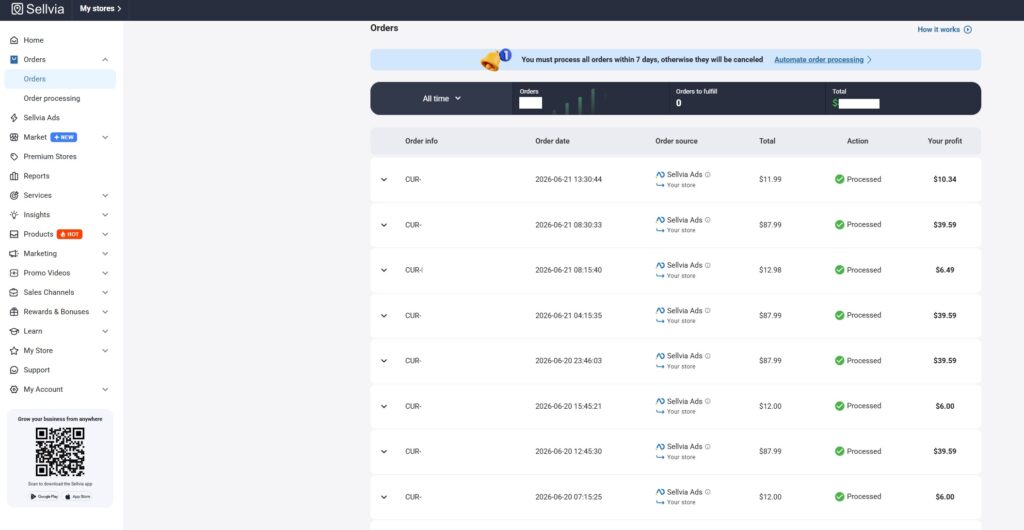
When a customer places an order, commission-related activity may appear inside the platform. But that does not always mean the money is instantly available for withdrawal.
In many platform-based systems, amounts can move through different stages before becoming available. For example, users may need to understand the difference between:
- pending amounts
- incoming amounts
- available balances
- processed orders
- payout eligibility
- minimum withdrawal requirements
- timing rules
This matters because beginners sometimes confuse “an order happened” with “cash is ready to withdraw.” Those are not always the same thing.
A practical way to think about it:
| Stage | What It Means |
|---|---|
| Customer order | A customer completed a purchase action through the store |
| Commission activity | The platform may show commission-related value |
| Processing step | The user may need to follow the platform workflow |
| Pending or incoming status | The amount may not yet be fully available |
| Available balance | The amount may be eligible according to platform rules |
| Payout request | The user may request withdrawal if requirements are met |
Users should check payout rules, minimum withdrawal requirements, and timing before relying on money shown inside the dashboard.
This is not a reason to panic. It is simply part of understanding the platform workflow. Any user researching Sellvia should also read Sellvia pricing and payment-related articles before making decisions.
Step 8: Users Need Marketing and Traffic
Sellvia does not automatically create profitable traffic by itself.
This is one of the most important points in the entire article.
A SaaS platform can provide infrastructure, tools, catalog access, and a store environment. But customers still need a reason to visit the store. They also need a reason to trust the offer, understand the product, and complete a purchase.
That means users need to think about:
- traffic sources
- audience targeting
- marketing budget
- content strategy
- campaign testing
- conversion rates
- customer intent
- product relevance
- performance tracking
Digital products can be attractive because they are flexible and scalable, but they still need the right audience.
A guide, course, checklist, template, or ebook is only valuable if it solves a real problem for the person seeing it. Marketing is the bridge between the digital product and the potential buyer.
Sellvia tools may help with this process, but users should not expect automatic results. Marketing requires testing. Some campaigns may work. Some may not. Some audiences may respond. Others may ignore the offer.
Beginners should approach Sellvia with realistic expectations: the platform can provide structure, but traffic and customer acquisition still matter.
What Sellvia Automates vs What the User Still Does
A useful way to understand how Sellvia works is to separate what the platform may provide from what the user still needs to handle.
| What Sellvia May Provide | What the User Still Needs to Handle |
|---|---|
| Platform access | Understanding costs |
| Ready-made digital store structure | Choosing direction |
| Digital product catalog | Learning marketing |
| Dashboard | Tracking performance |
| Tools | Understanding order and payment rules |
| Marketing options | Managing expectations |
| Payment or commission workflow | Testing and improving |
| Platform guidance | Reading Sellvia reviews and pricing details |
This distinction is critical.
Sellvia may reduce technical friction and provide a structured environment. But it does not remove responsibility from the user. A user still needs to understand what they are doing, why they are doing it, and how the platform fits into their broader goals.
Is Sellvia Fully Hands-Off?
No, users should not treat Sellvia as a fully hands-off business.
That is one of the most common misunderstandings with online business platforms. A platform can simplify setup, provide tools, and organize the workflow. But it cannot guarantee that every user will make good decisions or get the same results.
Sellvia may help users start from a more structured position. But users still need to understand:
- the platform model
- digital product positioning
- marketing strategy
- platform costs
- order and commission flow
- payout timing
- customer acquisition
- performance tracking
A fully hands-off mindset can create unrealistic expectations. A better approach is to treat Sellvia as a platform that may support the process, while the user remains responsible for learning and execution.
How Sellvia Works for Beginners
For beginners, the best way to approach Sellvia is step by step.
Here is a simple beginner checklist:
- Understand what Sellvia is.
- Learn how the platform access model works.
- Review the digital product store concept.
- Understand Sellvia pricing and possible additional costs.
- Learn how the dashboard and tools work.
- Review how orders, commissions, and payouts are handled.
- Read Sellvia reviews and common concerns.
- Start with realistic expectations.
- Track performance carefully.
- Avoid assuming that a platform alone guarantees results.
This approach helps beginners avoid the biggest mistake: jumping in without understanding the business model.
Sellvia may look simple from the outside, but every platform has rules, costs, workflows, and limitations. Learning those details first is usually better than making assumptions later.
Common Misunderstandings About How Sellvia Works
1. Thinking Sellvia guarantees income
Sellvia does not guarantee income. It provides access to a platform and related tools. Results depend on many factors, including marketing, audience fit, costs, and user decisions.
2. Thinking the monthly fee is the only cost
A monthly platform fee may be only one part of the total picture. Users should also think about marketing budget, testing, payment flow, and other possible business costs.
3. Thinking tools replace marketing
Tools can support marketing, but they do not replace strategy. Users still need to understand their audience, offers, positioning, and performance data.
4. Thinking orders equal immediately available cash
An order may create commission-related activity, but that does not always mean funds are instantly available. Users should understand pending, incoming, available, and payout stages.
5. Thinking a ready-made store means a ready-made business
A ready-made store structure can save time, but it does not automatically create a profitable business. Users still need traffic, trust, and customer demand.
6. Confusing platform access with full ownership of everything
Sellvia is best understood as a SaaS platform access model. Users should understand what they are accessing through the subscription and what remains tied to the platform environment.
7. Expecting results without traffic or testing
No online business platform works well without traffic and testing. Users need to test audience response, product positioning, and marketing channels.
8. Assuming every Sellvia user will have the same outcome
Different users may get different results. Budget, effort, skill, timing, audience, and decision-making can all affect the outcome.
Final Thoughts: How Does Sellvia Work?
So, how does Sellvia work?
Sellvia works as a SaaS online business platform that gives users access to a ready-made digital product store structure, digital catalog, dashboard, tools, and payment or commission workflow.
It may provide a structured starting point for users interested in digital product stores, but it should not be viewed as an automatic business. Users still need to understand marketing, costs, order processing, payout timing, platform rules, and realistic business expectations.
The best way to approach Sellvia is to treat it as a platform, not a promise. It can provide infrastructure and tools, but the user still needs to learn how the system works and make informed decisions.
After this explanation, the next useful steps are reading the Sellvia pricing guide, the Sellvia tools overview, and the Sellvia reviews section to understand the platform more completely.
FAQ
How does Sellvia work?
Sellvia works by giving users access to a SaaS platform with a ready-made digital product store structure, digital product catalog, dashboard tools, marketing-related features, and a payment or commission workflow. The platform provides the environment, but the user still needs to understand costs, marketing, orders, and platform rules.
Is Sellvia a SaaS platform?
Yes, Sellvia is best understood here as a SaaS online business platform. Users access platform features, tools, a digital store structure, and related workflows through a subscription-style model.
Is Sellvia the same as dropshipping?
In this context, Sellvia should not be understood as a traditional dropshipping platform. This article explains Sellvia as a SaaS platform focused on digital product store access, dashboard tools, catalog access, and platform workflow.
Does Sellvia work automatically?
No, Sellvia should not be treated as fully automatic. The Sellvia platform may provide tools and structure, but users still need to understand marketing, audience fit, costs, order processing, and performance tracking.
What does the Sellvia dashboard do?
The Sellvia dashboard acts as a control center for the platform. It may help users view store activity, digital catalog information, orders, customers, analytics, marketing features, commissions, and platform settings.
How do Sellvia commissions and payouts work?
Customer purchases may create commission-related activity inside the platform. However, users should understand timing rules, pending or available status, processing requirements, minimum withdrawal rules, and payout conditions before relying on funds.
What should beginners understand before using Sellvia?
Beginners should understand that Sellvia is a platform, not a guaranteed outcome. They should learn how the digital product store model works, what costs may apply, how marketing fits in, and how orders, commissions, and payouts are handled.

Jeck Palmer is an ecommerce writer and platform researcher at Sellvia.info. He specializes in analyzing Sellvia’s features, pricing, tools, advertising system, order workflow, and overall business model. His articles are designed to explain complex platform processes in clear and practical language, helping beginners understand potential costs, evaluate available tools, and make more informed decisions before starting an online business.

The step about the digital product catalog being only part of the picture is where I spent the most time early on – I kept expecting the catalog to do more work than it actually does. What changed things was realizing that the traffic piece was entirely on me, and once I started running the built-in ad system at around $15 a day the catalog started to make sense as a business asset rather than just a list of available products. About 5 weeks in I had my first week with consistent orders. The article is accurate that the platform provides infrastructure but not outcomes – that framing would have saved me about two weeks of confusion.
Before the service, I was manually cobbling together every single piece myself – and the comparison isn’t even close once you’re inside a structure that already exists. What I thought would be another overbuilt tool turned out to be the thing that made me stop rebuilding the same process from scratch every project.
Tbh the part that surprised me most was how fast the first sale came in – I had mentally prepared for weeks of silence, and that expectation was just wrong.
The withdrawal piece is the part this platform doesn’t explain loudly enough – you need $100 before anything moves, which caught me mid-month when I was watching commissions stack and wondering why nothing had cleared yet. Well, not exactly frustrating, but definitely something I’d have planned around if I’d known upfront.
The part this article gets right is that the deposit structure is what actually enables the 24/7 processing – once funds are in the system, orders move without me touching anything. I came in skeptical after losing money on a previous tool, but watching sales clear automatically overnight was the proof I needed before I said a word to anyone.
The screen I keep open is the order and commission panel – tbh nothing made the service feel real until I watched a sale move through it while I was completely offline. That one screen paid for the $39 monthly cost in my head faster than any feature list ever could.