
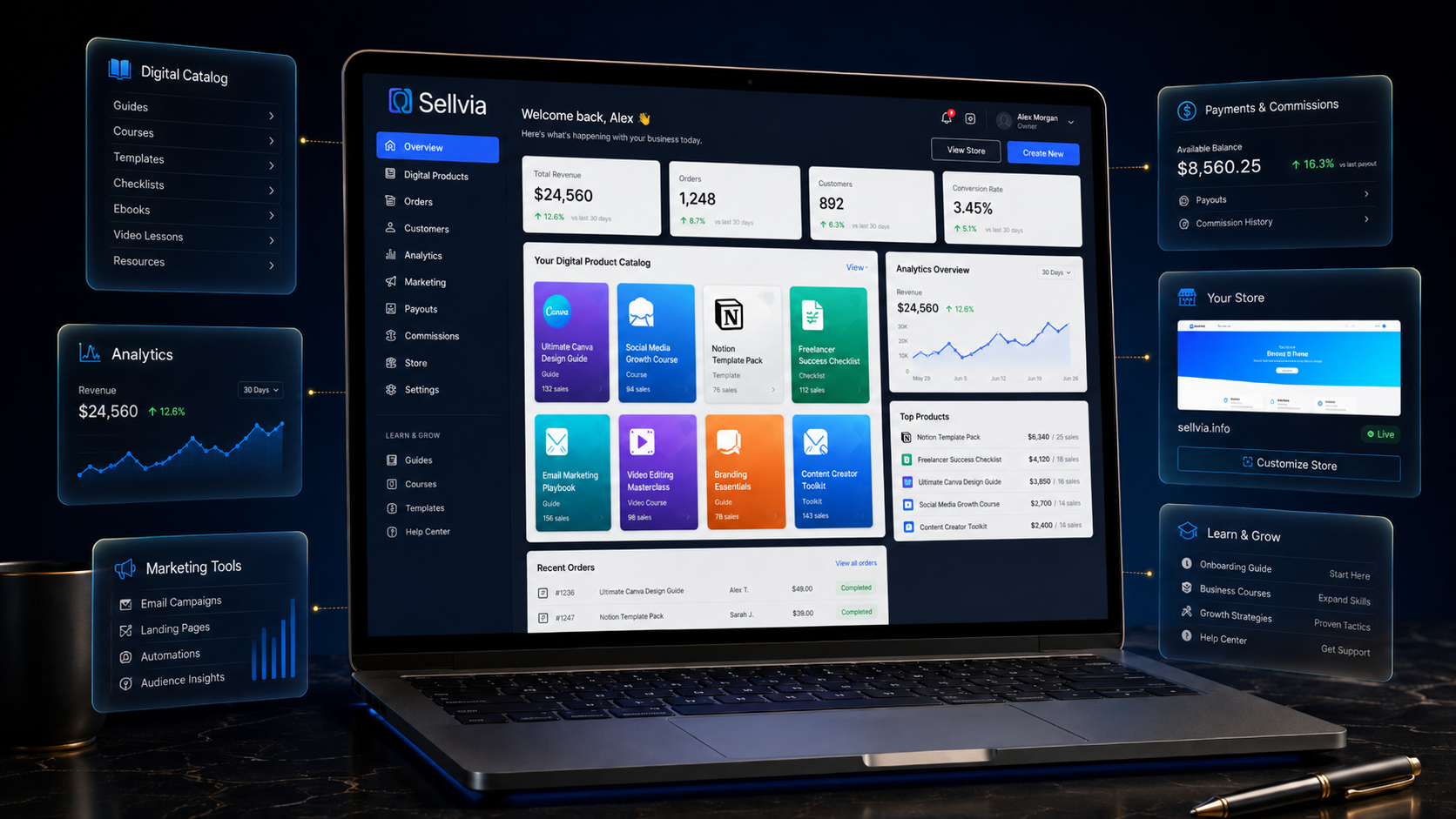
What Is Sellvia? A Simple Introduction to the SaaS Platform
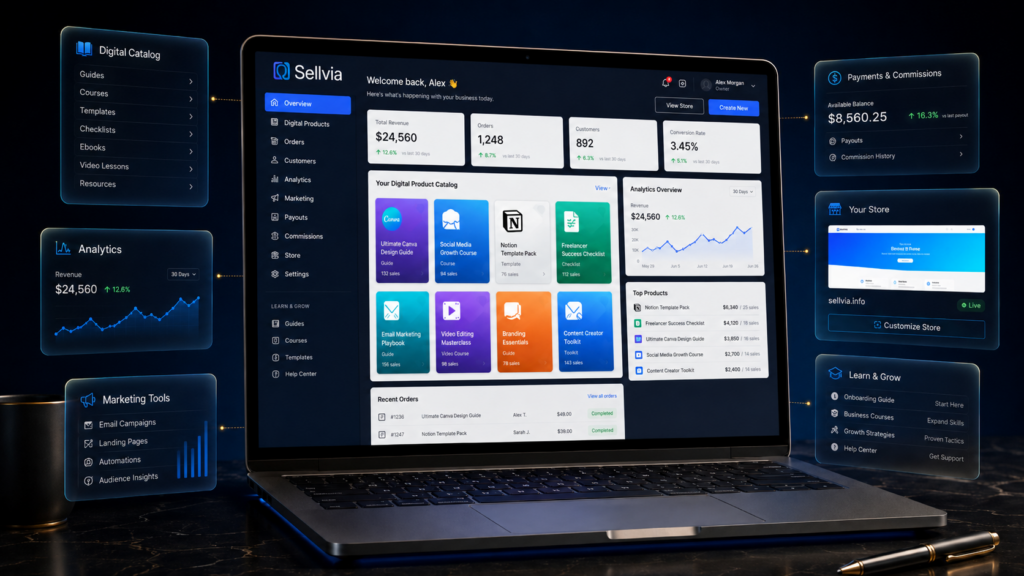
Many people search “what is Sellvia” because they want a simple explanation before they read deeper articles about Sellvia pricing, Sellvia tools, or Sellvia reviews. That is a smart starting point. Before comparing costs or user opinions, it helps to understand what the platform is actually designed to provide.
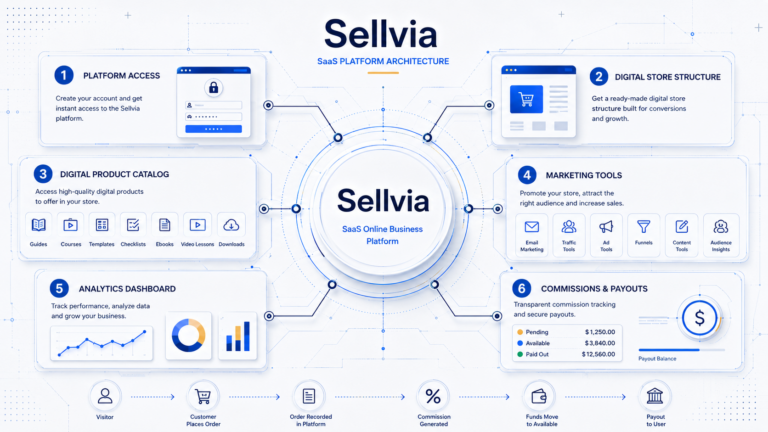
Sellvia is best understood as a SaaS online business platform built around ready-made digital product stores. In simple terms, users subscribe to access a platform environment that may include a store structure, digital product catalog access, dashboard tools, marketing-related features, advertising options, analytics, and payment or commission-related workflows.
This article is not a full review and not a detailed pricing breakdown. It is a beginner-friendly introduction for readers who want to understand how the Sellvia platform works, what kind of model it represents, and what responsibilities still remain on the user side.
What Is Sellvia?
Sellvia is a SaaS online business platform designed to give users access to a ready-made digital product store structure, a digital product catalog, and platform tools. It is built around platform access rather than the idea that a user is simply buying a finished business.
A beginner can think of Sellvia as a software-based operating environment for starting and managing a digital product store. The platform may provide the structure, catalog, dashboard, marketing features, and business workflow tools, but the user still needs to understand how to use them.
Sellvia is better understood as a platform/service model rather than a traditional physical-product dropshipping business. This distinction matters because the article is not describing Sellvia as a traditional dropshipping setup. Instead, it explains Sellvia as a SaaS-style platform focused on digital product stores, digital product catalog access, and ongoing use of platform features.
The key idea is simple: Sellvia can provide access to tools and infrastructure, but it does not automatically create a profitable business. Users still need to understand costs, marketing, audience fit, setup, payment flow, and platform rules.
That is why the question “what is Sellvia” should be answered carefully. Sellvia is not just a name, a store, or a promise of online income. It is a platform-based service that gives users access to a specific type of online business environment.
Why Sellvia Is Better Described as a SaaS Platform
SaaS means “software as a service.” In simple language, it means users pay for access to software, tools, features, and an online operating environment instead of owning every technical part separately.
This is a helpful way to understand the Sellvia SaaS platform. A user subscribes to access the platform and its available features. Those features may include a ready-made digital store structure, dashboard, product catalog access, marketing-related options, analytics, and workflow tools.
The SaaS model also means that access is tied to the platform relationship. Beginners should understand what they are accessing, what they are paying for, and what remains dependent on the platform. This includes the store structure, catalog access, tools, dashboard environment, and certain workflows connected to the account.
This does not make Sellvia unusual. Many online business tools work through subscription-based access. The important point is that users should not confuse access to a platform with ownership of a fully independent, guaranteed business.
In the case of Sellvia, the SaaS structure may be useful because it gives beginners a more organized starting point. Instead of assembling every technical piece from zero, users may begin with an existing store framework and available tools.
However, the platform does not remove business responsibility. The user still needs to make decisions about positioning, audience, marketing budget, product focus, and performance tracking. SaaS tools can support the process, but they cannot replace judgment.
This is one of the most important ideas for beginners. Sellvia may reduce some setup friction, but it does not eliminate the need to learn how an online business works.
How Sellvia Works
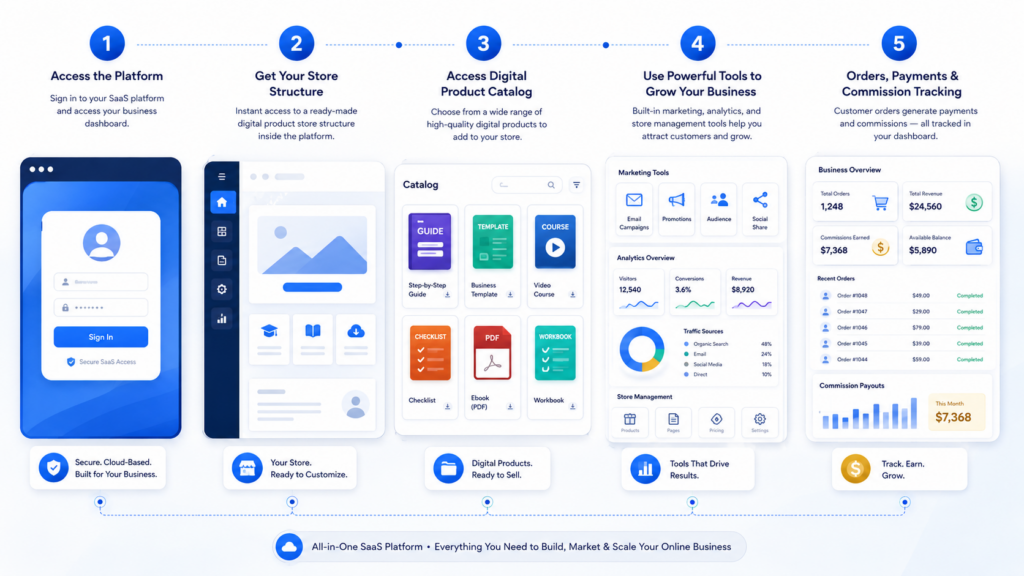
To understand how Sellvia works, it helps to look at the basic process step by step. This section keeps the explanation general because detailed costs and plan differences belong in a separate Sellvia pricing article.
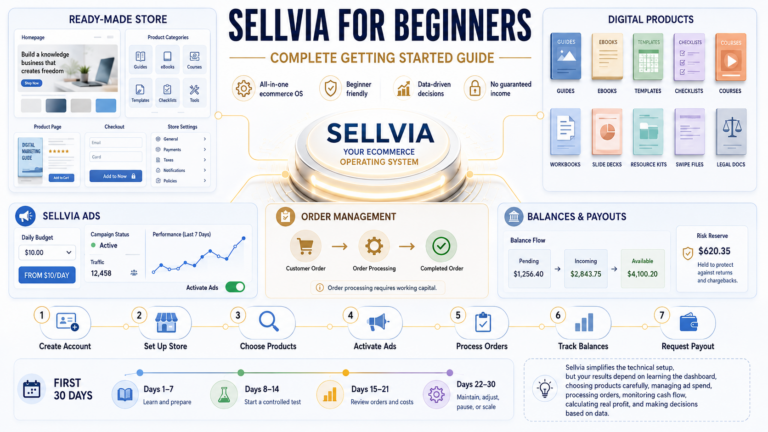
First, the user signs up for access to the Sellvia platform. This access is connected to the platform’s SaaS-style model, where the user pays to use the available software environment, tools, and business features.
Second, the user gets access to a ready-made digital product store structure. This structure gives the user a starting point instead of requiring every store element to be created manually from the beginning.
Third, the platform provides access to a digital product catalog. These products may include guides, courses, templates, checklists, educational resources, digital downloads, and other online learning materials.
Fourth, the user can use platform tools, marketing options, and dashboard features. These may help with store management, promotion, performance visibility, and account workflow. The exact tools available can depend on the platform setup and selected options.
Fifth, customers place orders through the online store. When that happens, the user needs to understand how the platform handles the order/payment workflow, commissions, account balance, and related rules.
Sixth, the user must understand costs and responsibilities. The monthly platform fee is only one part of the picture. Marketing costs, optional tools, testing budgets, and payment timing can all affect the real business outcome.
This is why Sellvia for beginners should be approached with realistic expectations. The platform may simplify some parts of the setup, but it does not make business decisions for the user.
What Kind of Products Does Sellvia Focus On?
In this guide, we are looking at Sellvia through its SaaS platform model: ready-made digital product stores, catalog access, dashboard tools, marketing features, and order/payment workflows.
Within this model, a Sellvia digital product store may be built around digital products such as guides, courses, templates, checklists, educational resources, downloadable files, online learning materials, and other content-based offers.
These products are usually designed to solve a specific problem, teach a skill, save time, or help a customer complete a task. For example, a digital product store may include a budgeting template, a fitness meal-planning guide, a productivity checklist, a small business planning workbook, a social media content calendar, a parenting guide, a resume template, or an educational mini-course.
This is important because digital products are not evaluated the same way as simple impulse purchases. A customer usually wants to understand what the product helps them do, why it is useful, and whether it matches their current problem or goal. That means the product page, description, niche, audience, and marketing message all matter.
A Sellvia digital product store is therefore not just a catalog with items placed inside it. It is a store structure where each digital product needs clear positioning. The user needs to understand who the product is for, what problem it solves, what outcome it promises realistically, and why someone would choose it over free information available online.
For beginners, this is one of the most important parts of understanding how Sellvia works. The platform may provide catalog access and a store framework, but the user still needs to think like an online business owner. That includes choosing a niche, understanding customer intent, testing marketing angles, and tracking which products attract attention.
Digital products can cover many categories. Some may focus on personal finance, productivity, wellness, business education, remote work, parenting, learning skills, lifestyle organization, or creator tools. The exact value depends on how relevant the product is to the audience and how clearly the offer is presented.
For example, a generic “productivity guide” may be too broad. But a “weekly productivity planner for remote workers” is easier to position because it speaks to a more specific customer. The same applies to templates, checklists, courses, and downloadable resources. Specificity usually makes the offer easier to explain and easier to market.
This is also why marketing remains important. Even if a store has access to digital products, customers still need a reason to visit, trust the offer, and buy. The Sellvia platform can provide structure and access, but it does not automatically create demand for every product in the catalog.
In simple terms, Sellvia digital products are best understood as content-based offers inside a SaaS platform environment. The platform may help organize the store and provide tools, but the user still needs to connect the right product with the right audience.
What Does the Sellvia Platform Provide?
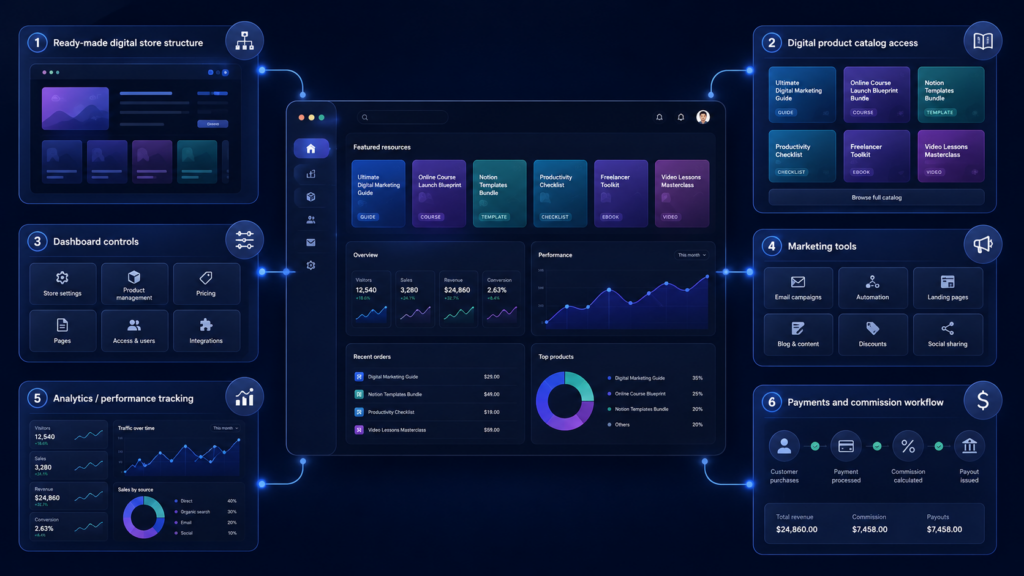
The Sellvia platform may provide several components that work together as part of the SaaS-style business environment. These components should be understood as tools and access points, not as guaranteed outcomes.
Ready-Made Digital Product Store Structure
Sellvia provides access to a ready-made digital product store structure. This gives users a foundation they can start from instead of building every store element from nothing.
For beginners, this can make the early setup process feel more manageable. However, a store structure is only the starting point. It still needs positioning, traffic, product selection, and ongoing improvement.
Digital Product Catalog Access
Digital product catalog access is one of the central parts of the Sellvia online business platform. Instead of starting with an empty store and creating every product from scratch, users may get access to a ready-made catalog of digital product offers that can be organized and presented inside the store structure.
In the SaaS platform model, catalog access does not simply mean a disconnected list of products. It means the user is working inside a platform environment where product listings, store pages, dashboard tools, marketing features, and order/payment workflows are connected.
This can make the starting process easier for beginners because they do not have to begin with a completely blank catalog. The catalog may include content-based products such as guides, courses, templates, checklists, workbooks, educational resources, digital downloads, and other learning or problem-solving materials.
However, catalog access is still only a starting point. The user needs to decide which products fit the store’s audience, how to group them, how to explain their value, and how to present them clearly on product pages.
For example, a productivity checklist, a budgeting template, and a small business planning workbook may all be digital products, but they speak to different customer needs. A beginner should not promote everything in the same way. Each product needs a clear audience, message, and reason to buy.
This is where catalog access becomes a business decision, not just a technical feature. The Sellvia platform may reduce the need to create products manually before launch, but it does not automatically create product-market fit, traffic, or sales.
Beginners should also understand the difference between catalog access and full business ownership. In a SaaS-style platform model, the user is paying for access to the platform environment, tools, and available catalog features. That means they should understand what is included, what depends on the subscription, and what responsibilities remain on the user side.
In simple terms, digital product catalog access gives users a starting library of content-based offers. But the real business work is deciding which products fit the audience, how to position them, how to market them, and how to track performance over time.
Dashboard
The dashboard is the control area where users can manage key parts of the platform experience. It may include store information, activity, tools, performance indicators, and account-related features.
For beginners, the dashboard is important because it connects many parts of the Sellvia platform in one place. Users should learn how to read and use it before making major decisions.
Store Management Tools
Store management tools help users handle parts of the digital store setup and operation. These tools may support product organization, store visibility, account management, and general platform use.
They are useful because they make the system easier to operate. Still, tools do not replace planning. The user must decide what to focus on and how to improve the store over time.
Marketing Tools
Sellvia tools may include marketing-related features designed to support store promotion. These tools can help users work on visibility, content, campaigns, or customer outreach.
Marketing tools are helpful only when used with a clear strategy. Beginners should learn the basics of audience targeting, messaging, and testing before expecting strong results.
Built-In Advertising Options
The platform may include built-in advertising options or advertising-related services. These can be attractive to users who want a more guided way to begin promotion.
However, advertising requires budget and patience. A beginner should understand that ads can test demand, but they can also cost money before producing useful results.
Analytics or Performance Visibility
Analytics or performance visibility helps users see what is happening in the store. This may include activity signals, order-related data, conversion behavior, or campaign performance indicators.
Data is valuable because it helps users make better decisions. But data does not automatically explain itself. Users need to learn what the numbers mean and how to respond to them.
Payment and Commission-Related Workflow
The Sellvia platform may include payment and commission-related workflows that users need to understand before starting. This includes how orders are reflected in the account, how commissions are tracked, and what platform rules apply.
This area is especially important because payment flow affects cash planning. Beginners should not focus only on possible revenue. They should also understand timing, costs, account balance movement, and payout-related rules.
Support and Platform Guidance
Support and platform guidance can help users understand the platform and use available tools. This can be valuable for people who are new to SaaS online business systems.
At the same time, support is not the same as someone else running the business. The user still needs to make decisions, manage expectations, and learn from results.
What Sellvia Does Not Automatically Do
This section is important because many beginners misunderstand what a SaaS platform can and cannot do.
Sellvia does not automatically guarantee profit. A platform can provide tools, structure, and access, but it cannot guarantee that every user will earn money.
It does not automatically guarantee traffic. A store needs visitors, and visitors usually require marketing, content, advertising, community building, or another customer acquisition method.
It does not automatically guarantee sales. Even if a store is active, customers still need a reason to buy. The offer must match a real audience need.
It does not automatically guarantee good product-market fit. A digital product may be useful for one audience and irrelevant to another. Users need to test which products and messages connect.
It does not automatically guarantee successful marketing. Marketing requires testing, budget planning, creative work, audience research, and performance tracking.
It does not automatically create instant business growth. Growth can take time, and early testing may produce mixed results.
It does not remove risk. Any online business platform involves uncertainty, especially when marketing spend, user decisions, and customer demand are involved.
The main point is that SaaS tools can support a business process, but they do not remove the need for user judgment, budget planning, and testing. Beginners should treat Sellvia as a platform they need to learn, not as an automatic business machine.
Who Is Sellvia For?
Sellvia may appeal to beginners researching online business platforms. If someone wants a structured starting point instead of building everything from zero, the Sellvia platform may be worth studying.
It may also appeal to people who want a ready-made store structure. A blank page can be intimidating, especially for someone who has never built an online store before. A structured platform can make the first steps more organized.
Sellvia may be interesting for users focused on digital products. Guides, courses, templates, checklists, and educational resources are easier to understand for people who like content-based business models.
It may also appeal to users who want platform tools and catalog access in one place. Instead of connecting many separate systems immediately, they can begin inside one platform environment.
However, Sellvia may not be ideal for everyone.
It may not be a good fit for people expecting guaranteed income. No platform can honestly promise that every user will become profitable.
It may not suit people who do not want to learn marketing. A store still needs customer attention, testing, and audience understanding.
It may not be ideal for users who ignore costs. A monthly fee is only part of the full business picture. Marketing budget, optional features, and workflow rules also matter.
It may also disappoint people expecting a fully hands-off business. A ready-made structure can help with setup, but the user still needs to operate, test, and improve the business.
Sellvia for beginners makes the most sense when the user wants structure but also understands that learning is still required.
Is Sellvia Legit?
People often search “is Sellvia legit” because they want to understand the difference between a real SaaS platform and unrealistic expectations around online business. That is a reasonable question.
Sellvia appears to operate as a real online business platform with platform access, a digital product store model, catalog access, tools, dashboard features, and payment or commission-related workflows. However, “legit” does not automatically mean every user will succeed.
A platform can be real and still not be right for every person. The more useful question is whether the Sellvia platform matches the user’s budget, expectations, learning style, and willingness to manage marketing.
Before deciding, users should review the platform model, Sellvia pricing, available tools, payout or payment rules, marketing requirements, and real user feedback. Sellvia reviews can also help readers understand common strengths, concerns, and practical experiences.
A balanced answer is that Sellvia should be evaluated like any other SaaS online business platform. It may provide useful infrastructure, but the user still needs to understand what they are paying for and what business responsibilities remain.
Sellvia Pricing, Tools, and Reviews: What to Read Next
This article is only an introduction. Its purpose is to explain what Sellvia is before readers move into deeper research.
After understanding the basics, readers should look at Sellvia pricing articles to understand costs. A pricing breakdown can explain the subscription model, possible optional costs, marketing budget considerations, and payment-related details more clearly.
Readers should also study Sellvia tools articles. These can explain what features are available, what they are designed to do, and how they may support store management or marketing.
Sellvia reviews are also useful because they can show pros, cons, concerns, and user-style analysis. A review can help readers understand how the platform looks in practice, not just in a simple definition.
The best reading order is usually simple: first understand what Sellvia is, then study Sellvia pricing, then review Sellvia tools, and finally compare user experiences through Sellvia reviews.
Beginner Checklist Before Using Sellvia
Before using Sellvia, beginners should go through a practical checklist.
First, understand that Sellvia is a SaaS platform. You are subscribing to access a platform environment, tools, store structure, and related features.
Second, understand what access means. Platform access may include the dashboard, catalog, tools, and store structure, but it does not mean the business runs itself.
Third, review the digital product model. Make sure you understand how guides, courses, templates, checklists, downloads, and educational resources fit into an online store.
Fourth, learn how the order/payment workflow works. Do not focus only on possible sales. Understand commissions, timing, account rules, and payment-related steps.
Fifth, estimate monthly costs and marketing budget. Sellvia pricing is not only about the subscription. Marketing and testing can also affect the real cost of operating the business.
Sixth, read Sellvia pricing details before starting. Pricing articles can help you avoid misunderstanding what is included and what may cost extra.
Seventh, read Sellvia reviews. Reviews can help you understand user experiences, common concerns, platform strengths, and possible limitations.
Eighth, avoid expecting automatic results. A SaaS platform can provide structure, but it cannot guarantee traffic, sales, or profit.
Ninth, be ready to test marketing and audience fit. Digital products need the right audience, the right message, and enough testing to understand what works.
This checklist can help beginners approach the Sellvia SaaS platform with more realistic expectations.
Final Thoughts: What Is Sellvia?
So, what is Sellvia?
Sellvia is a SaaS online business platform that gives users access to a ready-made digital product store structure, digital product catalog, dashboard, tools, and marketing-related features. It is best understood as a platform/service model built around digital product stores and ongoing platform access.
The Sellvia platform may be useful for beginners who want a structured starting point. It can reduce some setup complexity and provide an organized environment for managing a digital product store.
However, Sellvia does not remove the need to understand costs, marketing, platform limitations, and business responsibilities. Users should not expect automatic profit, guaranteed sales, or risk-free results simply because they have access to the platform.
A realistic approach is to treat Sellvia as a tool-supported business environment. Learn the model first, understand the costs, study the tools, read user-style analysis, and make decisions based on your own budget and expectations.
After reading this introduction, the next useful pages are Sellvia Pricing, Sellvia Tools, and Sellvia Reviews.
FAQ
What is Sellvia?
Sellvia is a SaaS online business platform built around ready-made digital product stores. The Sellvia platform may provide access to a store structure, digital product catalog, dashboard, tools, and marketing-related features. It should be understood as a platform/service model, not a guaranteed business outcome.
Is Sellvia a SaaS platform?
Yes, Sellvia is best described as a SaaS-style platform because users subscribe to access software, tools, platform features, and an operating environment. The Sellvia SaaS platform gives users access to a digital product store structure and related features. Beginners should understand what access includes before starting.
Is Sellvia the same as dropshipping?
This article does not explain Sellvia as a traditional dropshipping model. Sellvia is better understood here as a SaaS online business platform focused on digital product stores, digital catalog access, and platform tools. That distinction is important for setting realistic expectations.
How does Sellvia work?
Sellvia works by giving users access to a platform environment with a ready-made digital product store structure, catalog access, dashboard features, and tools. Customers can place orders through the online store, while the user needs to understand payment flow, commissions, costs, and platform rules. The platform provides infrastructure, but the user still manages business decisions.
Is Sellvia good for beginners?
Sellvia may be useful for beginners who want a structured starting point and are interested in digital products. However, it is not ideal for people expecting automatic results or guaranteed income. Beginners still need to learn marketing, budget planning, platform operations, and audience fit.

Jeck Palmer is an ecommerce writer and platform researcher at Sellvia.info. He specializes in analyzing Sellvia’s features, pricing, tools, advertising system, order workflow, and overall business model. His articles are designed to explain complex platform processes in clear and practical language, helping beginners understand potential costs, evaluate available tools, and make more informed decisions before starting an online business.

The SaaS framing is exactly what clicked for me after about three weeks of confusion about what I had actually signed up for. Once I stopped thinking of it as a finished business and started treating it like access to an operating environment – the same way I think about any other software subscription – the decisions got clearer. The platform gave me a starting structure, but I still had to figure out my marketing budget, how the payment timing worked, and what the real cost picture looked like beyond the $39. The article is right that reducing setup friction is not the same as removing business responsibility. That distinction took me longer to internalize than I would like to admit.
Does anyone else wish someone had flagged the processing fee structure before the first sale actually landed – because I was sitting here at 2am on day 31 of using this thing, staring at a dashboard notification for a transaction I never manually touched, and my first thought was genuinely “wait, where did that fee come from and why didn’t I read that part more carefully.” A family member suggested I look into it after I complained about how long everything takes when you build knowledge content manually, and I found it through a comparison article before eventually just trying it, mostly because I convinced myself the learning curve would eat me alive and I wanted an excuse to quit before I started. Ngl the part this article gets right is separating what the platform provides from what you still have to figure out yourself – because I treated that distinction as obvious and then got surprised anyway when the commission and payment workflow had layers I hadn’t mapped out. The realization that something had sold while I was doing nothing was less exciting and more confusing than I expected, and I actually convinced myself it was luck for about two weeks before the pattern stopped looking like coincidence. I was the skeptic in my circle who warned everyone off things like this, and now I’m the one sending the link, which is a deeply uncomfortable position to be in at 2am on a laptop with cold coffee. Worth it – processing fee confusion and all.
Ngl, 14 days wasn’t enough to see real results – the system only started making sense to me after my 11th sale, which happened well past that trial window.
Thought I was the skeptic too – then the $39/month started covering itself and I realized I’d been paying more than that just to keep three separate tools running that Sellvia handles in one place.
The article’s point about platform access not equaling a profitable business is exactly what slowed my first week down – I spent most of it learning the dashboard rather than running anything. Around day 158 now, and the early friction was real, not imagined. What I’m using did not accelerate faster than expected at the start, but the structure became clear once I stopped treating it like something I already knew how to operate.
Fourteen days felt short to me too, but the honest answer is that the first real signal came faster than I had budgeted time for – which is not something I expected to type. What changed my thinking wasn’t a feature list but the moment I realized the 50-70% margin on digital products wasn’t a rounding error someone invented for a landing page. The trial is tight, but it’s enough to see whether the math is real.
The part this article gets right – and that I had to learn the hard way – is that the platform gives you the environment but not the effort. I actually submitted a support question about how the commission workflow connects to the $100 withdrawal minimum, half-expecting a canned response, and got a clear specific answer that made me feel less like a fool for asking. That one conversation was probably what kept me from quitting.
The part this article gets right is that the platform costs are layered – $39 a month is just the entry point, and once you factor in ad spend on top of that, the $100 minimum withdrawal threshold is the number I wish someone had spelled out for me upfront. I kept looking for a hidden catch (there wasn’t one, but understanding the full cost picture early matters).
The early dashboard friction you’re describing is exactly what I compared against the time cost of managing everything manually before – and that comparison is what kept me from walking away. Any honest Sellvia review should probably mention that the first weeks feel slower than the eventual return on that friction.
Went in mentally prepared to watch the $40 coupon disappear into nothing – and somehow the first sale came through before the credit even ran out.
Almost cancelled during the free trial because I kept second-guessing whether the platform structure was actually worth committing to at $39 a month (turns out I was comparing it to manual effort instead of other tools, which was the wrong frame). The moment that changed was when the routine part – logging in, checking the dashboard, running the workflow – stopped feeling like a decision and started feeling like a system.
The part this article gets right is the distinction between platform access and automatic results – what I’m using gave me the structure on day one, including a Growth Manager who actually texted me before I had finished reading the dashboard. The $39 monthly cost only makes sense once you stop measuring it against “cheap” and start measuring it against the hours you’d spend building any of that manually.