

Sellvia Startup Budget: How Much Money Should Beginners Set Aside?

Most people who explore Sellvia for the first time ask the same question: how much does the monthly plan cost? That is a fair question, but it is only part of the picture. A real Sellvia startup budget covers more than just the subscription. It includes ad testing funds, a buffer for order-related costs, a cash reserve for payout timing, and a realistic window of time to learn whether the platform is working for you.
Sellvia is a SaaS online business platform built around subscription access, a digital product catalog, a built-in advertising system, an order processing workflow, and a payout structure. Getting started on Sellvia costs more than the monthly fee alone – and beginners who do not plan for the full picture often run short of money before they have gathered enough data to make a useful decision.
This article is not a full Sellvia pricing breakdown. For that, see Sellvia Pricing Explained. For monthly cost scenarios and 30-day and 90-day budgets, see How Much Does Sellvia Cost? This guide focuses specifically on startup budget planning – how much money a beginner should set aside before starting, what to spend it on, what to protect it from, and when to pause.
A startup budget is not about predicting profit. It is about making sure you have enough runway to test the platform, learn the workflow, and make a rational decision – without being forced to stop before you have seen anything useful.
Quick Answer: What Is a Realistic Sellvia Startup Budget?
A realistic Sellvia startup budget is not a single number – it is a layered plan. At a minimum, it should include the monthly subscription fee, a controlled ad testing budget, a buffer for any order-related processing costs, and a small cash reserve to cover the timing gap between platform earnings and actual payouts.
Running on the absolute lowest possible budget reduces your data, limits traffic, and makes it harder to judge whether the platform is actually working. A safer beginner approach covers at least 30 days of testing. A more practical approach covers 60-90 days – enough time to see a real pattern and make a calm decision.
Numbers vary by how much you spend on ads and whether you add optional features. Pricing can change, so verify all current figures directly on the Sellvia platform before committing.
Pricing references throughout this article reflect publicly available figures at the time of writing. Always verify current Sellvia pricing directly on the platform before making any payments.
Sellvia Startup Budget vs. Sellvia Pricing
These two things are often confused, but they serve different purposes. Sellvia pricing is what the platform charges for access, ads, and features. A Sellvia startup budget is the full amount you should set aside before starting – including everything that could cost money during your testing window.
| Concept | What It Means | Why It Matters |
|---|---|---|
| Platform pricing | The official fees for subscription, ads, and optional features | Tells you what the platform charges – but not what you need to prepare |
| Startup budget | The total amount you set aside before starting, including reserves | Tells you how much runway you actually have |
| Testing budget | The portion allocated specifically to running ads and generating data | Determines how much traffic and feedback you can afford to generate |
| Cash reserve | Money kept back to cover subscription and ad costs while payouts are pending | Prevents you from having to stop before a payout arrives |
| Stop-loss limit | The maximum you are willing to spend before pausing and reviewing | Protects you from spending emotionally during a slow period |
Many beginners plan only for the subscription. They skip the ad budget, ignore processing costs, and forget that payouts do not always arrive immediately. That gap between spending and receiving is where most early budget problems happen.
What Should Be Included in a Sellvia Startup Budget?

A complete Sellvia beginner budget is not just the monthly fee times three. Here is what to include:
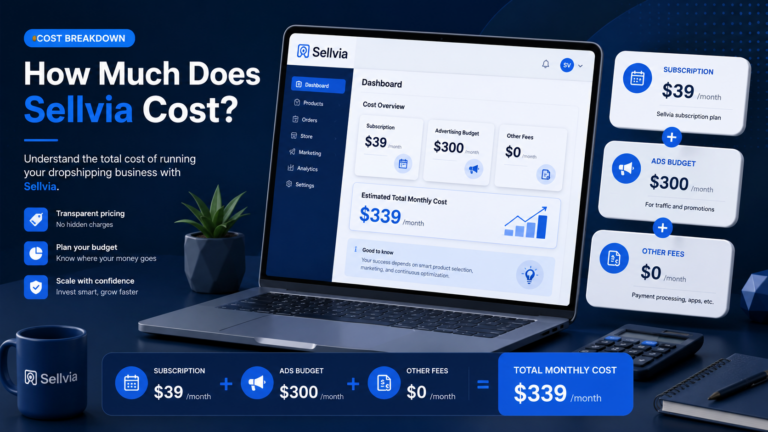
- Subscription fee. Currently listed at around $39/month after the trial period ends. This is the baseline. Without it, the store does not stay active.
- Ad testing budget. The built-in advertising system starts at around $10/day, depending on current platform terms. This is how the store gets traffic. Without it, you are testing very little.
- Order processing buffer. When orders come in, there are processing fees involved before you receive your earnings. Budget a small buffer for these – especially in your first active weeks.
- Optional tool limit. Sellvia offers product packs, premium upgrades, domain upgrades, marketing tools, and other add-ons. Set a firm ceiling on how much you will spend on these in month one. Zero is a valid starting number.
- Emergency cash reserve. A separate amount held back to cover an extra month of subscription and ads if your payout is delayed or lower than expected.
- Payout timing cushion. Your available balance in the dashboard may not be immediately withdrawable. Factor in a delay between when you earn and when you can access the funds.
- Learning period cost. The first 1-2 weeks are mostly learning. You will spend money without necessarily earning it back. Budget for this period explicitly.
- Tracking method. A simple spreadsheet costs nothing, but give yourself the time and habit to record every expense and every payout. Without this, the budget is just a guess.
- Time budget. Not a financial cost, but a real one. If you cannot check the dashboard daily during the first month, your data will be incomplete and your decisions will be slower.
The Bare-Minimum Sellvia Startup Budget
If you use the 14-day free trial and pay only the base subscription after it ends – with no paid ads and no optional tools – your monthly cost may be around $39 at the time of writing. That is the lowest possible Sellvia startup cost.
What you get at bare minimum: access to the dashboard, the digital product catalog, and the store itself. What you do not get: meaningful traffic. Without running ads, very few people will visit your store organically during the first weeks.
The bare-minimum approach is useful for one specific purpose: learning how the platform works. You can explore the dashboard, understand the order flow, read the tools, and get comfortable with the interface – all without spending much.
Important: A bare-minimum budget is an exploration budget, not a testing budget. It will not tell you whether Sellvia can generate consistent results for you. For that, you need traffic – and traffic requires ad spend.
The Safer Beginner Sellvia Startup Budget
A more practical Sellvia beginner budget combines the subscription with a low daily ad spend – enough to generate real traffic without burning through your reserve too quickly.
The key discipline here is pacing. Do not spend the whole ad budget in the first week. Start with the minimum daily amount, monitor results daily, and give yourself at least 14 days before drawing any conclusions.
| Budget Item | Suggested Beginner Allocation | Why It Matters |
|---|---|---|
| Platform access (1 month) | ~$39 | Required to keep the store active after the trial |
| Ad testing (30 days at $10/day) | ~$300 | Generates the traffic needed to collect meaningful data |
| Processing/cash flow buffer | ~$50 | Covers order fees and timing gaps before payouts land |
| Optional tools (month one) | $0 recommended | Add these after you understand the base model |
| Cash reserve (extra month backup) | ~$100-150 | Protects you if payout is delayed or results are slow |
| Total estimated startup budget | ~$490-540 | Enough runway for a genuine 30-day test |
These are illustrative estimates based on currently listed figures. Actual costs depend on your ad spend decisions and platform fee changes. Verify all pricing directly on Sellvia before committing.
The Comfortable 90-Day Sellvia Startup Budget
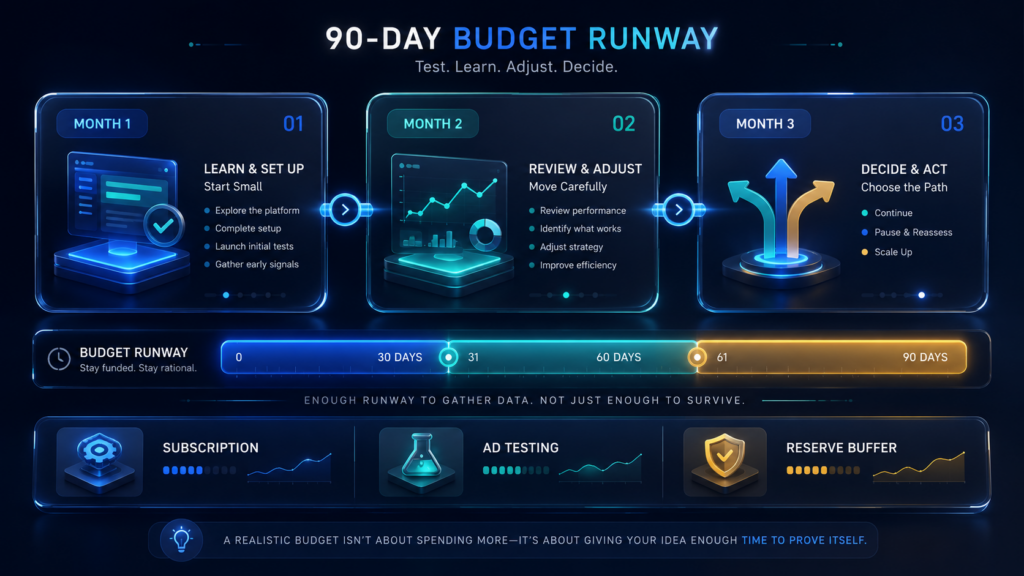
A 90-day window is the most realistic timeframe for making a confident decision about any online business platform. One month gives you impressions. Three months gives you patterns.
| Month | Main Goal | Budget Rule | Decision Point |
|---|---|---|---|
| Month 1 | Learn the platform, start small, gather first data | Minimum ad spend, no optional tools | Is the order flow working? Do I understand the process? |
| Month 2 | Review Month 1 data, adjust ad approach if needed | Adjust only if data justifies it, not from optimism | Is cost-per-order improving? Is available balance growing? |
| Month 3 | Decide whether to continue, pause, or scale | Make the decision based on numbers, not feelings | Does the math support continuing? Is payout timing manageable? |
A 90-day Sellvia startup budget does not mean spending aggressively for three months. It means having enough runway so you do not have to make a panic decision in week two. Estimated total for a controlled 90-day test: $1,200-$1,500, depending on daily ad spend, optional tool purchases, and whether results in month two justify adjustments.
Reminder: Three months of data does not guarantee a profit outcome. Results vary. The purpose of a 90-day budget is to give yourself enough information to make an honest evaluation.
What Not to Spend Money on in Month One
Beginners often lose money not by running ads badly, but by spending on things that should wait. Here is what to protect your Sellvia startup budget from in the first 30 days:
- Every optional tool at once. Sellvia offers product packs, premium upgrades, SEO tools, and more. Buying several of these in week one is a common mistake. None of them replace traffic, and traffic comes from ads.
- Upgrading before seeing data. Premium features increase your costs before you know whether the base model is working for you. Wait until you have at least 30 days of real order data.
- Scaling ad spend too fast. Doubling your daily ad budget after one good day is tempting, but it can drain your reserve quickly. Increase spend based on a pattern, not a single result.
- Extra assets before understanding the base model. Additional product packs and catalog expansions make sense eventually. In month one, the goal is understanding – not growing an untested store.
- Multiple paid services at the same time. If you are also paying for external tools, apps, or services alongside Sellvia, your effective monthly cost rises fast. Keep external costs minimal in month one.
- Assuming more tools fix weak traffic. If ads are not converting, adding more products or tools rarely solves it. The issue is usually in the traffic source or the offer – not the catalog size.
- Spending without tracking. If you do not know your cost per order, you cannot make a good budget decision. Spend nothing without recording it.
- Continuing ads without a review process. Ads running on autopilot without weekly review will spend your budget without teaching you anything useful.
How Much Should Beginners Keep in Reserve?
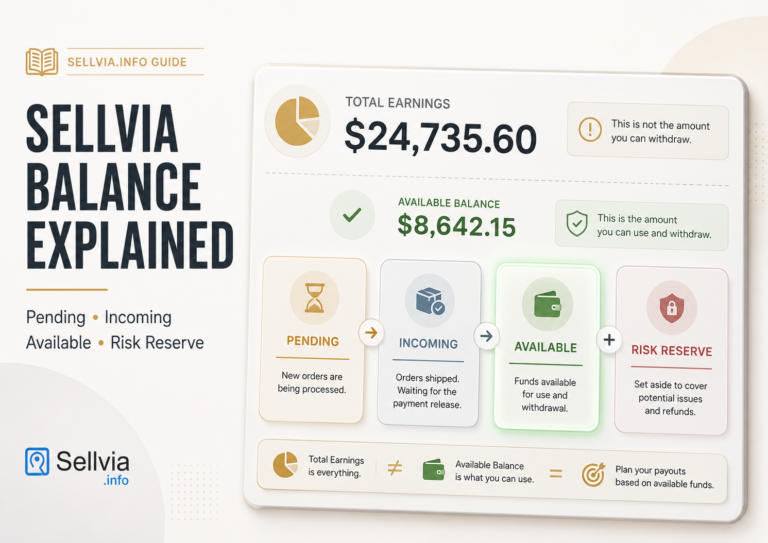
Payout timing is one of the most overlooked parts of any Sellvia budget plan. Your store may process orders and show a positive dashboard balance – but that balance may not be immediately available for withdrawal. There can be a gap between when you earn and when the funds are accessible.
During that gap, your subscription renews and your ads continue to run. If you started with only enough money for the minimum, you can find yourself in a situation where you need to add funds before any payout has arrived.
The practical rule: do not start with only enough money to cover the first month. Keep at least one additional month of planned subscription and ad costs in reserve – untouched, separate from your testing budget.
A reserve is not wasted money. If everything goes well, it remains unspent. If timing is slower than expected, it buys you calm decision-making instead of panic spending.
The 30-Day Sellvia Startup Budget Plan
Here is how to pace a 30-day Sellvia startup budget week by week:
Week 1 – Learn the platform. Explore the dashboard. Understand the order processing workflow. Start ads at the minimum daily budget. Do not upgrade anything. Focus on getting comfortable with the interface.
Week 2 – Monitor first signals. Check ad performance daily. Note how many visitors are arriving and how many orders are coming in. Track every cost. Do not increase spend yet – this week is for observation.
Week 3 – Review cost per order. By now you should have enough data to see a rough cost-per-order figure. Check your dashboard balance categories: pending, incoming, and available. Understand which part of your earnings you can actually access.
Week 4 – Make a calm decision. Review your total spend versus your available balance. Decide whether to continue at the same rate, pause, or adjust. Do not make this decision based on a single good or bad day. Look at the full four-week pattern.
This is a planning framework, not a revenue forecast. How much you earn in 30 days depends on traffic quality, product selection, and platform performance – all of which vary.
The 60-Day Sellvia Startup Budget Plan
Month two is where your Week 1-4 data becomes genuinely useful. After a full 30 days, you have a real cost-per-order figure, a sense of your payout timing, and a view of whether results are improving or flat.
At the start of month two, compare what you planned to spend with what you actually spent. Ask:
- Is ad spend generating a clear pattern of orders?
- Is the available balance in the dashboard growing over time?
- Did any optional tools improve results, or were they unused?
- Is the cost per order trending down, flat, or up?
A common mistake in month two is increasing the budget only because of optimism from one strong week. Do not move money from your reserve into ads based on a single data point. Increase only if the trend across three or four weeks justifies it.
Month two is also the right time to decide whether a domain upgrade or catalog expansion makes sense. These are growth investments – they add value, but only if the base model is already showing signs of working.
When to Pause Your Sellvia Budget
Pausing is not failure. It is budget control. Knowing when to pause is one of the most important skills in managing a Sellvia startup budget.
Consider pausing when:
- Ad spend is increasing but order quality is not improving over time
- You cannot explain where the money is going from week to week
- Your available balance is not growing despite regular orders
- Optional costs have started growing before the base model is proven
- Budget decisions are becoming emotional – spending more after a bad day to “recover”
- Payout timing is creating real financial pressure on your monthly expenses
- You have reached your pre-set stop-loss limit without meaningful results
- You do not have a clear answer to “what does a good result look like for me?”
Pausing gives you time to review what the data is telling you, read the platform documentation more carefully, and decide whether a different approach might work better. It does not close the account.
How to Create a Sellvia Stop-Loss Budget
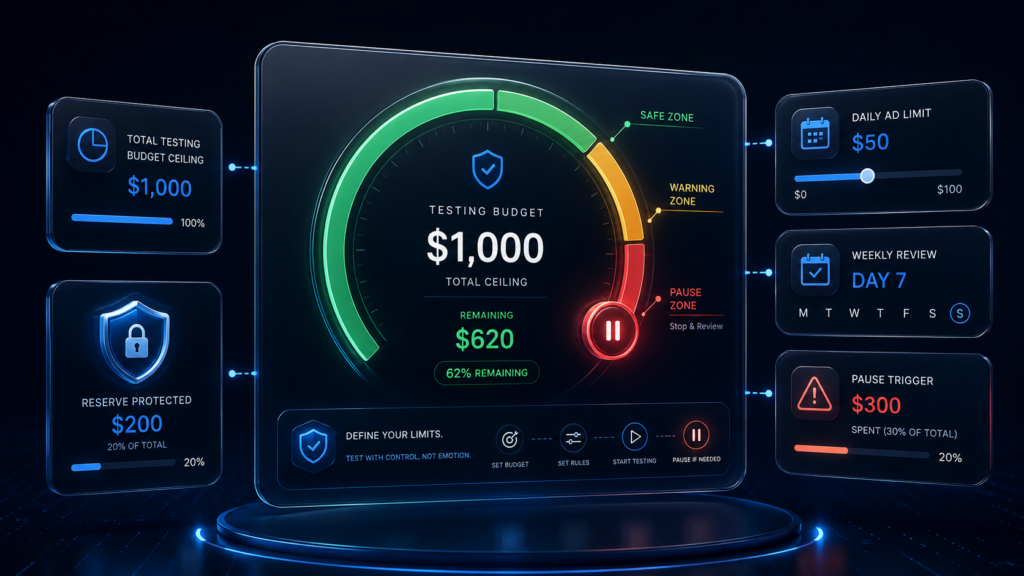
A stop-loss budget is the maximum total amount you are willing to spend while testing Sellvia – before you pause and review objectively. It is one of the most practical tools a beginner can set up before starting.
Here is how to build one:
- Set your total testing budget. Decide the maximum you are willing to spend during the first 30-90 days. This is not your target – it is your ceiling.
- Separate subscription from ad spend. The subscription is a fixed cost. Your stop-loss logic should apply mainly to ad spend, where variance is highest.
- Set a daily ad limit. Do not run unlimited daily ads. Choose a specific number and stick to it until a weekly review says otherwise.
- Set a weekly review day. Pick one day per week to review spend, orders, and available balance. Do not skip it.
- Define what “good enough to continue” looks like. Before you start, write down a specific signal that would tell you the platform is working – not a revenue target, but a pattern of progress.
- Define what triggers a pause. Write down the specific condition that means you stop and review. This could be reaching 50% of your stop-loss budget with no clear data improvement.
- Do not revise the limit under emotional pressure. If you have a good day, that is not a reason to raise the ceiling. If you have a bad week, that is not a reason to panic spend. The limit stays until a planned review date.
Budget Mistakes That Make Sellvia Feel More Expensive
Sellvia’s actual platform costs are not the only reason a beginner might run out of budget. These planning mistakes multiply the effective cost significantly:
- Starting without a number. If you do not have a defined startup budget, you cannot protect it.
- Treating the free trial as full proof. The 14-day trial is a starting window, not a definitive test. Do not make final judgments based only on trial data.
- Underestimating ad spend. Many beginners allocate money for the subscription and forget that generating traffic requires a separate budget.
- Buying optional tools too early. Tools should follow results, not precede them.
- Not tracking every order. Without a per-order cost breakdown, you cannot know if the math is working.
- Confusing gross sales with available profit. The number on your dashboard may include pending amounts. Your actual available balance is often smaller.
- Ignoring payout timing. The cycle from order to available payout can take time. Budget for this gap.
- Increasing budget after one good day. One strong day does not indicate a trend. Review weekly, not daily.
- Quitting after one bad day. One slow day is also not a trend. Use your stop-loss limit, not your mood, as the trigger for pausing.
- Not comparing cost against learning value. Even if month one does not generate a profit, it may generate useful data. That has value too.
Sample Sellvia Startup Budget Templates
| Template | Purpose | Budget Style | What to Avoid | Best For |
|---|---|---|---|---|
| Template 1: Exploration Budget | Learn the platform with minimal spend | Subscription only; no or minimal ads; no optional tools | Expecting traffic or orders without ad spend | Beginners who want to understand the platform before committing to ad testing |
| Template 2: Controlled Testing Budget | Run a genuine 30-day traffic test | Subscription + low daily ad budget + small processing buffer + reserve | Upgrading tools or scaling spend before 30 days of data | Most beginners – the right balance between data and cost |
| Template 3: Serious 90-Day Testing Budget | Evaluate the platform over three full months | Subscription + moderate daily ads + phased optional tools + larger reserve | Spending aggressively in month one; making decisions in week two | Beginners with more runway who want a thorough, low-pressure evaluation |
No template guarantees a revenue outcome. Results depend on traffic quality, product performance, and how the platform is managed. Always verify current Sellvia pricing before using these templates for planning.
How to Track Your Sellvia Startup Budget
You do not need accounting software. A simple spreadsheet with the following columns is enough to stay in control of your Sellvia cash flow:
- Subscription cost (monthly, fixed)
- Daily ad spend (total for the week)
- Optional costs (any tools or upgrades purchased)
- Order count (how many orders were processed)
- Net earnings per order (your profit after processing fees)
- Pending balance (in dashboard)
- Available balance (in dashboard)
- Payout requests (dates and amounts)
- Total spend to date (running total)
- Stop-loss remaining (ceiling minus total spent so far)
Update this weekly, not monthly. The weekly rhythm matches the review cadence described earlier and catches problems before they drain the full reserve.
Is a Small Sellvia Startup Budget Enough?
A small budget – for example, covering only the subscription plus a few days of ads – is enough to explore the platform and see how the order workflow functions. It is not enough to judge whether Sellvia can produce consistent results for your situation.
Low ad spend means slower data. Slower data means longer time to learn. If your budget is very limited, consider using the trial period exclusively for learning the platform, then committing to a focused 30-day test with a defined daily ad spend before drawing conclusions.
The risk with a small budget is not running out of money. It is running out of data before you know enough to evaluate fairly.
When a Larger Startup Budget Makes Sense
A larger starting budget is worth considering when:
- You can afford to test without creating financial stress in your regular budget
- You have read the platform documentation and understand how the tools work
- You have reviewed Sellvia’s pricing and payout rules and understand them clearly
- You have a tracking system in place before you start spending
- You know exactly what your stop-loss limit is
- You are not depending on immediate payouts to fund your ongoing costs
A larger budget buys better data, faster. It does not buy better results. The platform still needs to perform. The difference is that you have more runway to find the approach that works before you have to stop.
Final Thoughts: Planning a Sellvia Startup Budget
A Sellvia startup budget should give you enough runway to learn, test, track, and make a rational decision – without financial pressure forcing you to stop too early. The best budget is not the biggest one. It is the one that separates subscription costs, ad testing funds, optional tool limits, processing buffers, and cash reserves before you spend a single dollar.
Before starting, verify all current Sellvia pricing directly on the platform. Read how Sellvia works to understand the full order flow. Review available Sellvia tools before buying any of them. Read Sellvia reviews from real users to calibrate your expectations. And define your stop-loss budget in writing before you activate your first ad.
Planning the Sellvia startup budget is not the exciting part of starting an online business. But it is the part that determines whether you get a fair chance to find out if the platform works for you.
Frequently Asked Questions
1. What is a Sellvia startup budget?
A Sellvia startup budget is the total amount of money a beginner should set aside before starting on the Sellvia platform – covering not just the monthly subscription, but also ad testing funds, order processing costs, a cash reserve, and a stop-loss limit. It is different from platform pricing: it is the full financial plan for your testing window.
2. How much money should I set aside before starting Sellvia?
A practical beginner approach involves setting aside enough to cover at least 30 days of subscription costs, a controlled daily ad budget, a small order processing buffer, and a reserve for payout timing. Based on currently listed figures, this could be in the range of $490-$550 for a basic 30-day test – but pricing can change, and you should verify all current figures directly on the Sellvia platform before planning your budget.
3. Is the Sellvia monthly fee enough to start?
The subscription fee alone covers platform access, but not traffic. Without an ad budget, very few people will visit your store in the early weeks. The monthly fee is the baseline cost of keeping the store active – not the full Sellvia startup cost for anyone who wants to test results seriously.
4. Should I spend on Sellvia Ads in the first month?
Yes, if you want to generate actual traffic and orders. The built-in advertising system is the primary way to bring buyers to your store, and without it, you have very little data to evaluate. Start at the minimum daily budget, track everything, and review weekly before adjusting. Do not scale ad spend in week one.
5. What should I avoid spending money on early?
In month one, avoid buying optional tools, product packs, or premium upgrades before you have 30 days of order data. These add costs without fixing underlying traffic or conversion issues. A clean Sellvia startup budget for month one should be: subscription plus ads plus reserve – nothing else.
6. Why do I need a cash reserve for Sellvia?
Your earnings in the Sellvia dashboard may not be immediately available for withdrawal. There is typically a timing gap between when an order is processed and when the balance becomes accessible. During that gap, your subscription and ads continue to run. A cash reserve ensures you do not have to stop or make panicked decisions while waiting for funds to clear.
7. Can I start Sellvia with a very small budget?
Yes, you can start with a minimal budget – enough for the subscription and limited ad testing. However, a very small Sellvia startup budget produces limited data. It may be enough to explore the platform and understand the workflow, but it is generally not enough to determine whether the platform can generate consistent results for your situation.

Jeck Palmer is an ecommerce writer and platform researcher at Sellvia.info. He specializes in analyzing Sellvia’s features, pricing, tools, advertising system, order workflow, and overall business model. His articles are designed to explain complex platform processes in clear and practical language, helping beginners understand potential costs, evaluate available tools, and make more informed decisions before starting an online business.
Nobody warns you that the startup budget question and the exit value question are actually the same question asked from opposite ends – I didn’t connect that until I saw a $1,200 flip listed on Sellvia Market around day 58 and realized the money I’d carefully protected during testing had quietly become the asset itself. Well, not exactly the asset itself but close enough to make me rethink what “runway” actually means.
the stop-loss budget section is the one thing i wish existed before i started. spent way past what i meant to in week 2 just chasing a good day that turned out to be a fluke
did the 90 day version. not because i had a lot of spare cash, just because i kept reading sellvia reviews where everyone quit at week 3 and figured that was the actual mistake, not the platform
the part about pending vs available balance should be tattooed on every new user’s dashboard tbh. thought my money was gone for like 10 days before i understood the reserve thing
Following the weekly review cadence described here changed everything for me. I was checking my numbers daily and making emotional decisions based on single days. Switched to Sunday-only reviews and stopped panic-adjusting my ad spend.
lol i did the exact mistake in the “what not to spend on” list – bought like 3 upgrades in week one because i was excited. wish i’d read this first
60-90 day window matches what i actually needed. anything less and i wouldn’t have had enough data to know if my sellvia store was actually working or if i just got lucky
the emergency reserve thing sounds like overkill until your payout is delayed a week and your ad spend keeps running regardless. learned that one the expensive way
this is more honest than most sellvia pricing breakdowns floating around. actually tells you to expect a slow start instead of pretending everything clicks in week one
budgeted exactly $39 my first month like an idiot. the ad spend alone blew past that in four days. should’ve read something like this beforehand
tracking spreadsheet columns listed here are basically what my growth manager told me to set up too. good to see it written out clearly somewhere public
the “quitting after one bad day” mistake called me out specifically. almost shut mine down after a slow tuesday, glad i didn’t
genuinely useful breakdown for anyone trying to figure out if sellvia is worth the money before committing real cash to it
the stop loss idea works. set mine at $500 for the first month, hit about 70% of it before things started evening out. would’ve panicked without a defined ceiling
nobody talks about the learning period cost enough. spent the first two weeks basically paying to understand the dashboard, not to make money. that’s normal apparently
solid resource. wish someone linked me this before i signed up instead of after i’d already made half these mistakes